React-draft-wysiwyg: Override styles from public-DraftStyleDefault-block
With my editor I have found that there is a bit of excess white space at the top that is caused by the margin being set to 1 em in public-DraftStyleDefault-block.
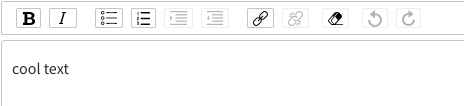
I have several times mistaken it for an extra new line and don't want my users to make the same mistake. How do I override the default style? My best guess was that I could do it through blockStyleFn somehow but I can't get it to work.
 tjkind
All 7 comments
you could define your own className to override it ..
wrapperClassName="your-wrapper-class"
editorClassName="your-editor-class"
toolbarClassName="your-toolbar-class"
 endiliey
on 7 May 2018
endiliey
on 7 May 2018
I am already doing that. But it doesn't seem that giving 0 margin to any of these elements makes the extra space go away.
tjkind
on 7 May 2018
Try using !important in css
endiliey
on 8 May 2018
Also @tjkind you can override the default css styles added by DraftJS. For instance public-DraftStyleDefault-block class in this case.
 jpuri
on 14 May 2018
jpuri
on 14 May 2018
Also @tjkind you can override the default css styles added by DraftJS. For instance public-DraftStyleDefault-block class in this case.
@jpuri: could you give an example of how to do this? I am having the same problem (using ES6).
Update: I was able to solve this with the following changes:
styles.css:
.public-DraftStyleDefault-block > div {
margin: 0px;
}
index.js:
import styles from './styles.css';
.
.
.
customBlockStyleFn = (contentBlock) => {
return styles['public-DraftStyleDefault-block'];
}
.
.
.
render() {
<Editor blockStyleFn={this.customBlockStyleFn} ... />
}
 rstiyer
on 15 May 2018
rstiyer
on 15 May 2018
You need to just declare this in css to override the default like
.public-DraftStyleDefault-block > div {
    margin: 0px !important;
}
Only this worked in my case
index.css:
.public-DraftEditor-content .public-DraftStyleDefault-block {
  margin: 0;
  padding: 15px 20px;
}
 dariavv
on 4 May 2021
dariavv
on 4 May 2021
Related issues
 Pixelatex
·
3Comments
jpuri
·
4Comments
Pixelatex
·
3Comments
jpuri
·
4Comments
 Satherial
·
4Comments
Satherial
·
4Comments
 trongbang86
·
3Comments
trongbang86
·
3Comments
 gyarasu
·
4Comments
gyarasu
·
4Comments
Most helpful comment
You need to just declare this in css to override the default like