React-draft-wysiwyg: component shows image as camera icon
Hey,
I'm using "react-draft-wysiwyg": "^1.12.4".
while adding an image to the text, everything goes well, but when I'm loading the HTML with the img tag back to the component, I get a camera icon instead of showing the image.

the parsing process looks like :
const blocksFromHTML = convertFromHTML(response['signature']);
      const text = ContentState.createFromBlockArray(
          blocksFromHTML.contentBlocks,
          blocksFromHTML.entityMap
        );

        this.setState({
          editorState: EditorState.createWithContent(text)
})
response.signature is the HTML, looks like :
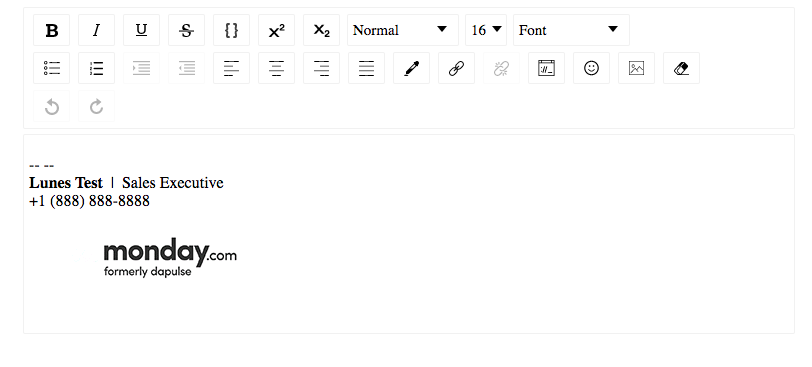
<p>-- -- <br><strong>Lunes Test</strong>  |  Sales Executive<br>+1 (888) 888-8888</p>
<img src="https://s3.amazonaws.com/exceedbot-webchat/monday.gif" alt="undefined" style="float:left;height: auto;width: auto"/>
<p></p>
Thanks for helping!
 sahar922
All 12 comments
It works for me in storybook:
 jpuri
on 15 Jan 2018
jpuri
on 15 Jan 2018
@jpuri what works for you?
as I said, when I write it through the editor it works for me as well.
but when I load the HTML to the editor the image shown as a camera icon
sahar922
on 15 Jan 2018
just to clarify my problem,
the HTML written by the editor is correct, but after I save the HTML, and load it back to the component, I expect to see the image, instead, I see this icon.
maybe I am loading the HTML to the editor wrong?
sahar922
on 15 Jan 2018
I used this html as input to editor
<p>-- -- <br><strong>Lunes Test</strong>  |  Sales Executive<br>+1 (888) 888-8888</p>
<img src="https://s3.amazonaws.com/exceedbot-webchat/monday.gif" alt="undefined" style="float:left;height: auto;width: auto"/>
<p></p>
here: https://github.com/jpuri/react-draft-wysiwyg/tree/master/stories/ConvertFromHTML
And it worked.
jpuri
on 15 Jan 2018
Same issue as @sahar922. When initializing the WYSIWYG with default content, either via defaultEditorState or editorState with an HTML->EditorState (like @sahar922's code), the images convert to camera icons. Adding images directly in the Editor and it works as expected.
 lefnire
on 15 Jan 2018
lefnire
on 15 Jan 2018
@jpuri thanks for pointing out the example code, using html-to-draftjs (rather than the official Draft.js example code posted by @sahar922) works. I'd tried https://github.com/sstur/draft-js-utils, so figured it wasn't a tooling thing.
lefnire
on 15 Jan 2018
thanks @jpuri !
sahar922
on 17 Jan 2018
@lefnire i use draft-js-import-html but it not worrking
https://www.npmjs.com/package/draft-js-import-html
 BuiXuanNhanTriSE052111
on 24 Feb 2018
BuiXuanNhanTriSE052111
on 24 Feb 2018
@caominhtung1992 : did you tried html-to-draftjs https://github.com/jpuri/html-to-draftjs ?
jpuri
on 2 Mar 2018
I used this html as input to editor
<p>-- -- <br><strong>Lunes Test</strong>  |  Sales Executive<br>+1 (888) 888-8888</p>
<img src="https://s3.amazonaws.com/exceedbot-webchat/monday.gif" alt="undefined" style="float:left;height: auto;width: auto"/>
<p></p>
here: https://github.com/jpuri/react-draft-wysiwyg/tree/master/stories/ConvertFromHTML
And it worked.
it's working
 Shamanpreet
on 19 Apr 2019
Shamanpreet
on 19 Apr 2019
@jpuri Thanks bro!
BuiXuanNhanTriSE052111
on 5 Jul 2019
Hi,
For those trying to understand where the magic happens?
its your CompositeDecorator
you'll need a strategy to find the images in your content like so
function findImageEntities(contentBlock, callback, contentState) {
    contentBlock.findEntityRanges(character => {
      const entityKey = character.getEntity();

      return (
        entityKey !== null &&
        contentState.getEntity(entityKey).getType() === 'IMAGE' &&
        !isVideoType(contentState.getEntity(entityKey).getData().src)
      );
    }, callback);
  }
and component like this to take care of the images
import React from 'react';
import PropTypes from 'prop-types';

const Image = props => {
  const { alt, height, src, width } = props.contentState.getEntity(props.entityKey).getData();
  const url = src;

  return <img alt={alt} src={url} height={height} width={width} style={{ maxWidth: '100%' }} />;
};

Image.propTypes = {
  contentState: PropTypes.object.isRequired,
  entityKey: PropTypes.string.isRequired,
};

export default Image;
and finally in your composite decorator
```
const decorator = new CompositeDecorator([
{
strategy: findImageEntities,
component: Image,
},
]);
then
convert to html using draftJS inbuilt convertFromHTML
and update editorstate with your converted content and decorator!
EditorState.createWithContent(state, decorator)
Hope this helps someone.
 negati-ve
on 1 Jun 2020
negati-ve
on 1 Jun 2020
Related issues
 Huespal
·
3Comments
Huespal
·
3Comments
 trongbang86
·
3Comments
trongbang86
·
3Comments
 sontek
·
4Comments
sontek
·
4Comments
 Satherial
·
4Comments
Satherial
·
4Comments
 gyarasu
·
4Comments
gyarasu
·
4Comments
Most helpful comment
I used this html as input to editor
here: https://github.com/jpuri/react-draft-wysiwyg/tree/master/stories/ConvertFromHTML
And it worked.