React-draft-wysiwyg: Paste without source styling
Hi,
Thanks for this great editor :)
When pasting from another editor, it keeps source's paragraph styling such as
<p style="text-align:left;"><span style="color: rgb(96,103,241);font-size: 27px;font-family: sofia-pro, sans-serif;">
Is there a way to disable this behaviour?
Thanks.
 berkayk
All 7 comments
Hi, if You use chrome you can just press right mouse button and "paste as plain text". This is a line below than the line "Paste"
 alishtm
on 26 Dec 2017
alishtm
on 26 Dec 2017
Command+Shift+V for pasting can also be used for pasting without styles.
 jpuri
on 8 Jan 2018
jpuri
on 8 Jan 2018
There is no option atm to otherwise disable this behavior.
jpuri
on 8 Jan 2018
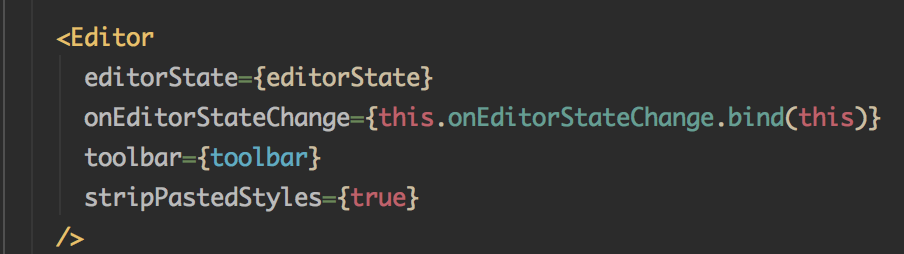
use the property stripPastedStyles
https://github.com/jpuri/react-draft-wysiwyg/issues/270
 thefakeworld
on 19 Jun 2018
thefakeworld
on 19 Jun 2018
Does the property stripPastedStyles work?
If it works then why this issue has not been closed?
 suryarsp
on 10 Jun 2019
suryarsp
on 10 Jun 2019
@suryarsp just tried this in my own project and it does work (I'm using version 1.13.1, haven't tested any others)
 whawker
on 12 Jun 2019
whawker
on 12 Jun 2019
@suryarsp me too, i just tried this and it does work!
current version 1.14.5
 Serse2
on 27 May 2020
Serse2
on 27 May 2020
Related issues
 gyarasu
·
4Comments
gyarasu
·
4Comments
 ananddodia
·
4Comments
ananddodia
·
4Comments
 Huespal
·
3Comments
Huespal
·
3Comments
 trongbang86
·
3Comments
trongbang86
·
3Comments
 dahudson88
·
3Comments
dahudson88
·
3Comments
Most helpful comment
use the property stripPastedStyles

https://github.com/jpuri/react-draft-wysiwyg/issues/270