React-draft-wysiwyg: emoji add fontSize draftToHtml � why?
example:
😫
add fontSize
output
��
 Pillar-Zhang
All 6 comments
Hi @Pillar-Zhang : since it works here: https://jpuri.github.io/react-draft-wysiwyg/#/demo
It looks to me like encoding of your page is not supporting unicodes correctly.
 jpuri
on 13 Jul 2017
jpuri
on 13 Jul 2017
Any luck with the issue, this does not appears to be issue with the editor. Should I go ahead to close this ?
jpuri
on 17 Jul 2017
ok
Pillar-Zhang
on 26 Jul 2017
Sorry, if it's bad form to reply to closed issues, but I had a very similar problem and can add more information...
I noticed the same thing when we had an emoji and made it larger, once converted from draft to html, it would be a: <span style="font-size:48px;">�</span>�</p>
I feel like I saw somewhere when going thru different libraries and files, that when a selection is modified its length is taken into account, however i think with the addition of an emoji character the length is not properly accounted for...
Examp: if you make the text "asdf 😍 asdf"
and then make that all 72px tall, you end up with everything 72px except the last 'f':
<p><span style="font-size:72px;">asdf 😍 asd</span>f</p>
Hopefully this helps, thanks for a great library.
 willbuckingham
on 13 Oct 2017
willbuckingham
on 13 Oct 2017
Doesn't work on demo page either, look at HTML, there are weird ��.
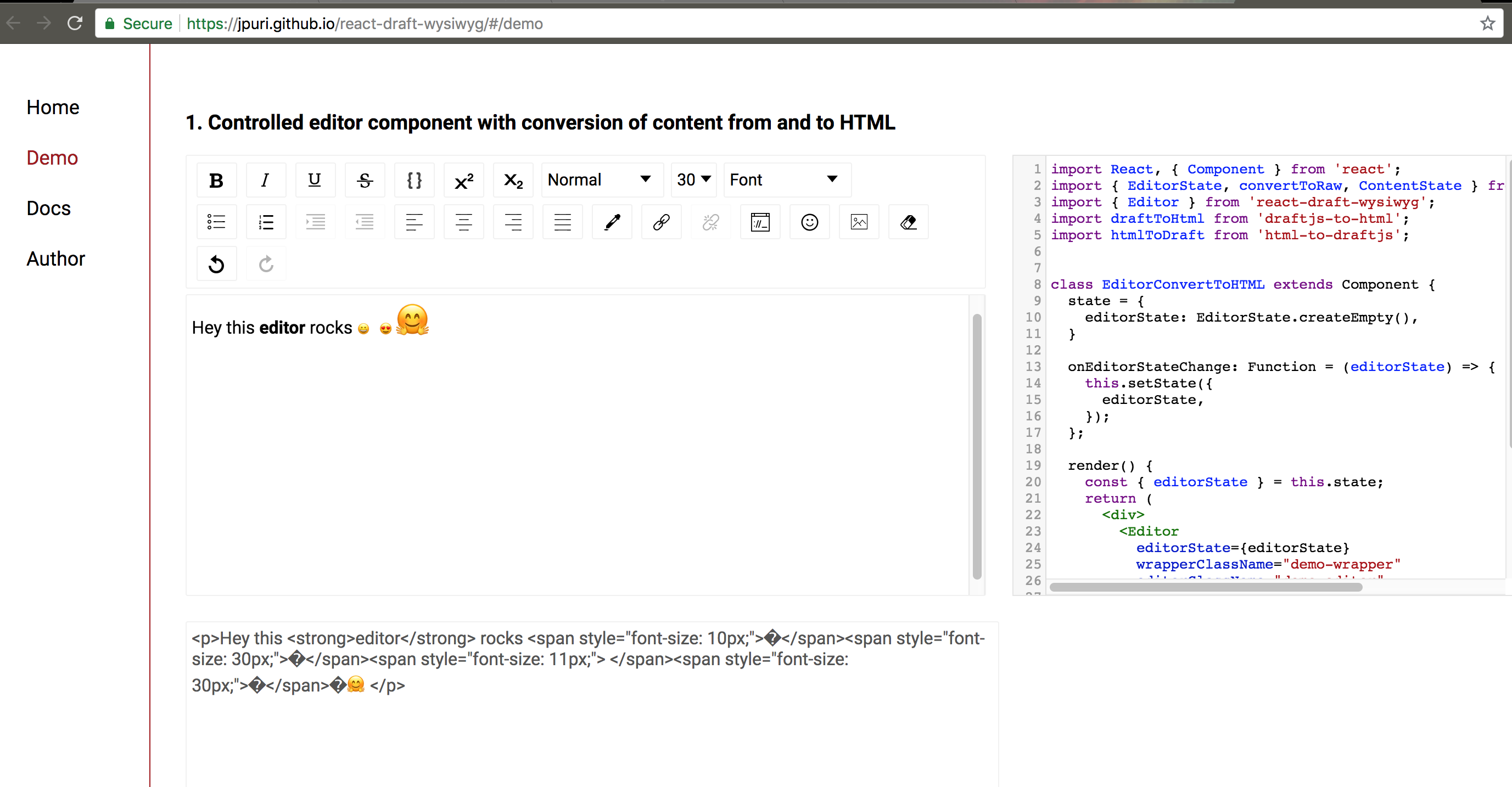
 LevanArabuli
on 28 Jun 2018
LevanArabuli
on 28 Jun 2018
same problem.
does anyone find any solution?
 yousefMostafayi
on 23 Oct 2018
yousefMostafayi
on 23 Oct 2018
Related issues
 Fireprufe15
·
4Comments
jpuri
·
4Comments
Fireprufe15
·
4Comments
jpuri
·
4Comments
 Leadrive
·
3Comments
Leadrive
·
3Comments
 kcabading
·
3Comments
kcabading
·
3Comments
 dahudson88
·
3Comments
dahudson88
·
3Comments
Most helpful comment
Sorry, if it's bad form to reply to closed issues, but I had a very similar problem and can add more information...
I noticed the same thing when we had an emoji and made it larger, once converted from draft to html, it would be a:
<span style="font-size:48px;">�</span>�</p>I feel like I saw somewhere when going thru different libraries and files, that when a selection is modified its length is taken into account, however i think with the addition of an emoji character the length is not properly accounted for...
Examp: if you make the text "asdf 😍 asdf"
and then make that all 72px tall, you end up with everything 72px except the last 'f':
<p><span style="font-size:72px;">asdf 😍 asd</span>f</p>Hopefully this helps, thanks for a great library.