React-dnd: Cannot hide Source element behind Drag Layer
Describe the bug
When dragging an element, I would like the element dragged under the mouse to look different than the original source element. When dragging, the custom drag layer is appended to the default drag layer rather than replacing it.
To Reproduce
Steps to reproduce the behavior:
- Go to this codesandbox example.
- Drag the monster (upper left corner)
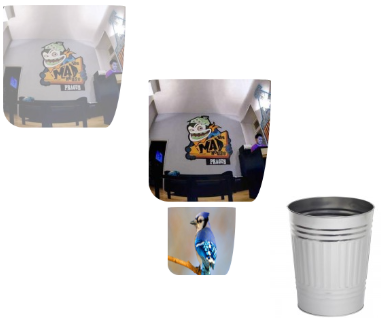
- Observe that the monster is dragged under the mouse, with the Bird element underneath it.
Expected behavior
I would like to see _just_ the bird under the mouse while I am dragging the item. I expect this behavior because my custom drag layer returns a Bird element:
// DragLayer.js

const CustomDragLayer = ({ item, itemType, isDragging, currentOffset }) => {
  if (!isDragging) return null;

  return <Bird style={getItemStyles(currentOffset)} />;
};
Screenshots
This is what I currently see (undesired behavior). The two elements stacked atop each other are in mid-drag. Ideally, the dragged element in the middle is _just_ a bird, with no monster above it.
Desktop (please complete the following information):
- OS: Chrome OS
- Browser: Chrome
- Version: 69
Additional context
I am very new to DnD and am aware this is likely not a bug. After a few days tooling around with DragLayer, I think I need a push in the right direction. Thanks!
 lukebelliveau
>All comments
Resolved.
To prevent the drag preview from assuming the drag source's image, you need to pass react-dnd-html5-backend's getEmptyImage() to connectDragPreview. Do this in componentDidMount().
// Source.js

import { getEmptyImage } from 'react-dnd-html5-backend'

const SourceCollector = (connect, monitor) => ({
 connectDragPreview: connect.dragPreview()
})

class Source extends React.Component {
 componentDidMount() {
   this.props.connectDragPreview(getEmptyImage())
 }
}
Related issues
 dreamcog
·
4Comments
dreamcog
·
4Comments
 redochka
·
3Comments
redochka
·
3Comments
 mx2323
·
3Comments
mx2323
·
3Comments
 TheBolliwood
·
3Comments
TheBolliwood
·
3Comments
 BrennanRoberts
·
3Comments
BrennanRoberts
·
3Comments
Most helpful comment
Resolved.
To prevent the drag preview from assuming the drag source's image, you need to pass
react-dnd-html5-backend'sgetEmptyImage()toconnectDragPreview. Do this incomponentDidMount().Relevant doc example