React-diagrams: Broken Rendering with Redux + Model Serialization/De-Serialization
So i'm trying to setup a simple app with redux as the global store.
The graph is stored in a slice as a simple serialized model object.
On every change to the DiagramModel entities (nodes, links), the DiagramModel is serialized and written back into the store.
import React, { useEffect, useState } from "react";
import { useDispatch, useSelector } from "react-redux";
import createEngine, { DiagramModel } from "@projectstorm/react-diagrams";
import { CanvasWidget } from "@projectstorm/react-canvas-core";
import { setGraph, fetchGraph } from "../features/graph/graphSlice";
import { RootState } from "./rootReducer";
import { SimpleSerializedGraph } from "../features/graph/types/simple";
import "./App.css";

const App: React.FC = () => {
    console.log("I got called");
    const [engine, setEngine] = useState(createEngine());

    const dispatch = useDispatch();
    const graph: SimpleSerializedGraph = useSelector(
        (state: RootState) => state.graph
    );

    // emulate graph data being loaded from the server
    useEffect(() => {
        console.log("loading graph");
        dispatch(fetchGraph());
    }, []);

    let model = new DiagramModel();
    let obj: ReturnType<DiagramModel["serialize"]> = JSON.parse(
        JSON.stringify(graph)
    );
    model.deserializeModel(obj, engine);
    console.log(model.serialize());
    model.getModels().forEach((item) =>
        item.registerListener({
            eventDidFire: () => {
                console.log("WOOSH");
                dispatch(setGraph(engine.getModel().serialize()));
            },
        })
    );
    engine.setModel(model);

    return (
        <React.Fragment>
            <CanvasWidget className="diagram-container" engine={engine} />
        </React.Fragment>
    );
};

export default App;
However this is resulting in very broken rendering. (see pic below). I've got a couple of questions:
- Is there something that i'm doing wrong here?
- if a state management solution is used, how is that global state supposed to be updated?
- Should I store something else in the store e.g. the
ModelEngineobject itself? not sure how feasible that would be with redux - is redux not a good choice for react-diagrams? maybe something like mobx or react context? I hope this isn't the case because redux tooling is very nice and it would be shame if the react-diagrams and redux were at odds.
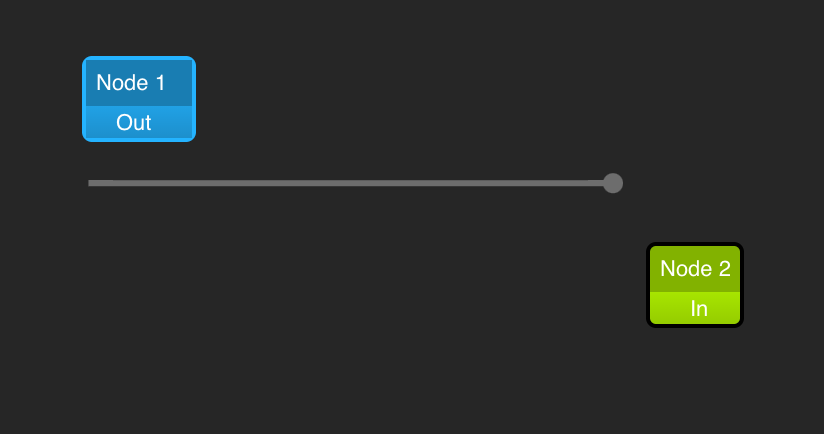
the dummy data being used is as follows:
export const initialData: SimpleSerializedGraph = {
    "id": "initialData",
    "offsetX": 0,
    "offsetY": 0,
    "zoom": 100,
    "gridSize": 0,
    "layers": [],
}

export const dummyData: SimpleSerializedGraph = {
    "id": "dummyData",
    "offsetX": 0,
    "offsetY": 0,
    "zoom": 100,
    "gridSize": 0,
    "layers": [
        {
            "id": "28",
            "type": "diagram-links",
            "isSvg": true,
            "transformed": true,
            "models": {
                "36": {
                    "id": "36",
                    "type": "default",
                    "source": "32",
                    "sourcePort": "33",
                    "target": "34",
                    "targetPort": "35",
                    "points": [
                        {
                            "id": "37",
                            "type": "point",
                            "x": 147.234375,
                            "y": 133.5
                        },
                        {
                            "id": "38",
                            "type": "point",
                            "x": 409.5,
                            "y": 133.5
                        }
                    ],
                    "labels": [],
                    "width": 3,
                    "color": "gray",
                    "curvyness": 50,
                    "selectedColor": "rgb(0,192,255)",
                }
            }
        },
        {
            "id": "30",
            "type": "diagram-nodes",
            "isSvg": false,
            "transformed": true,
            "models": {
                "32": {
                    "id": "32",
                    "type": "default",
                    "x": 100,
                    "y": 100,
                    "ports": [
                        {
                            "id": "33",
                            "type": "default",
                            "x": 139.734375,
                            "y": 126,
                            "name": "Out",
                            "alignment": "right",
                            "parentNode": "32",
                            "links": [
                                "36"
                            ],
                            "in": false,
                            "label": "Out"
                        }
                    ],
                    "name": "Node 1",
                    "color": "rgb(0,192,255)",
                    "portsInOrder": [],
                    "portsOutOrder": [
                        "33"
                    ]
                },
                "34": {
                    "id": "34",
                    "type": "default",
                    "x": 400,
                    "y": 100,
                    "ports": [
                        {
                            "id": "35",
                            "type": "default",
                            "x": 402,
                            "y": 126,
                            "name": "In",
                            "alignment": "left",
                            "parentNode": "34",
                            "links": [
                                "36"
                            ],
                            "in": true,
                            "label": "In"
                        }
                    ],
                    "name": "Node 2",
                    "color": "rgb(192,255,0)",
                    "portsInOrder": [
                        "35"
                    ],
                    "portsOutOrder": []
                }
            }
        }
    ]
}
and the types being used are (i deduced them from the lib source code):
export interface SimpleSerializedBaseModel {
    type: string;
    selected?: boolean;
    extras?: any;
    id: string;
    locked?: boolean;
};

// this will allow abitrary proeprties to be added to the model
// as along as the base properties are present
export interface SimpleSerializedModel extends SimpleSerializedBaseModel {
    [prop: string]: any;
};

export interface SimpleSerializedLayer {
    isSvg: boolean;
    transformed: boolean;
    models: { [x: string]: SimpleSerializedModel };
    type: string;
    selected?: boolean;
    extras?: any;
    id: string;
    locked?: boolean;
}

export interface SimpleSerializedGraph {
    offsetX: number;
    offsetY: number;
    zoom: number;
    gridSize: number;
    layers: SimpleSerializedLayer[];
    id: string;
    locked?: boolean;
};
 jamal-ahmad
All 7 comments
Additional info would be that this issue only occurs when i try to write back to the store:
model.getModels().forEach((item) =>
    item.registerListener({
        eventDidFire: () => {
            console.log("WOOSH");
            dispatch(setGraph(engine.getModel().serialize()));
        },
    })
);
As a workaround, i'm updating the state every second right now instead of on every change:
    // every sec save the current state to the redux slice
    useEffect(() => {
        const saveDisposer = setInterval(() => {
            let newState = engine?.getModel()?.serialize();
            // inorder to avoid state history pollution
            // only update when changed
            if(!deepGraphEqual(graph, newState)) {
                dispatch(setGraph(newState));
            }
        }, 1000);
        return () => clearInterval(saveDisposer);
        // eslint-disable-next-line react-hooks/exhaustive-deps
    });
Using react-diagrams with redux is not a good idea, AFAIK.
I'm not sure why you need to serialize the diagram state to the redux so often, but this may end up causing perfomance issues. Are you trying to implement undo/redo features or something like that?
 renato-bohler
on 19 Sep 2020
renato-bohler
on 19 Sep 2020
Yeah, i'm implementing a drag and drop editor for a state machine framework. Undo/Redo would be features i want to have in there. I guess saving the state on some interval (every few seconds) and only saving when there's a diff reduces the number of times the model is repopulated into the engine. Following is how i've gotten it to render correctly:
The store slice:
import { createSlice, PayloadAction } from '@reduxjs/toolkit';
import deepEqual from 'deep-equal';
import { AppThunk, AppDispatch } from '../../app/store';
import { initialData, dummyData } from './data';
import { SimpleSerializedGraph } from './types/simple';

const initialState = initialData;
const graphSlice = createSlice({
    name: 'graph',
    initialState,
    reducers: {
        setGraph(state, action: PayloadAction<SimpleSerializedGraph | undefined>) {
            console.log("setting graph")
            return (action.payload) ? action.payload : state;
        }
    }
});

export const { setGraph } = graphSlice.actions;

export const deepGraphEqual = (
    stateA: SimpleSerializedGraph | undefined,
    stateB: SimpleSerializedGraph | undefined
): boolean => {
    return deepEqual(stateA, stateB);
}

export const fetchGraph = (): AppThunk => async (dispatch: AppDispatch) => {
    // simulate fetching from server
    setTimeout(() => {
        let fetchedGraph = dummyData;
        dispatch(graphSlice.actions.setGraph(fetchedGraph));
    }, 1000);
}

export default graphSlice.reducer;
the rendering component:
import React, { useEffect, useState } from "react";
import { useDispatch, useSelector } from "react-redux";
import createEngine, { DiagramEngine, DiagramModel } from "@projectstorm/react-diagrams";
import { CanvasWidget } from "@projectstorm/react-canvas-core";
import { setGraph, fetchGraph, deepGraphEqual } from "../features/graph/graphSlice";
import { RootState } from "../app/rootReducer";
import { SimpleSerializedGraph } from "../features/graph/types/simple";
import { BbsmStateNodeFactory } from "./bbsm-state-node/BbsmStateNodeFactory";
import "./Graph.css";

const deSerializeModel = (graph: SimpleSerializedGraph, engine: DiagramEngine): DiagramModel => {
    let model = new DiagramModel();
    let obj: ReturnType<DiagramModel["serialize"]> = JSON.parse(JSON.stringify(graph));
    model.deserializeModel(obj, engine);
    return model;
};

export const Graph: React.FC = () => {
    const dispatch = useDispatch();
    const graph: SimpleSerializedGraph = useSelector((state: RootState) => state.graph);

    // eslint-disable-next-line @typescript-eslint/no-unused-vars
    const [engine, setEngine] = useState(createEngine());
    engine.getNodeFactories().registerFactory(new BbsmStateNodeFactory());

    useEffect(() => {
        dispatch(fetchGraph());
    }, [dispatch]);

    useEffect(() => {
        const saveDisposer = setInterval(() => {
            let newState = engine?.getModel()?.serialize();
            if (!deepGraphEqual(graph, newState)) {
                dispatch(setGraph(newState));
            }
        }, 1000);
        return () => clearInterval(saveDisposer);
    });

    engine.setModel(deSerializeModel(graph, engine));

    return (
        <div className="GraphContainer">
            <CanvasWidget className="CanvasWidgetContainer" engine={engine} />
        </div>
    );
};
However, it would be nice if there were some examples/demos on external store practices for react-diagrams. Something along the lines of, "here's how you use react-diagrams with redux/mobx/context"
jamal-ahmad
on 19 Sep 2020
For the undo/redo, I would recommend using the command pattern. There's this great comment explaining what this is and how to use it: https://github.com/projectstorm/react-diagrams/issues/391#issuecomment-567390715.
I've implemented it on my project. If you want to try it out (example / source).
Again, using react-diagrams and store every change (or save based on a small time interval) to a redux store may be a bad approach. It may be easier to implement, but it will probably suffer on performance, as serializing and deserializing large diagrams could be time consuming.
renato-bohler
on 20 Sep 2020
For the undo/redo, I would recommend using the command pattern. There's this great comment explaining what this is and how to use it: #391 (comment).
+1 for the command pattern.
I think i was approaching the problem from data first perspective (bad habit from previous mobx usage) but react-diagrams seems to follow more of a MVC like design.
I never thought of extending the DiagramModel class itself and i really like the approach because now i can bake the external features (loading and saving state-machines via backend service) right into the react-diagrams framework.
Also thanks for sharing your source code! it's very helpful to look at your design :)
A side note: i think it would be nice for react-diagrams to have a product showcase for open-source tools like yours. Not only would it provide reference implementations/patterns/designs but would also allow people to gauge the capability of the library without diving into too much details or POCing (or as in my case doing a bad pattern based POC)
jamal-ahmad
on 20 Sep 2020
@renato-bohler can I start a showcase part of the Readme and put your project there?
 dylanvorster
on 23 Sep 2020
dylanvorster
on 23 Sep 2020
Sure @dylanvorster :smile:
renato-bohler
on 23 Sep 2020
Related issues
 affanshahid
·
3Comments
affanshahid
·
3Comments
 ganesh-sankey
·
4Comments
ganesh-sankey
·
4Comments
 duvet86
·
3Comments
duvet86
·
3Comments
 msaglietto
·
3Comments
msaglietto
·
3Comments
 Naveenraj006
·
3Comments
Naveenraj006
·
3Comments
Most helpful comment
For the undo/redo, I would recommend using the command pattern. There's this great comment explaining what this is and how to use it: https://github.com/projectstorm/react-diagrams/issues/391#issuecomment-567390715.
I've implemented it on my project. If you want to try it out (example / source).
Again, using
react-diagramsand store every change (or save based on a small time interval) to areduxstore may be a bad approach. It may be easier to implement, but it will probably suffer on performance, as serializing and deserializing large diagrams could be time consuming.