React-diagrams: Prevent creation of extra Points on a Link
I need a listener to prevent creation of extra Points on a Link (all Points except the first and last one)
These Points
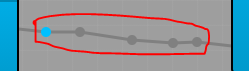
i used the linksUpdated listener but it doesn't fire when i create Point on a Link
 Tohid1999
>All comments
If you want to customize how many points you can have in your link, you'll need to have a custom link set up in your project.
Once you have that, you can override addPoint method on YourLinkModel and add your logic. This is the default method inherited by LinkModel:
To prevent more than MAX_POINTS points on your link, you can override it with something like:
addPoint(pointModel, index) {
  if (this.points.length >= MAX_POINTS) return;
  return super.addPoint(pointModel, index);
}
 renato-bohler
on 8 Sep 2020
renato-bohler
on 8 Sep 2020
🚀2
Was this page helpful?
0 / 5 - 0 ratings
Related issues
 jardg
·
3Comments
jardg
·
3Comments
 shortwavedave
·
3Comments
shortwavedave
·
3Comments
 affanshahid
·
3Comments
affanshahid
·
3Comments
 msaglietto
·
3Comments
msaglietto
·
3Comments
 M2Costa
·
3Comments
M2Costa
·
3Comments
Most helpful comment
If you want to customize how many points you can have in your link, you'll need to have a custom link set up in your project.
Once you have that, you can override
addPointmethod onYourLinkModeland add your logic. This is the default method inherited byLinkModel:https://github.com/projectstorm/react-diagrams/blob/8ded9cd30e2d605c31f24270d38b1053dbda64dc/packages/react-diagrams-core/src/entities/link/LinkModel.ts#L289-L293
To prevent more than
MAX_POINTSpoints on your link, you can override it with something like: