React-diagrams: How to lock a canvas widget (not only nodes)
Hi,
Is there a way to fix the canvas widget position?
I have tried using model.setLocked(true) according to demo: https://github.com/projectstorm/react-diagrams/blob/master/packages/diagrams-demo-gallery/demos/demo-locks/index.tsx,
but it seems to be locked only the nodes and links inside. I can still move and zoom the entire page.
Thank you in advance for your kindly response.
 netzanava05
All 5 comments
Hey @netzanava05.
I never done this, but I would bet that to achieve this you would have to override the default state that handles canvas dragging (DragCanvasState) and add something like this:
async activated(prev) {
+ if (this.engine.getModel().isLocked()) return;

  super.activated(prev);
  this.engine.getModel().clearSelection();
  await this.engine.repaintCanvas(true);

  // ...

}
Or maybe
fireMouseMoved(event: AbstractDisplacementStateEvent) {
+ if (this.engine.getModel().isLocked()) return;

  this.engine
    .getModel()
    .setOffset(this.initialCanvasX + event.displacementX, this.initialCanvasY + event.displacementY);
  this.engine.repaintCanvas();
}
 renato-bohler
on 13 Mar 2020
renato-bohler
on 13 Mar 2020
@renato-bohler @pierre-moire added those lines, nothing changed. Canvas is still draggable and zoomable/scalable. Any ideas? What am I missing?
 xanderoku
on 30 Mar 2020
xanderoku
on 30 Mar 2020
Hmm, I tested the change and it works for me.
Here's what I did:
- Imported
DragCanvasStateinto my project, including the proposed change on thefireMouseMovedmethod:
import {
  State,
  AbstractDisplacementState,
} from '@projectstorm/react-canvas-core';

export default class DragCanvasState extends AbstractDisplacementState {
  constructor() {
    super({
      name: 'drag-canvas',
    });
  }

  async activated(prev) {
    super.activated(prev);
    this.engine.getModel().clearSelection();
    await this.engine.repaintCanvas(true);

    // we can block layer rendering because we are only targeting the transforms
    for (const layer of this.engine.getModel().getLayers()) {
      layer.allowRepaint(false);
    }

    this.initialCanvasX = this.engine.getModel().getOffsetX();
    this.initialCanvasY = this.engine.getModel().getOffsetY();
  }

  deactivated(next: State) {
    super.deactivated(next);
    for (const layer of this.engine.getModel().getLayers()) {
      layer.allowRepaint(true);
    }
  }

  fireMouseMoved(event) {
    // (!!) This is my proposed change
    if (this.engine.getModel().isLocked()) return;

    this.engine
      .getModel()
      .setOffset(
        this.initialCanvasX + event.displacementX,
        this.initialCanvasY + event.displacementY,
      );
    this.engine.repaintCanvas();
  }
}
- Edited my
Statesclass to use my customDragCanvasState:
import {
  // ...
- DragCanvasState,
} from '@projectstorm/react-canvas-core';

+import DragCanvasState from './DragCanvasState';

export default class States extends State {
  constructor() {
    // ...
+   this.dragCanvas = new DragCanvasState();
  }
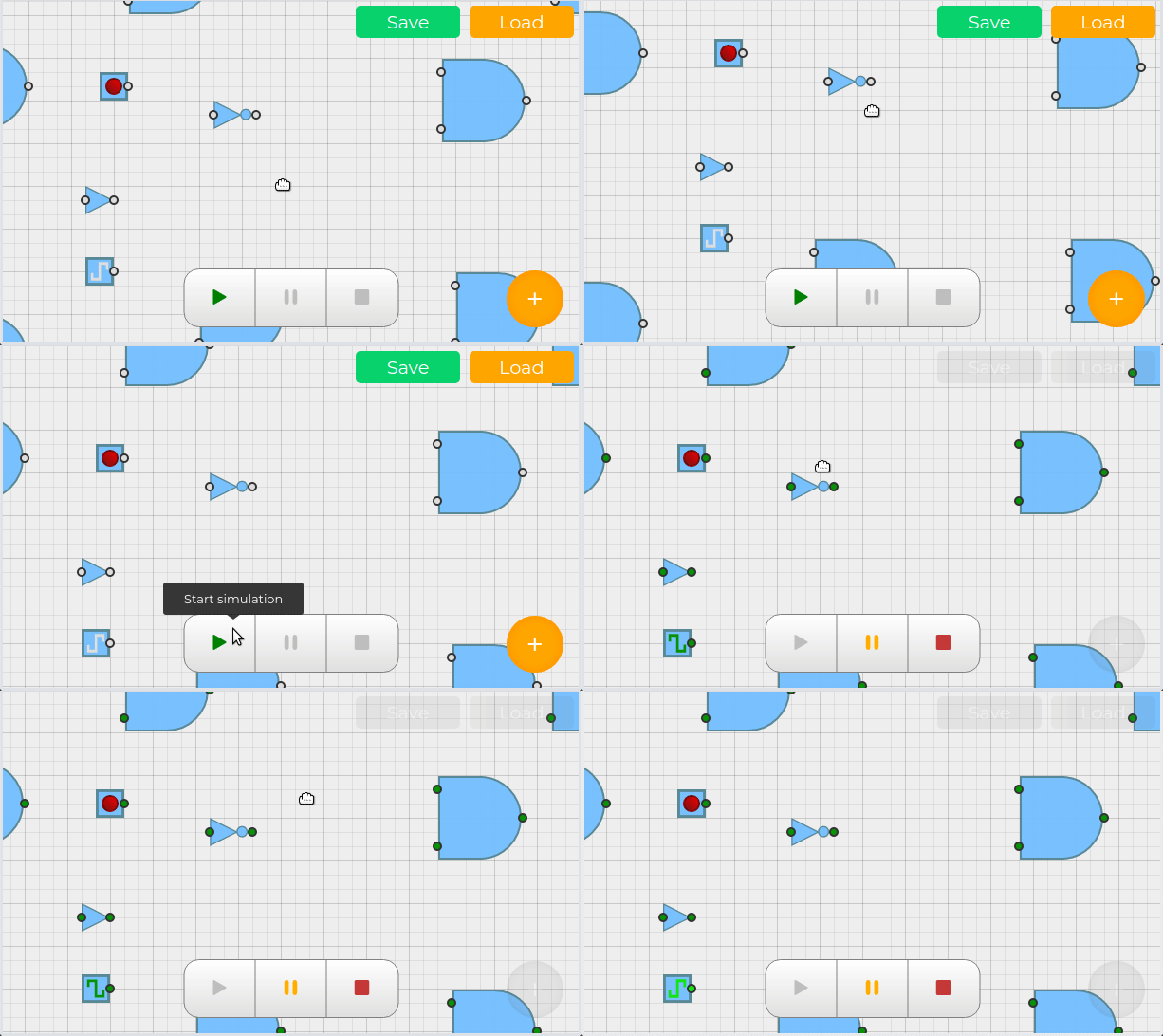
To show it working, in my application, when simulation starts, the diagram model is locked. This is the result:
renato-bohler
on 31 Mar 2020
Not sure if it's relevant, but I only wanted to remove the zoom and this works just right:
const engine = createEngine({ registerDefaultZoomCanvasAction: false });
 gonzaloaune
on 1 Apr 2020
gonzaloaune
on 1 Apr 2020
Preraped PR which allows lock the canvas
https://github.com/projectstorm/react-diagrams/pull/660
 bogomya
on 13 Jun 2020
bogomya
on 13 Jun 2020
Related issues
 quangas
·
3Comments
quangas
·
3Comments
 ganesh-sankey
·
4Comments
ganesh-sankey
·
4Comments
 affanshahid
·
3Comments
affanshahid
·
3Comments
 dixitk13
·
3Comments
dixitk13
·
3Comments
 gugaevkirill
·
3Comments
gugaevkirill
·
3Comments