React-diagrams: Finding connected nodes
Traversing the diagram seems quite complex.
As far as I can tell any two nodes are connected via:
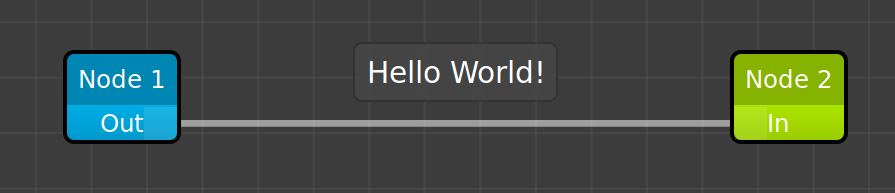
(child) Node 1 -- (source) Out port -- link -- (target) In port -- (parent) Node 2
This is the code that I have for finding the child nodes connected via a port to a parent node:
/**
 * Find children of a node
 * @param   {Node}    node     Parent node
 * @param   {string}  portName Port connecting to children e.g. 'In'
 * @returns {[Node]}           List of Nodes
 */
const children = (node, portName) => {
  const links = Object.values(node.getPort(portName).getLinks());
  return links.map(link => link.getSourcePort().getNode());
};
Links and Ports are both objects so to iterate over them you have to do something like Object.values or Object.entries each time
Is there some other/neater way of doing this?
 ianchanning
>All comments
Hi,
What I suggest to do is to create your own class that you extends from NodeModel
Then you declare a child attribute
export class BrickModel extends NodeModel {

  ports: { [s: string]: PortModel };
  child: string[]; <---- You can change here according to your needs
And so, each time you'll link a node to another one, you'll add the new node ID to the the parent node
child attribute.
You can work as a "double linked list" so you can get your first node or the last one.
Sorry about my English, don't hesitate if you have any questions ;)
 Nijooke
on 22 May 2019
Nijooke
on 22 May 2019
Related issues
 affanshahid
·
3Comments
affanshahid
·
3Comments
 shortwavedave
·
3Comments
shortwavedave
·
3Comments
 DanieLazarLDAPPS
·
3Comments
DanieLazarLDAPPS
·
3Comments
 msaglietto
·
3Comments
msaglietto
·
3Comments
 schecter22107
·
3Comments
schecter22107
·
3Comments
Most helpful comment
Hi,
What I suggest to do is to create your own class that you extends from NodeModel
Then you declare a child attribute
And so, each time you'll link a node to another one, you'll add the new node ID to the the parent node
child attribute.
You can work as a "double linked list" so you can get your first node or the last one.
Sorry about my English, don't hesitate if you have any questions ;)