React-diagrams: [question] Zoom and pan background along with graph
Pretty sure this feature isn't available. I'd like the background to pan and zoom along with elements in the graph. Take the grid in the storybook as an example.
Here the node is almost the same size as 4 squares:
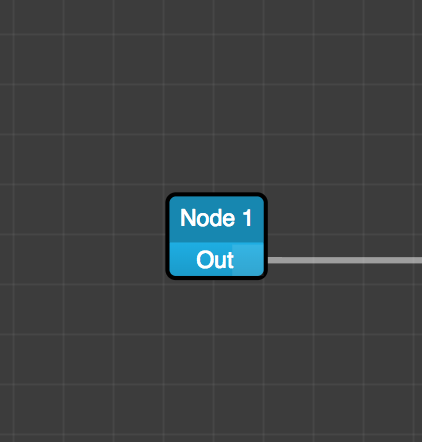
But after you zoom in, it becomes more like 9 or 16:
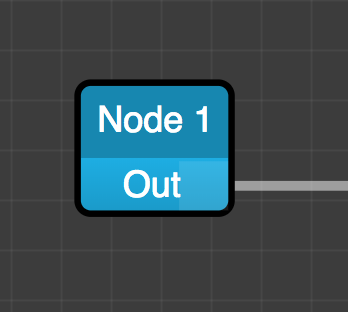
It would be nice if after zooming, the background also zoomed such that it was still the same size as 4 squares. The same applies to panning.
I don't mind implementing this myself, but I have no idea where to start. Does anyone have some ideas on how to go about doing this?
 jonathanpipe
All 5 comments
This is actually being done in the rewrite:
https://github.com/projectstorm/react-canvas/blob/master/src/primitives/grid/GridElementWidget.tsx
I would start here if you are interested, to see how the matrix logic would work. That is of course if you want to draw the grid with a canvas, at the moment the grid is css driven, but the gaps between the lines could be done using a similar approach
 dylanvorster
on 21 Jan 2019
dylanvorster
on 21 Jan 2019
@dylanvorster is there a guide or document on the migration from current react-diagrams to the new rewrite?
 obaid
on 12 Feb 2019
obaid
on 12 Feb 2019
@jonathanpipe
👋 If anyone is interested, this is how I do it in JS + CSS, it's trivial, but it works like a charm 👨🍳 😋
      const backgroundEl = backgroundRef.current as HTMLDivElement;
      const offsetX = model.getOffsetX();
      const offsetY = model.getOffsetY();
      const zoomLevel = model.getZoomLevel();

      const zoomAdjusmtent = (zoomLevel / 100);
      backgroundEl.style.width = `${100 / zoomAdjusmtent}%`;
      backgroundEl.style.height = `${100 / zoomAdjusmtent }%`;
      backgroundEl.style.backgroundPosition = `${offsetX / zoomAdjusmtent}px ${offsetY / zoomAdjusmtent}px`;

      const backgroundScale = `scale(${zoomAdjusmtent})`;
      backgroundEl.style.transform = backgroundScale;
 iliasbhal
on 5 Jan 2020
iliasbhal
on 5 Jan 2020
I think this one can be closed @pierre-moire :sweat_smile:
 renato-bohler
on 2 Apr 2020
renato-bohler
on 2 Apr 2020
just did some adjustments from @iliasbhal. I hope it work for others too.
the problem with that one is that when you use transform scale(), the position of the element will change. therefore I use transform translate() to fix the problem.
      modelRef.current.registerListener({
        eventDidFire: () => {
          requestAnimationFrame(() => {
            const offsetX = modelRef.current.getOffsetX();
            const offsetY = modelRef.current.getOffsetY();
            const zoomLevel = modelRef.current.getZoomLevel();
            const zoomAdjusmtent = (zoomLevel / 100);
            backgroundRef.current.style.width = `${100 / zoomAdjusmtent}%`;
            backgroundRef.current.style.height = `${100 / zoomAdjusmtent}%`;
            backgroundRef.current.style.backgroundPosition = `${offsetX / zoomAdjusmtent}px ${offsetY / zoomAdjusmtent}px`;
            const translatePercent = ((zoomAdjusmtent - 1) / 2) * 100;
            const transformValue = ` translate(${translatePercent}%, ${translatePercent}%) scale(${zoomAdjusmtent})`;
            backgroundRef.current.style.transform = transformValue;
          });
        },
      });
 KendoJaaa
on 15 Apr 2020
KendoJaaa
on 15 Apr 2020
Related issues
 abhijitnandy2011
·
3Comments
abhijitnandy2011
·
3Comments
 msaglietto
·
3Comments
msaglietto
·
3Comments
 gugaevkirill
·
3Comments
gugaevkirill
·
3Comments
 Nesterov-Konstantin
·
4Comments
Nesterov-Konstantin
·
4Comments
 DanieLazarLDAPPS
·
3Comments
DanieLazarLDAPPS
·
3Comments