React-diagrams: Custom models help
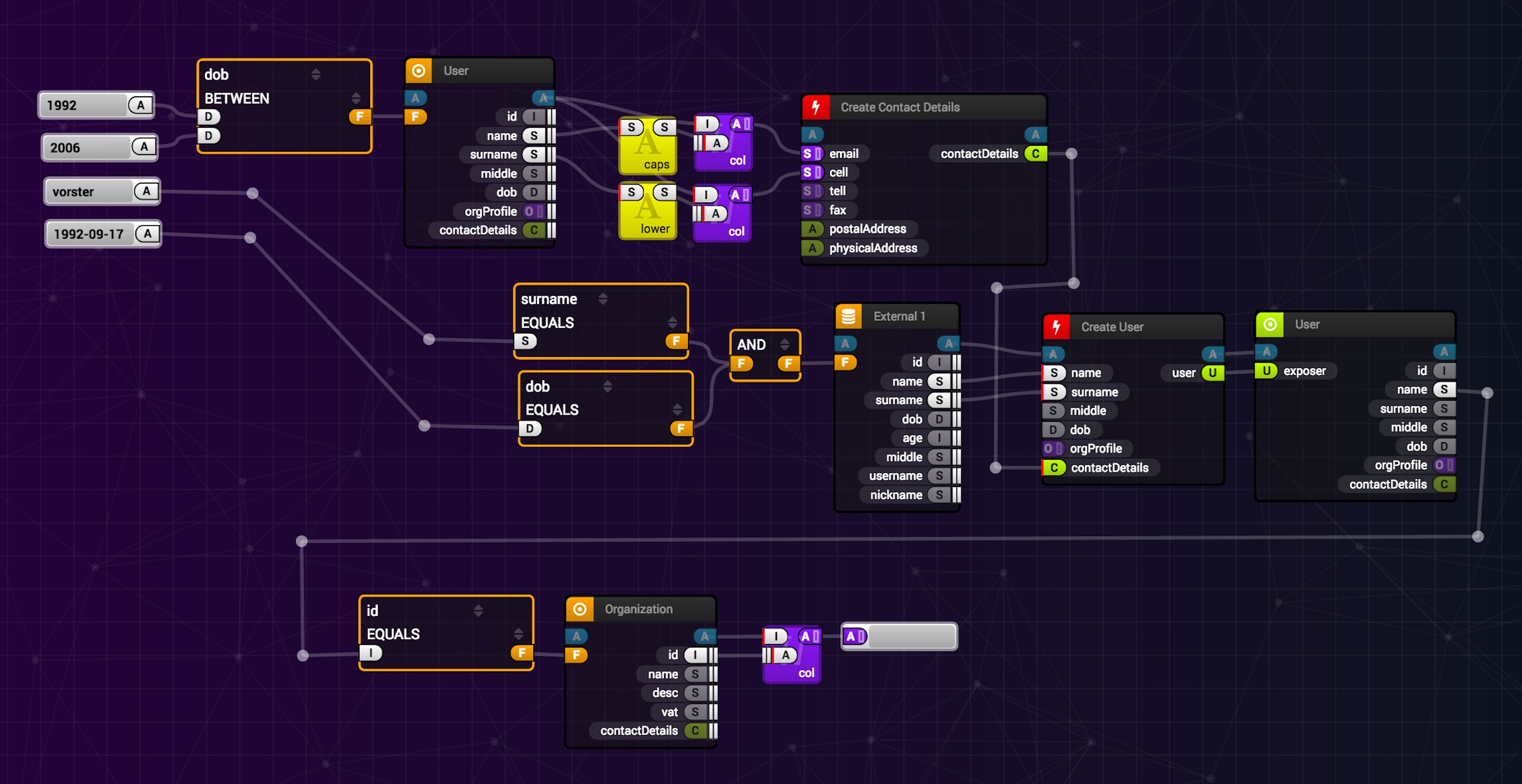
Hi, Has anyone set up the custom models given in the example diagrams ( create organisation, user etc )?
Can anyone share some light on this?

 deepak-workex
All 18 comments
You should probably look at the custom node demo: that should give you an idea of how you can implement custom nodes.
Basically you need to extend classes from the library according to what you need:
- AbstractFactory for factory class (you need this to tell the Diagram engine how to associate a Model class to the Widget you want!)
- NodeModel for the model: here you can change what data gets serialized, how ports are added, etc.
- BaseWidget for the node widgets.
You can have a look at the defaults folder to see how they are implemented and take it from there.
I got as far as to redefine a custom factory and model. From what I understand, widgets have some kind of classname-based logic to gather data for changes like moving nodes, and I wasn't able to make them work properly. For now I'm using the DefaultNodeWidget, since I was mostly interested in changing the model.
If you manage to add custom widgets, please share your experience :)
 rsayn
on 10 Sep 2018
rsayn
on 10 Sep 2018
I need help with the same- in particular with how to implement custom link widgets, if anyone can shed some light on that, then it would be really helpful.
 PikkaPikkachu
on 20 Jun 2019
PikkaPikkachu
on 20 Jun 2019
Also need some help here. I'm getting "TypeError: Class extends value undefined is not a constructor or null" when attempting to implement the example Custom Node (link to JSX example).
 drummerjolev
on 15 Jul 2019
drummerjolev
on 15 Jul 2019
I'm running into TypeError: Class constructor cannot be invoked without 'new'
// TestCustomNode.js
engine.registerPortFactory(new JobPortFactory('job', config => new JobPortModel(config)));


// JobPortFactory.js
import { PortModel, AbstractPortFactory } from '@projectstorm/react-diagrams';

export class JobPortFactory extends AbstractPortFactory {

    constructor(type, cb) {
    super(type); // Error thrown here
        this.cb = cb;
  }
  /**
   *
   * @param {*} initialConfig Optional configuration object
   * @returns {PortModel} A new PortModel
   */
    getNewInstance(initialConfig = {}) {
        return this.cb(initialConfig);
    }
}
Not sure if it's related to your issue @drummerjolev but would imagine that is likely the case.
 matthax
on 25 Jul 2019
matthax
on 25 Jul 2019
@matthax @drummerjolev your TSConfig options need to be:
"compilerOptions": {
        "declaration": false,
        "jsx": "react",
        "allowJs": true,
        "target": "es6",
        "moduleResolution": "node"
    },
 dylanvorster
on 25 Jul 2019
dylanvorster
on 25 Jul 2019
@dylanvorster I'm not using Typescript in my app, just transpiling with babel. Do I need to change my configuration to transpile this library as well?
matthax
on 25 Jul 2019
Thanks for the suggestion, it helped me track down the issue.
I'm using webpack + babel to transpile, in development I ignore everything in node_modules but still have my targets in the .babelrc file set like so:
            "targets": {
              "browsers": [
                "last 2 versions"
              ]
            }
The problem is this transpiles my local files to ES5, but not anything in node_modules. Thanks to this answer on StackOverflow I realized this library isn't distributed already compiled to ES5.
The solution was, in development, simply to alter my targets in the .babelrc file:
            "targets": {
              "node": "6.5"
            }
Hi,
I have the same problem, but, when i try to add targets, i have an error :
ReferenceError: [BABEL] : Unknown option: .targets. Check out https://babeljs.io/docs/en/babel-core/#options for more information about options. I have try this [https://babeljs.io/docs/en/babel-preset-env/](url) but i have the same error.
Did you have the same problem ?
Thanks
 csannierfr-dev
on 8 Aug 2019
csannierfr-dev
on 8 Aug 2019
Going to close this for now, as the entire project was vastly refactored and ES6 is now the default target. Furthermore there is a demo project that should get everyone up and running: https://github.com/projectstorm/react-diagrams/tree/master/packages/diagrams-demo-project
dylanvorster
on 11 Aug 2019
@dylanvorster @drummerjolev @matthax I'm experimenting the same error in my App:
TypeError: Class constructor cannot be invoked without 'new'
when I run the repo code the provided demo works fine, but I'm getting the error when I try to use it in my app (even if I copy and paste exactly the same demo example). I'm using the same TSConfig options you provided above (as the suggested solution), but it's still not working, do you know a workaround for this? Thanks, and awesome library!
I don't have a .babelrc, instead, I'm using a babel.config.js with the following content:
```module.exports = function(api) {
const env = {
production: {
presets: [
'@babel/preset-env',
'@babel/preset-typescript',
'@babel/preset-react'
],
plugins: [
'babel-plugin-emotion',
'babel-plugin-macros',
'@babel/plugin-proposal-object-rest-spread',
'@babel/plugin-proposal-class-properties'
]
},
development: {
presets: [
'@babel/preset-env',
'@babel/preset-typescript',
'@babel/preset-react'
],
plugins: [
[
'babel-plugin-emotion',
{
sourceMap: true
}
],
'babel-plugin-macros',
'@babel/plugin-proposal-object-rest-spread',
'@babel/plugin-proposal-class-properties'
]
},
test: {
presets: [
'@babel/preset-env',
'@babel/preset-typescript',
'@babel/preset-react'
],
plugins: [
'babel-plugin-emotion',
'babel-plugin-macros',
'@babel/plugin-proposal-object-rest-spread',
'@babel/plugin-proposal-class-properties'
]
}
}
return env[api.env()]
}
and my `tsconfig.json` looks like:


```{
    "include": ["src/**/*", "stories/**/*", "test-setup/**/*"],
    "exclude": [
        "**/__mocks__/*",
        "scripts/**/*",
        "test-setup/jsdom-environment.js"
    ],
    "compilerOptions": {
        "module": "es6",
        "allowSyntheticDefaultImports": true,
        "skipLibCheck": true,
        "noUnusedLocals": true,
        "noUnusedParameters": true,
        "strictNullChecks": true,
        "resolveJsonModule": true,
        "noEmit": true,

        "declaration": false,
    "jsx": "react",
    "allowJs": true,
    "target": "es6",
    "moduleResolution": "node"
    }
}
this is the tsconfig.json and the webpack.config.js of the current repo demo example.
 xduranmtz
on 3 Sep 2019
xduranmtz
on 3 Sep 2019
nvm, I found the solution, I just included transpilation for the @projectstorm library and it worked, e.g in my webpack.config.js
...
// projectstorm is written for recent versions of the
// node engine, so it will not work on older browsers
// without transpilation
path.resolve(__dirname, 'node_modules/@projectstorm') ],
loader: require.resolve('babel-loader') },
...
xduranmtz
on 4 Sep 2019
@serchduran can you explain a little further in which section I need to add this to my webpack config?
I've tried to include it in the module section
 module: {
    rules: [
      {
        test: /\.js$/,
        include: [path.join(__dirname, 'src'), /\/node_modules\/@projectstorm/],
        use: ['babel-loader'],
      },
and under resolve
   modules: [
      'node_modules',
      path.resolve(__dirname, 'node_modules/@projectstorm'),
      path.resolve(__dirname, './src'),
    ],
 saschb2b
on 12 Sep 2019
saschb2b
on 12 Sep 2019
@saschb2b of course man, this the entire block, let me know if you need more help
module: {
      rules: [
        {
          test: /\.(js|ts|tsx)$/,
          include: [
            // projectstorm is written for recent versions of the
            // node engine, so it will not work on older browsers
            // without transpilation
            path.resolve(__dirname, 'node_modules/@projectstorm')
          ],
          loader: require.resolve('babel-loader')
        }
      ]
    }
xduranmtz
on 12 Sep 2019
@saschb2b of course man, this the entire block, let me know if you need more help
module: {
      rules: [
        {
          test: /\.(js|ts|tsx)$/,
          include: [
            // projectstorm is written for recent versions of the
            // node engine, so it will not work on older browsers
            // without transpilation
            path.resolve(__dirname, 'node_modules/@projectstorm')
          ],
          loader: require.resolve('babel-loader')
        }
      ]
    }
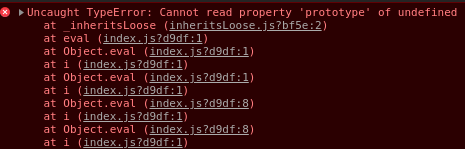
I always end up with
Uncaught TypeError: Cannot read property 'prototype' of undefinedas soon as I use any import of the packaes from@projecstorm(when applying this webpack rule)
saschb2b
on 13 Sep 2019
@saschb2b how are you importing it? could u provide an example?
I do it in this way

Are you able to successfully run the demos of this repo?
xduranmtz
on 16 Sep 2019
@serchduran my packages and babelconfig weren't up to date. I've updated all relevant babel packages
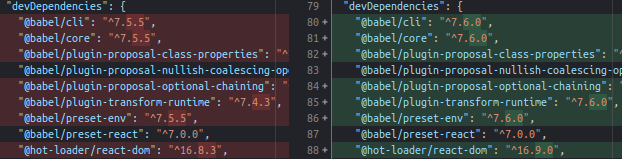

It could be mainly the polyfills fault as it was a beta package at the time. The rest was "pretty" up to date though
and changed the babel config to target node with preset-env

After that in combination with your webpack resolver I was able to use the package fully and build custom nodes
saschb2b
on 16 Sep 2019
Getting this error while using the same code as in demo
Uncaught Error: Cannot find factory with type [undefined]
    at t.FactoryBank.getFactory (index.js:650)
    at t.DiagramEngine.getFactoryForNode (index.js:1234)
    at t.DiagramEngine.generateWidgetForNode (index.js:1256)
    at Object.children (index.js:770)
    at t.PeformanceWidget.render (index.js:1480)
    at finishClassComponent (react-dom.development.js:18461)
    at updateClassComponent (react-dom.development.js:18416)
    at beginWork$1 (react-dom.development.js:20145)
    at HTMLUnknownElement.callCallback (react-dom.development.js:337)
    at Object.invokeGuardedCallbackDev (react-dom.development.js:386)
    at invokeGuardedCallback (react-dom.development.js:439)
    at beginWork$$1 (react-dom.development.js:25723)
    at performUnitOfWork (react-dom.development.js:24649)
    at workLoopSync (react-dom.development.js:24622)
    at performSyncWorkOnRoot (react-dom.development.js:24211)
    at react-dom.development.js:12263
    at unstable_runWithPriority (scheduler.development.js:821)
    at runWithPriority$2 (react-dom.development.js:12209)
    at flushSyncCallbackQueueImpl (react-dom.development.js:12258)
    at flushSyncCallbackQueue (react-dom.development.js:12246)
    at discreteUpdates$1 (react-dom.development.js:24365)
    at discreteUpdates (react-dom.development.js:1442)
    at dispatchDiscreteEvent (react-dom.development.js:5917)
 codefromhimanshu
on 8 Nov 2019
codefromhimanshu
on 8 Nov 2019
nvm, I found the solution, I just included transpilation for the @projectstorm library and it worked, e.g in my
webpack.config.js... // projectstorm is written for recent versions of the // node engine, so it will not work on older browsers // without transpilation path.resolve(__dirname, 'node_modules/@projectstorm') ], loader: require.resolve('babel-loader') }, ...I have used react-boilerplate as the foundation framework of my project I am facing the same issue with react-diagram when I integrate it into the react-boilerplate framework.
Can you help me, where I need to put your solution babel.config.js and .eslintrc.js?
Project configuration files
babel.config.js
`module.exports = {
  sourceType: 'unambiguous',
  presets: [
    [
      '@babel/preset-env',
      {
        // targets: {
        //   node: 'current',
        // },
        exclude: [
          'babel-plugin-transform-classes',
          '@babel/plugin-transform-classes',
        ],
        modules: false,
      },
    ],
    '@babel/preset-react',
  ],
  plugins: [
    'styled-components',
    '@babel/plugin-proposal-class-properties',
    '@babel/plugin-syntax-dynamic-import',
    ['import', { libraryName: 'antd', style: 'css' }],
  ],
  env: {
    production: {
      only: ['app'],
      plugins: [
        'lodash',
        'transform-react-remove-prop-types',
        '@babel/plugin-transform-react-inline-elements',
        '@babel/plugin-transform-react-constant-elements',
      ],
    },
    test: {
      plugins: [
        '@babel/plugin-transform-modules-commonjs',
        'dynamic-import-node',
      ],
    },
  },
};
`
.eslintrc.js
````
const fs = require('fs');
const path = require('path');
const prettierOptions = JSON.parse(
fs.readFileSync(path.resolve(__dirname, '.prettierrc'), 'utf8'),
);
module.exports = {
parser: 'babel-eslint',
extends: ['airbnb', 'prettier', 'prettier/react'],
plugins: ['prettier', 'redux-saga', 'react', 'react-hooks', 'jsx-a11y'],
env: {
jest: true,
browser: true,
node: true,
es6: true,
},
parserOptions: {
ecmaVersion: 6,
sourceType: 'module',
ecmaFeatures: {
jsx: true,
},
},
rules: {
'prettier/prettier': ['error', prettierOptions],
'arrow-body-style': [2, 'as-needed'],
'class-methods-use-this': 0,
'import/imports-first': 0,
'import/newline-after-import': 0,
'import/no-dynamic-require': 0,
'import/no-extraneous-dependencies': 0,
'import/no-named-as-default': 0,
'import/no-unresolved': 2,
'import/no-webpack-loader-syntax': 0,
'import/prefer-default-export': 0,
indent: [
2,
2,
{
SwitchCase: 1,
},
],
'jsx-a11y/aria-props': 2,
'jsx-a11y/heading-has-content': 0,
'jsx-a11y/label-has-associated-control': [
2,
{
// NOTE: If this error triggers, either disable it or add
// your custom components, labels and attributes via these options
// See https://github.com/evcohen/eslint-plugin-jsx-a11y/blob/master/docs/rules/label-has-associated-control.md
controlComponents: ['Input'],
},
],
'jsx-a11y/label-has-for': 0,
'jsx-a11y/mouse-events-have-key-events': 2,
'jsx-a11y/role-has-required-aria-props': 2,
'jsx-a11y/role-supports-aria-props': 2,
'max-len': 0,
'newline-per-chained-call': 0,
'no-confusing-arrow': 0,
'no-console': 1,
'no-unused-vars': 2,
'no-use-before-define': 0,
'prefer-template': 2,
'react/destructuring-assignment': 0,
'react-hooks/rules-of-hooks': 'error',
'react/jsx-closing-tag-location': 0,
'react/forbid-prop-types': 0,
'react/jsx-first-prop-new-line': [2, 'multiline'],
'react/jsx-filename-extension': 0,
'react/jsx-no-target-blank': 0,
'react/jsx-uses-vars': 2,
'react/require-default-props': 0,
'react/require-extension': 0,
'react/self-closing-comp': 0,
'react/sort-comp': 0,
'redux-saga/no-yield-in-race': 2,
'redux-saga/yield-effects': 2,
'require-yield': 0,
},
settings: {
'import/resolver': {
webpack: {
config: './internals/webpack/webpack.prod.babel.js',
},
},
},
};
```
Where I need to put the that two-line in an above file some projectstrom can be transpile
 kamleshgorasiya
on 25 Mar 2020
kamleshgorasiya
on 25 Mar 2020
Related issues
 Nesterov-Konstantin
·
4Comments
Nesterov-Konstantin
·
4Comments
 M2Costa
·
3Comments
M2Costa
·
3Comments
 gugaevkirill
·
3Comments
gugaevkirill
·
3Comments
 Naveenraj006
·
3Comments
Naveenraj006
·
3Comments
 shortwavedave
·
3Comments
shortwavedave
·
3Comments
Most helpful comment
Also need some help here. I'm getting "TypeError: Class extends value undefined is not a constructor or null" when attempting to implement the example Custom Node (link to JSX example).