React-diagrams: Create arrow head in links
I want to create something like this blue arrow:

I tried to customize the link, but had no success.
Can someone send me and example or help me with that?
Thanks!
 matheusgaya
All 30 comments
+1
 ganesh-sankey
on 14 Mar 2018
ganesh-sankey
on 14 Mar 2018
+1
 akhilesh-sankey
on 20 Mar 2018
akhilesh-sankey
on 20 Mar 2018
override link widget generatePoint function
generatePoint(pointIndex) {
const x = this.props.link.points[pointIndex].x
const y = this.props.link.points[pointIndex].y
return (
onMouseEnter={this.setSelected}
data-id={this.props.link.points[pointIndex].id}
data-linkid={this.props.link.id}
cx={x}
cy={y}
r={20}
opacity={0}
className={point ${this.bem('__point')}}
/>
)
}
 silvacpp
on 23 Mar 2018
silvacpp
on 23 Mar 2018
@silvacpp The above solution might not be proper since it only creates arrow head in one direction only.
and also when you try to connect out port to in port, it will not create arrow head at in port side.
The result will be like this.
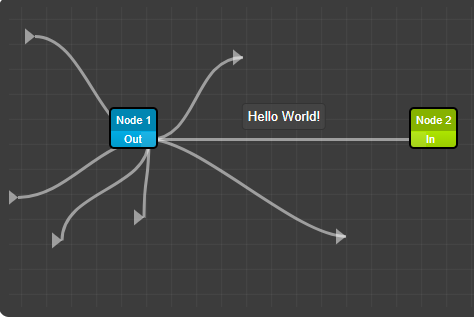
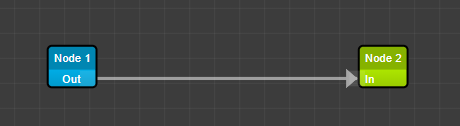
Instead we can override the generateLinkSegment method in DefaultLinkFactory.js. In that method, define marker with g tag and attach it to the path tag with markerEnd property. so it will take care of changing arrow head direction with link direction and also when you connect in port and out port, it will still create arrow head. also add marker sass property in DefaultLinkWidget sass file for visibility of it. also need to playaround with some css.
The final result will be

Still we need to wait for proper configurable solution for it. @dylanvorster
ganesh-sankey
on 24 Mar 2018
hi @ganesh-sankey could you kindly share your code of your example?
 roylo
on 30 Mar 2018
roylo
on 30 Mar 2018
@roylo the sample code provided below might not worked in all condition i.e only works in top down approach - making link from top node to down node. Also add negative margin left to port position in using css: .srd-default-port (not provided in below code).
I have forked this library and made changes to default node itsself and use that fork as node_module for my project.
we need to work on logic to handle arrow head in all conditions.
in DefaultLinkWidget.scss change the following:
&-marker{
fill: rgb(165,165,165) !important;
}
&--marker-selected{
fill: rgb(50,50,50) !important;
pointer-events:all;
}
in DefaultLinkFactory.tsx change the following:
generateLinkSegment(model: DefaultLinkModel, widget: DefaultLinkWidget, selected: boolean, path: string) {
var markerId= Toolkit.UID();
var markerEndUrl = "url(#"+markerId+")";
return (
<g>
<defs>
<marker id={markerId} markerWidth="8" markerHeight="8" refX="3.5" refY="3"
orient="auto" markerUnits="strokeWidth">
<path d="M0,0 L0,6 L3.5,3 z" className={selected ? widget.bem("--marker-selected") : widget.bem("-marker")} />
</marker>
</defs>
<path
className={selected ? widget.bem("--path-selected") : ""}
fill= "none"
strokeWidth={model.width}
stroke={model.color}
d={path}
markerEnd={markerEndUrl}
/>
</g>
);
}
ganesh-sankey
on 30 Mar 2018
Tried this approach, but I eventually get many errors related (likely) to the fact
 unsafecode
on 24 Apr 2018
unsafecode
on 24 Apr 2018
+1
 zoii
on 2 May 2018
zoii
on 2 May 2018
+1
 Nahuel92
on 6 May 2018
Nahuel92
on 6 May 2018
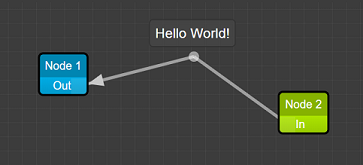
@matheusgaya @unsafecode Here is my workaround solution https://github.com/samnb/react-diagrams-arrowhead-dist
In ../demos/demo-simple/index.tsx call setMarkers(startMarker: bool, endMarker: bool)
let link1 = port1.link(port2);
(link1 as DefaultLinkModel).addLabel("Hello World!");
(link1 as DefaultLinkModel).setMarkers(true, false);
 shamiln
on 21 May 2018
shamiln
on 21 May 2018
@smlnbyv Would it be possible to refactor your PoC without forking the whole library, and instead write separate, pluggable Factories/Widgets?
unsafecode
on 24 May 2018
OK, so I've written a solution for this problem.
getAngle(px1, py1, px2, py2) {
const x = px2-px1;
const y = py2-py1;
const hypotenuse = Math.sqrt(Math.pow(x, 2)+Math.pow(y, 2));
let cos = x/hypotenuse;
let radian = Math.acos(cos);
let angle = 180/(Math.PI/radian);
if (y<0) {
angle = -angle;
} else if ((y == 0) && (x<0)) {
angle = 180;
}
return angle;
}
generatePoint(pointIndex: number): JSX.Element {
let {link} = this.props;
let x = link.points[pointIndex].x;
let y = link.points[pointIndex].y;
const pointOne = link.points[pointIndex-1];
const pointTwo = link.points[pointIndex];
let angle = this.getAngle(pointOne.x, pointOne.y, pointTwo.x, pointTwo.y);
return (
<g key={"point-" + this.props.link.points[pointIndex].id}>
{/* <circle
cx={x}
cy={y}
r={5}
className={
"point " +
this.bem("__point") +
(this.props.link.points[pointIndex].isSelected() ? this.bem("--point-selected") : "")
}
/> */}
<circle
onMouseLeave={() => {
this.setState({ selected: false });
}}
onMouseEnter={() => {
this.setState({ selected: true });
}}
data-id={this.props.link.points[pointIndex].id}
data-linkid={this.props.link.id}
cx={x}
cy={y}
r={5}
opacity={.5}
className={
"point " +
this.bem("__point") +
(this.props.link.points[pointIndex].isSelected() ? this.bem("--point-selected") : "")
}
/>
<polygon
x={x-20}
y={y+12}
transform={`rotate(${angle}, ${x}, ${y})`}
points={`${x - 10},${y - 8} ${x+3},${y} ${x - 10},${y + 8}`}
/>
</g>
);
}
 percyteng
on 29 Aug 2018
percyteng
on 29 Aug 2018
You can also use this solution:
- Add this markup to the container
<svg>
<defs>
<marker id={markerHead} markerWidth="6" markerHeight="4" refX="5" refY="2" orient="auto">
<path d="M0,0 L0,4 L4,2 Z" style={{fill: "#b5d9fd"}} />
</marker>
<marker id={markerHeadInversed} markerWidth="6" markerHeight="4" refX="-1" refY="2" orient="auto">
<path d="M4,0 L4,4 L0,2 Z" style={{fill: "#b5d9fd"}} />
</marker>
</defs>
</svg>
- Check if the link is inversed, and pass the return value as prop to the
linkSegment(create it):
getDirection(source: Object, target: Object): boolean {
const difX = source.x - target.x,
difY = source.y - target.y,
isHorisontal = Math.abs(difX) > Math.abs(difY);
return isHorisontal ? difX > 0 : difY > 0;
}
- Use this function to set the style to the link path:
setPathMarker = (inversed: boolean): Object => {
if(inversed) {
return {
markerStart: `url(#${markerHeadInversed})`
}
} else {
return {
markerEnd: `url(#${markerHead})`
}
}
}
Hope, that it'll help you.
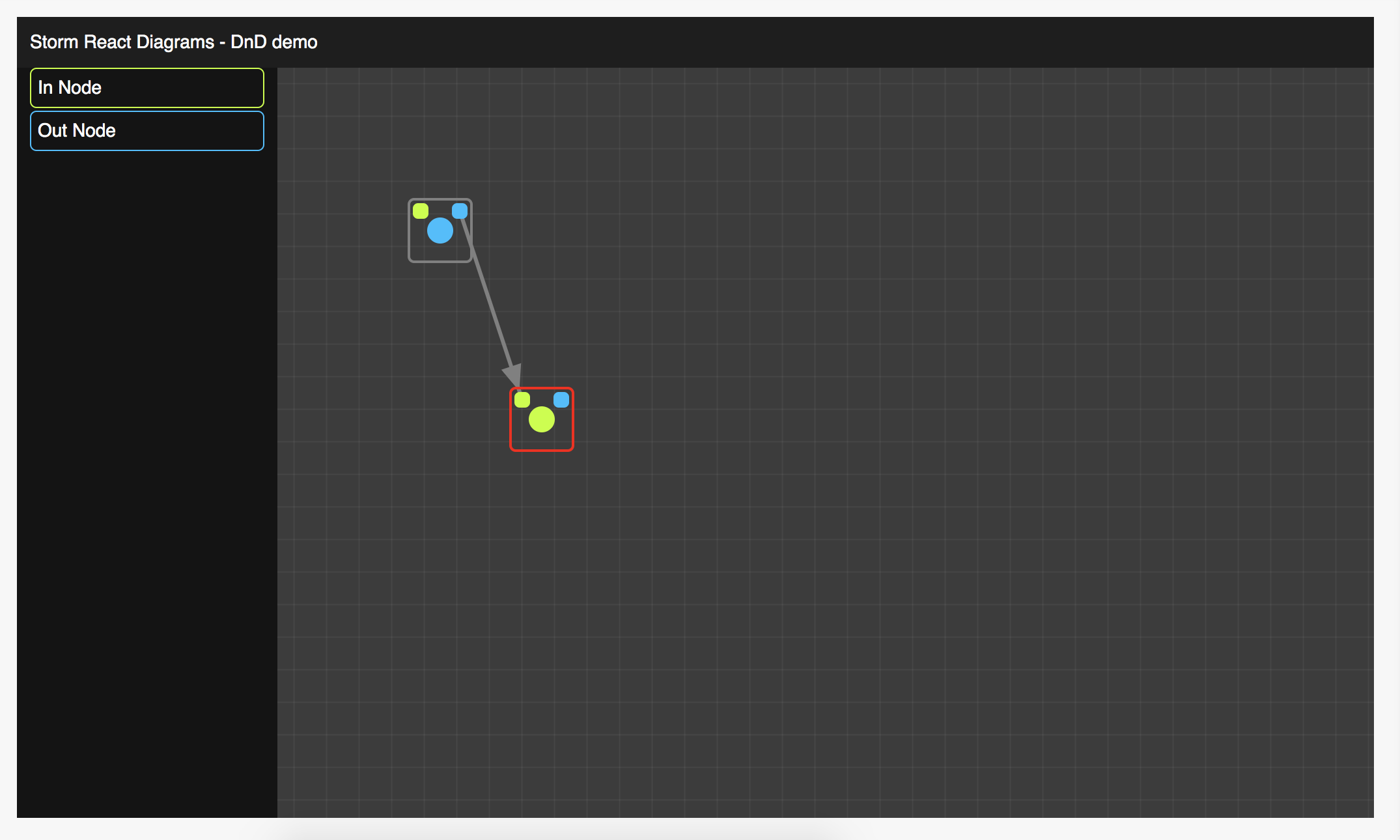
Example (green dots - inPorts, blue - outPorts):

 wamujlb
on 2 Jan 2019
wamujlb
on 2 Jan 2019
You can also use this solution:
1. Add this markup to the container<svg> <defs> <marker id={markerHead} markerWidth="6" markerHeight="4" refX="5" refY="2" orient="auto"> <path d="M0,0 L0,4 L4,2 Z" style={{fill: "#b5d9fd"}} /> </marker> <marker id={markerHeadInversed} markerWidth="6" markerHeight="4" refX="-1" refY="2" orient="auto"> <path d="M4,0 L4,4 L0,2 Z" style={{fill: "#b5d9fd"}} /> </marker> </defs> </svg>1. Check if the link is inversed, and pass the return value as prop to the `linkSegment` (create it):getDirection(source: Object, target: Object): boolean { const difX = source.x - target.x, difY = source.y - target.y, isHorisontal = Math.abs(difX) > Math.abs(difY); return isHorisontal ? difX > 0 : difY > 0; }1. Use this function to set the style to the link path:setPathMarker = (inversed: boolean): Object => { if(inversed) { return { markerStart: `url(#${markerHeadInversed})` } } else { return { markerEnd: `url(#${markerHead})` } } }Hope, that it'll help you.
Example (green dots - inPorts, blue - outPorts):
Hi @wamujlb , would you mind sharing where we can put those changes to the code, I'm also creating a custom link for my app and hopefully saved my day.
Thanks in advance,
Duc
 DieByMacro
on 6 Feb 2019
DieByMacro
on 6 Feb 2019
Hi @DieByMacro
create a custom
LinkSegment component
// @flow
import React, {PureComponent} from "react";
import LinkModel from "./Model";
import StepLabel from "../Label";
import {markerHead, markerHeadInversed} from "./markers.jsx"
type Props = {
model: BotDetailEditFlowDiagramStepLinkModel,
path: string,
inversed: boolean,
}
import "./style.sass";
/**
* Flow diagram Link segmet
* @class LinkSegment
*/
class LinkSegment extends PureComponent<Props> {
path: ?any;
circle: ?any;
animation: any;
progress: number;
style: Object;
/**
* Create `step` link segment
* @method constructor
* @param props - component props
*/
constructor(props: Object) {
super(props);
this.progress = props.inversed ? 100 : 0;
this.content = this.getTooltipContent();
this.style = this.setPathMarker(props.inversed);
}
/**
* Change path style if path direction changed
* @method componentDidUpdate
* @param prevProps - previous props
*/
componentDidUpdate = (prevProps: Object) => {
if (prevProps.inversed !== this.props.inversed) {
this.style = this.setPathMarker(this.props.inversed);
}
}
/**
* Set link path marker head regarding to the link path direction
* @method setPathMarker
* @param inversed - is the path inversed
* @return style object with marker
*/
setPathMarker = (inversed: boolean): Object => {
if(inversed) {
return {
markerStart: `url(#${markerHeadInversed})`
}
} else {
return {
markerEnd: `url(#${markerHead})`
}
}
}
// eslint-disable-next-line require-jsdoc
render() {
const {path, model} = this.props;
return (
<g className="link-segment">
<path
className="link-segment__path"
ref={ref => this.path = ref}
strokeWidth={model.width}
strokeLinecap="round"
d={path}
style={this.style}
/>
<path
className="link-segment__path link-segment__path_shadow"
onMouseEnter={this.onMouseEnter}
onMouseLeave={this.onMouseLeave}
strokeWidth={model.width * 5}
d={path}
/>
<circle
className="link-segment__circle"
ref={ref => this.circle = ref}
r={model.width * 2}
/>
</g>
);
}
}
export default LinkSegment;
Extend LinkWidget component and add these methods:
LinkWidget
// @flow
import React from "react";
import {
DefaultLinkWidget,
BaseWidgetProps,
DiagramEngine,
} from "storm-react-diagrams";
import LinkModel from "./Model";
export type Props = {
...BaseWidgetProps,
width?: number,
smooth?: boolean,
link: BotDetailEditFlowDiagramStepLinkModel,
diagramEngine: DiagramEngine,
}
/**
* Render only 1 link
* LinkWidget
*/
class LinkWidget extends DefaultLinkWidget {
/**
* Get direction of the link
* Useful for animation
* @method getDirection
* @param source - source port
* @param target - target port
* @return true if direction should be reversed
*/
getDirection(source: Object, target: Object): boolean {
const difX = source.x - target.x,
difY = source.y - target.y,
isHorisontal = Math.abs(difX) > Math.abs(difY);
return isHorisontal ? difX > 0 : difY > 0;
}
/**
* Generate link
* @method generateLink
* @param path - link path
* @param extraProps - extra properties
* @param id - link idea
* @return Link path
*/
generateLink(
path: string,
extraProps: any,
id: string | number
): Element<"g"> {
const { diagramEngine, link } = this.props,
{ selected } = this.state;
let inversed = this.getDirection(link.sourcePort, link.targetPort);
const Link = React.cloneElement(
diagramEngine
.getFactoryForLink(link)
.generateLinkSegment(
link,
this,
selected || link.isSelected(),
path,
inversed,
),
{
...extraProps,
strokeLinecap: "round",
"data-linkid": link.getID(),
onContextMenu: event => {
if (!this.props.diagramEngine.isModelLocked(link)) {
event.preventDefault();
link.remove();
}
}
}
);
// Needed for the creating Labels
const LinkClone = (
<path
strokeWidth={1}
stroke="rgba(0,0,0,0)"
d={path}
ref={ref => ref && this.refPaths.push(ref)}
/>
);
return (
<g key={"link-" + id}>
{LinkClone}
{Link}
</g>
);
}
}
export default LinkWidget;
Hi @wamujlb ,
Thanks for your instruction, I really appreciate that.
I've been working on a new Segment component and found out this weird behavior, if I create a new segment component and return its path like the way you did, the mouse hover on the link won't work like a _DefaultLinkWidget_ (I meant when you mouse over the link path, there won't be a blue dashing line). Things just get back to normal when I return a normal
Thanks,
Duc
DieByMacro
on 7 Feb 2019
It can be because of some CSS code. You can change my approach to make it
the same as you want to be
On Thu, Feb 7, 2019, 17:13 Duc Quach <[email protected] wrote:
Hi @wamujlb https://github.com/wamujlb ,
Thanks for your instruction, I really appreciate that.
I've been working on a new Segment component and found out this weird
behavior, if I create a new segment component and return its path like the
way you did, the mouse hover on the link won't work like a
DefaultLinkWidget (I meant when you mouse over the link path, there
won't be a blue dashing line). Things just get back to normal when I return
a normal in generateLinkSegment , do you happen to see this ?Thanks,
Duc—
You are receiving this because you were mentioned.
Reply to this email directly, view it on GitHub
https://github.com/projectstorm/react-diagrams/issues/183#issuecomment-461491497,
or mute the thread
https://github.com/notifications/unsubscribe-auth/AONu1DFi3urGshstWqF-pROwzDCnicIZks5vLFC-gaJpZM4SgzgC
.
wamujlb
on 7 Feb 2019
@matheusgaya @unsafecode Here is my workaround solution https://github.com/samnb/react-diagrams-arrowhead-dist
In
../demos/demo-simple/index.tsxcallsetMarkers(startMarker: bool, endMarker: bool)let link1 = port1.link(port2); (link1 as DefaultLinkModel).addLabel("Hello World!"); (link1 as DefaultLinkModel).setMarkers(true, false);
Hi! I know it's been a while but can you please specify what part of the source code did you modify in order to get the marker appear? would really appreciate that.
 QuangHuy2705
on 7 Mar 2019
QuangHuy2705
on 7 Mar 2019
@QuangHuy2705
I have added this method to the Link.
My link code
/**
 * Render only 1 link
 * @class MyLinkWidget
 */
class MyLinkWidget extends DefaultLinkWidget {

    /**
     * Get direction of the link
     * Useful for animation
     * @method getDirection
     * @param source - source port
     * @param target - target port
     * @return true if direction should be reversed
     */
    getDirection(source: Object, target: Object): boolean {
        const difX = source.x - target.x,
            difY = source.y - target.y,
            isHorisontal = Math.abs(difX) > Math.abs(difY);

        return isHorisontal ? difX > 0 : difY > 0;
    }

    /**
     * Generate link
     * @method generateLink
     * @param path - link path
     * @param extraProps - extra properties
     * @param id - link idea
     * @return Link path
     */
    generateLink(
        path: string,
        extraProps: any,
        id: string | number
    ): Element<"g"> {
        const { diagramEngine, link } = this.props,
            { selected } = this.state;

        let inversed = this.getDirection(link.sourcePort, link.targetPort);

        const Link = React.cloneElement(
            diagramEngine
                .getFactoryForLink(link)
                .generateLinkSegment(
                    link,
                    this,
                    selected || link.isSelected(),
                    path,
                    inversed,
                ),
            {
                ...extraProps,
                strokeLinecap: "round",
                "data-linkid": link.getID(),
                onContextMenu: event => {
                    if (!this.props.diagramEngine.isModelLocked(link)) {
                        event.preventDefault();
                        link.remove();
                    }
                }
            }
        );

        // Needed for the creating Labels
        const LinkClone = (
            <path
                strokeWidth={1}
                stroke="rgba(0,0,0,0)"
                d={path}
                ref={ref => ref && this.refPaths.push(ref)}
            />
        );

        return (
            <g key={"link-" + id}>
                {LinkClone}
                {Link}
            </g>
        );
    }
}

export default MyLinkWidget;
My link segment code
class MyLinkSegment extends PureComponent<Props> {

    static defaultProps: Object = {
        show: () => {},
        hide: () => {},
    }

    path: ?any;
    circle: ?any;
    animation: any;
    progress: number;
    content: BotDetailEditFlowDiagramStepLabel;
    style: Object;

    /**
     * Create `step` link segment
     * @method constructor
     * @param props - component props
     */
    constructor(props: Object) {
        super(props);
        this.progress = props.inversed ? 100 : 0;
        this.content = this.getTooltipContent();
        this.style = this.setPathMarker(props.inversed);
    }

    /**
     * Change path style if path direction changed
     * @method componentDidUpdate
     * @param prevProps - previous props
     */
    componentDidUpdate = (prevProps: Object) => {
        if (prevProps.inversed !== this.props.inversed) {
            this.style = this.setPathMarker(this.props.inversed);
        }
    }


    /**
     * Start animation on mouse enter
     * @method onMouseEnter
     * @param e - event
     */
    onMouseEnter = (e: Object) => {
        // @flow-ignore
        const length = this.path.getTotalLength(),
            step = 4 * 100 / length; // Move 100px for 1000ms

        this.progress = this.props.inversed ? 100 : 0; // reset progress

        // Show tooltip
        this.props.show({
            origin: { x: e.clientX, y: e.clientY },
            content: this.content,
        })

        this.animation = requestAnimationFrame(() => {
            this.animateCircle(length, step)
        });
    }

    /**
     * Cancel animation on mouse leave
     * @method onMouseLeave
     */
    onMouseLeave = () => {
        this.props.hide()
        cancelAnimationFrame(this.animation);
    }

    /**
     * Direction circle animation
     * @method animateCircle
     * @param length - path length
     * @param step - animation step
     */
    animateCircle = (length: number, step: number) => {
        const {inversed} = this.props;

        if(this.path && this.circle) {
            if(inversed) {
                this.progress -= step;
                if (this.progress < 0) {
                    this.progress = 100;
                }
            } else {
                this.progress += step;
                if (this.progress > 100) {
                    this.progress = 0;
                }
            }

            let point = this.path.getPointAtLength(
                Number.parseInt((length * (this.progress / 100.0)).toFixed())
            );

            // @flow-ignore
            this.circle.setAttribute("cx", "" + point.x);
            // @flow-ignore
            this.circle.setAttribute("cy", "" + point.y);

            this.animation = requestAnimationFrame(() => {
                this.animateCircle(length, step);
            });
        }
    }

    /**
     * Get Source step and Target step to show in tooltip
     * @method getTooltipContent
     * @return tooltip content
     */
    getTooltipContent = (): BotDetailEditFlowDiagramStepLabel => {
        const {t, model} = this.props,
            {source} = model.sourcePort.info,
            {responses} = model.extras;

        return (
            <BotDetailEditFlowDiagramStepLabel
                t={t}
                source={source}
                responses={responses}
            />
        )
    }

    /**
     * Set link path marker head regarding to the link path direction
     * @method setPathMarker
     * @param inversed - is the path inversed
     * @return style object with marker
     */
    setPathMarker = (inversed: boolean): Object => {
        if(inversed) {
            return {
                markerStart: `url(#${markerHeadInversed})`
            }
        } else {
            return {
                markerEnd: `url(#${markerHead})`
            }
        }
    }

    // eslint-disable-next-line require-jsdoc
    render() {
        const {path, model} = this.props;

        return (
            <g className="link-segment">
                <path
                    className="link-segment__path"
                    ref={ref => this.path = ref}
                    strokeWidth={model.width}
                    strokeLinecap="round"
                    d={path}
                    style={this.style}
                />
                <path
                    className="link-segment__path link-segment__path_shadow"
                    onMouseEnter={this.onMouseEnter}
                    onMouseLeave={this.onMouseLeave}
                    strokeWidth={model.width * 5}
                    d={path}
                />
                <circle
                    className="link-segment__circle"
                    ref={ref => this.circle = ref}
                    r={model.width * 2}
                />
            </g>
        );
    }
}

export default MyLinkSegment;
And put this SVGs in your diagram container (we need them in the linkSegment for arrows)
// @flow
import React, {PureComponent} from "react";

import type {Node, ChildrenArray} from "react";

export const markerHead = "markerHead",
    markerHeadInversed = "markerHeadInversed";

/**
 * Create container wrapper for the bot edit flow diagram
 * @function BotDetailEditFlowDiagramContainer
 * @return wrapper container
 */
class MyDiagramContainer extends PureComponent<Props> {

    // eslint-disable-next-line require-jsdoc
    render() {
        const {handleAddStep, handleZoomToFit, handleAutoDistribute, children} = this.props;

        return (
            <div className="bot-diagram">
                <div className="bot-diagram__content">{children}</div>
                <svg>
                    <defs>
                        <marker id={markerHead} markerWidth="6" markerHeight="4" refX="5" refY="2" orient="auto">
                            <path d="M0,0 L0,4 L4,2 Z" style={{fill: "#b5d9fd"}} />
                        </marker>

                        <marker id={markerHeadInversed} markerWidth="6" markerHeight="4" refX="-1" refY="2" orient="auto">
                            <path d="M4,0 L4,4 L0,2 Z" style={{fill: "#b5d9fd"}} />
                        </marker>
                    </defs>
                </svg>
            </div>
        )
    }
}

export default MyDiagramContainer;
And then just create a new Factory for this linkWidget. That's it.
wamujlb
on 7 Mar 2019
@unsafecode @matheusgaya @QuangHuy2705
Have a look at these files. You are welcome.
https://github.com/samnb/react-diagrams-arrowhead-dist/blob/master/src/defaults/models/DefaultLinkModel.ts (lines 22, 29, 73)
https://github.com/samnb/react-diagrams-arrowhead-dist/blob/master/src/defaults/widgets/DefaultLinkWidget.tsx (the function generateLink(...) and the lines 411 - 421)
https://github.com/samnb/react-diagrams-arrowhead-dist/blob/master/src/defaults/factories/DefaultLinkFactory.tsx (the lines 37 - 47)
shamiln
on 7 Mar 2019
@samnb
Haha))) Your name also Shamil. Never met someone with this name.
wamujlb
on 7 Mar 2019
@wamujlb @samnb you guys are the best! Thanks a ton!!
QuangHuy2705
on 8 Mar 2019
@wamujlb Nice to meet you :)
shamiln
on 8 Mar 2019
@unsafecode @matheusgaya @QuangHuy2705
Have a look at these files. You are welcome.
https://github.com/samnb/react-diagrams-arrowhead-dist/blob/master/src/defaults/models/DefaultLinkModel.ts (lines 22, 29, 73)
https://github.com/samnb/react-diagrams-arrowhead-dist/blob/master/src/defaults/widgets/DefaultLinkWidget.tsx (the function
generateLink(...)and the lines 411 - 421)https://github.com/samnb/react-diagrams-arrowhead-dist/blob/master/src/defaults/factories/DefaultLinkFactory.tsx (the lines 37 - 47)
Hey @samnb, I implemented the changes to the Default Link, Model, and Factory, but the arrow doesn't appear at all. Neither when drawing a new link, or when a link is connected. I used the simple demo boilerplate as well. Am I missing something? Should I change any other files?
 jbcurrie
on 5 Apr 2019
jbcurrie
on 5 Apr 2019
Hey @jbcurrie I'll check this out again.
shamiln
on 9 Apr 2019
Hi! I have been working with the library for a while. your guides are also so great, the arrows are working fine. However, I noticed that when we select one of the nodes and press 'delete' button, the node is gone as if it were a text in a input field. Does anyone know a workaround for that? Thanks!
QuangHuy2705
on 22 May 2019
My way to solve this is using @silvacpp @percyteng methods by building new LinkSegment.
`
 arrow:SVGPolygonElement;
 mounted: boolean;
componentDidMount() {
    this.mounted = true;
    this.callback = () => {
        if (!this.arrow || !this.path) {
            return;
        }
        let point = this.path.getPointAtLength(this.path.getTotalLength());
        let startPoint = this.path.getPointAtLength(this.path.getTotalLength()*0.9);
        let angle=this.getAngle(startPoint.x,startPoint.y,point.x,point.y);
        this.arrow.setAttribute("points",`${point.x - 20},${point.y - 8} ${point.x+2},${point.y} ${point.x - 20},${point.y + 8}`);
        this.arrow.setAttribute("transform",`rotate(${angle}, ${point.x}, ${point.y})`);
        this.arrow.setAttribute("fill","#0057b8");
        if (this.mounted) {
            requestAnimationFrame(this.callback);
        }
    };
    requestAnimationFrame(this.callback);
}
componentWillUnmount() {
    this.mounted = false;
}
`
And in render function
<polygon
                id={id}
                ref={
                    ref=>{
                        this.arrow=ref;
                    }
                }
Then build a new factory and register it to your engine.
I locate arrowhead position by
let point = this.path.getPointAtLength(this.path.getTotalLength());
This works well if you use straight line path.But with Bezier curves the path begin point and end point sometimes swaps which may dislocate the arrowhead.
 sjw441500
on 12 Jul 2019
sjw441500
on 12 Jul 2019
My way to solve this is using @silvacpp @percyteng methods by building new LinkSegment.
`
 arrow:SVGPolygonElement;
 mounted: boolean;
componentDidMount() {
    this.mounted = true;
  this.callback = () => {
      if (!this.arrow || !this.path) {
          return;
        }
        let point = this.path.getPointAtLength(this.path.getTotalLength());
        let startPoint = this.path.getPointAtLength(this.path.getTotalLength()*0.9);
        let angle=this.getAngle(startPoint.x,startPoint.y,point.x,point.y);
        this.arrow.setAttribute("points",`${point.x - 20},${point.y - 8} ${point.x+2},${point.y} ${point.x - 20},${point.y + 8}`);
        this.arrow.setAttribute("transform",`rotate(${angle}, ${point.x}, ${point.y})`);
        this.arrow.setAttribute("fill","#0057b8");
      if (this.mounted) {
          requestAnimationFrame(this.callback);
      }
  };
  requestAnimationFrame(this.callback);
}
componentWillUnmount() {
  this.mounted = false;
}
`
And in render function
<polygon id={id} ref={ ref=>{ this.arrow=ref; } }Then build a new factory and register it to your engine.
I locate arrowhead position by
let point = this.path.getPointAtLength(this.path.getTotalLength());
This works well if you use straight line path.But with Bezier curves the path begin point and end point sometimes swaps which may dislocate the arrowhead.
I solved this by calculate the distance between source port coordinate and the two points on each side of the path,and reverse it if necessary.
sjw441500
on 25 Sep 2019
hi @wamujlb.
how can i create a new factory with new MyLinkWidget with my code like this.thanks.
```javascript
import React from 'react';
import {
DiagramWidget,
DiagramEngine,
// DefaultNodeFactory,
// DefaultLinkFactory,
DiagramModel,
DefaultNodeModel,
// DefaultPortModel,
// LinkModel,
} from 'storm-react-diagrams';
import styled from 'styled-components';
import 'storm-react-diagrams/dist/style.min.css';
const Wrapper = styled.div
  .srd-diagram {
    height: 80vh;
    background-color: rgb(60,60,60);
  }
;
class DemoOne extends React.Component {
constructor(props) {
super(props);
this.state = {};
}
componentWillMount() {
// 1) setup the diagram engine
this.engine = new DiagramEngine();
this.engine.installDefaultFactories();
// 2) setup the diagram model
const model = new DiagramModel();

// 3) create a default node
const node1 = new DefaultNodeModel('Node 1', 'rgb(0,192,255)');
const port1 = node1.addOutPort('Out');
node1.setPosition(100, 100);

// 4) create another default node
const node2 = new DefaultNodeModel('Node 2', 'rgb(192,255,0)');
const port2 = node2.addInPort('In');
node2.setPosition(400, 100);

// 5) link the 2 nodes together
const link1 = port1.link(port2);
link1.addLabel('Hello');

// 6) add the models to the root graph
model.addAll(node1, node2, link1);

// 7) load model into engine
this.engine.setDiagramModel(model);
}
render() {
return (
);
}
}
export default DemoOne;
 khoaanh2212
on 22 Nov 2019
khoaanh2212
on 22 Nov 2019
HI I have implemented this example: http://projectstorm.cloud/react-diagrams/?path=/story/customization--custom-link-ends-arrows
And I am able to see the arrowhead but the issue is, now when I move or create new link it will not have a curved path.
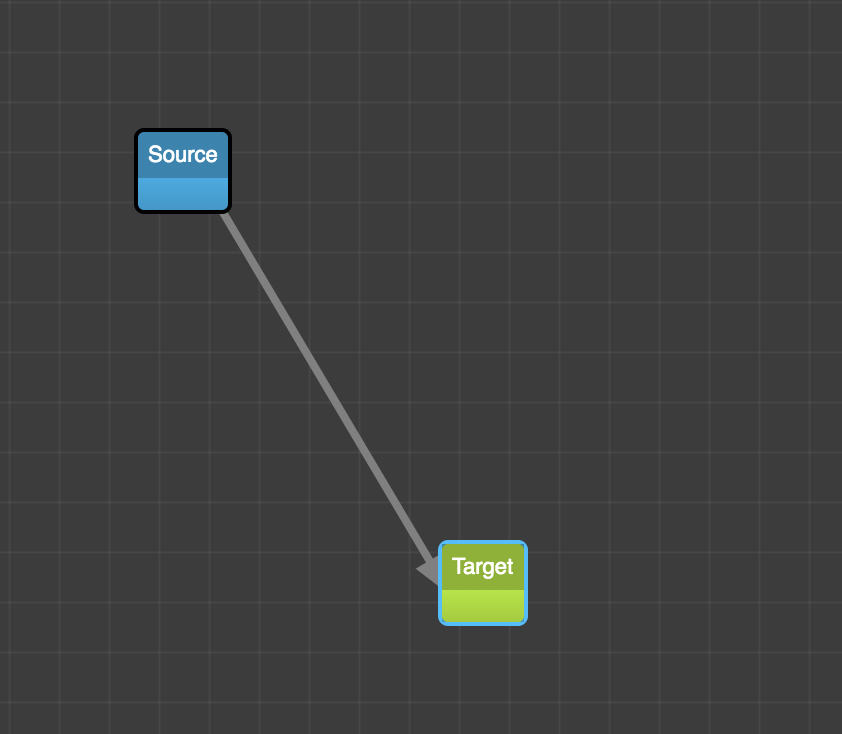
Expected Link path curve with an arrowhead.
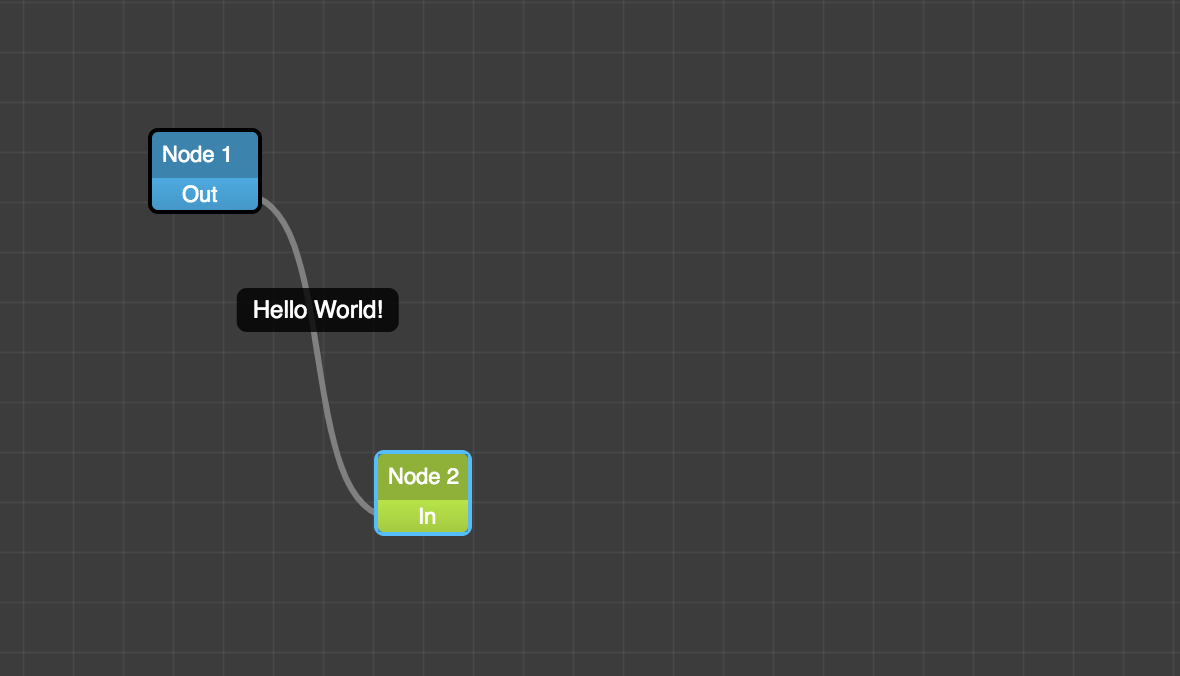
This is my example:
Hi, @dylanvorster @wamujlb @shamiln Could you please help me?
 kevalbhatt
on 30 May 2020
kevalbhatt
on 30 May 2020
Related issues
 kmannislands
·
3Comments
kmannislands
·
3Comments
 CarlousF
·
3Comments
CarlousF
·
3Comments
 duvet86
·
3Comments
ganesh-sankey
·
4Comments
duvet86
·
3Comments
ganesh-sankey
·
4Comments
 shortwavedave
·
3Comments
shortwavedave
·
3Comments
Most helpful comment
@QuangHuy2705
I have added this method to the Link.
My link code
My link segment code
And put this SVGs in your diagram container (we need them in the linkSegment for arrows)
And then just create a new Factory for this linkWidget. That's it.