React-diagrams: Really Struggling
Hello all,
First and foremost, I'm a complete n00b to react and webpack. But I'd really like to use react-diagrams in my project, but can't seem to get it to render properly.
Here is what I've done so far:
- cd into my project folder
- ran
npm install --save storm-react-diagrams - Created a new page on my site and added the following code to it:
import React, { Component } from 'react';

import {
    DiagramEngine,
    DiagramModel,
    DefaultNodeModel,
    LinkModel,
  DefaultPortModel,
  DiagramWidget,
  DefaultLinkModel
} from "storm-react-diagrams";


//1) setup the diagram engine
var engine = new DiagramEngine();
engine.installDefaultFactories();

//2) setup the diagram model
var model = new DiagramModel();

//3-A) create a default node
var node1 = new DefaultNodeModel("Node 1", "rgb(0,192,255)");
var port1 = node1.addPort(new DefaultPortModel(false, "out-1", "Out"));
node1.x = 100;
node1.y = 100;

//3-B) create another default node
var node2 = new DefaultNodeModel("Node 2", "rgb(192,255,0)");
var port2 = node2.addPort(new DefaultPortModel(true, "in-1", "IN"));
node2.x = 400;
node2.y = 100;

//3-C) link the 2 nodes together
var link1 = new LinkModel();
link1.setSourcePort(port1);
link1.setTargetPort(port2);

//4) add the models to the root graph
model.addNode(node1);
model.addNode(node2);
model.addLink(link1);

//5) load model into engine
engine.setDiagramModel(model);

class SandboxPage extends Component {
  render() {
    return (
      <div>
        <DiagramWidget diagramEngine={engine} />
      </div>
    );
  }
}

export default SandboxPage;
But the page renders like this:

I pretty much copied the code from the simple demo example, but obviously, something is wrong.
Any help would be appreciated.
 jc78
jc78
All 18 comments
I used this library about 4 months ago and ran into the same issue. I think you're not importing the sass file from the src/sass folder.
 ehmadzubair
on 26 Feb 2018
ehmadzubair
on 26 Feb 2018
@jc78 please look at this too https://github.com/projectstorm/react-diagrams/issues/100
ehmadzubair
on 26 Feb 2018
Thanks for responding @ehmadzubair. Unfortunately, importing the sass didn't work for me. The graph still looks broken as above.
After doing a little bit more digging, I'm wondering if I need to do something to the typescript files? Or should those load automatically from the node_modules\storm-react-diagrams folder? Do I need to compile them?
jc78
on 26 Feb 2018
@ehmadzubair strange, thats definitely a styles issue. There is also a .css file that gets generated and shipped with the dist folder as well as a transpiled e2015 version of the project in that file as well. You can also clone the project and run (after running yarn install) yarn run test:ci which will generate sandboxed versions of the demo in the dist folder -> e2e. You might have some luck looking at those sandboxed demos.
 dylanvorster
on 26 Feb 2018
dylanvorster
on 26 Feb 2018
I agree with @dylanvorster, the file was in the dist folder, and it was a .css file. I did this 4 months ago, so my memory was a little fuzzy
ehmadzubair
on 26 Feb 2018
Sorry @ehmadzubair I meant to tag @jc78 but thanks for also assisting :)
dylanvorster
on 26 Feb 2018
So, after importing the css file from dist instead, I did notice a change in the way the graph rendered. Unfortunately, that change is a completely blank graph.
import "storm-react-diagrams/dist/style.css";
I see no errors in the npm output or chrome's console. Just to be sure, I commented out the import css line and the graph went back to rendering like the original image I submitted.
Here's my latest component file code. I'm importing the component into a separate page js file, using react-router to serve my pages.
import React, { Component } from 'react';
import {
    DiagramEngine,
    DiagramModel,
    DefaultNodeModel,
    LinkModel,
  DefaultPortModel,
  DiagramWidget
} from "storm-react-diagrams";

import "storm-react-diagrams/dist/style.css";


//1) setup the diagram engine
var engine = new DiagramEngine();
engine.installDefaultFactories();

//2) setup the diagram model
var model = new DiagramModel();

//3-A) create a default node
var node1 = new DefaultNodeModel("Node 1", "rgb(0,192,255)");
var port1 = node1.addPort(new DefaultPortModel(false, "out-1", "Out"));
node1.x = 100;
node1.y = 100;

//3-B) create another default node
var node2 = new DefaultNodeModel("Node 2", "rgb(192,255,0)");
var port2 = node2.addPort(new DefaultPortModel(true, "in-1", "IN"));
node2.x = 400;
node2.y = 100;

//3-C) link the 2 nodes together
var link1 = new LinkModel();
link1.setSourcePort(port1);
link1.setTargetPort(port2);

//4) add the models to the root graph
model.addNode(node1);
model.addNode(node2);
model.addLink(link1);

//5) load model into engine
engine.setDiagramModel(model);

class ActionGrid extends Component {
  render() {
    return (
      <DiagramWidget diagramEngine={engine} />
    );
  }
}

export default ActionGrid;
I'm also still a little confused about role of the typescript files. Are those files that I need to process\compile or deal with after I run npm install storm-react-diagrams? Or can I essentially not worry about the fact they're .ts.tsx files instead of .js files?
I did notice a tsx loader in the library's webpack.config.js file, but I wasn't sure if that meant I needed to add a similar loader to my webpack.config.js file?
jc78
on 26 Feb 2018
@jc78 I am fairly certain in the 5.0 update that, there is only an minimised version of the style sheet.
So instead of import "storm-react-diagrams/dist/style.css" , you should have import 'storm-react-diagrams/dist/style.min.css' instead.
 winston-bosan
on 27 Feb 2018
winston-bosan
on 27 Feb 2018
@jc78 please check if your diagram container has any height. In addition to loading sass file I had to manually force the container to have some height.
 emero
on 27 Feb 2018
emero
on 27 Feb 2018
@jc78 @emero I also came to the same solution. The container of my component did not have the correct height. Try using height: 100vh; on the immediate container of the DiagramWidget! (uses viewport height instead of container's height, like 100% would)
 richnotwealthy
on 27 Feb 2018
richnotwealthy
on 27 Feb 2018
Convert the sass to css and u will be fine. The reason is that your scss isn't interpreted properly. I had the same issue
 percyteng
on 23 Aug 2018
percyteng
on 23 Aug 2018
i am still having the same issue any reliable solution plz !!
 nooryameen
on 1 Nov 2018
nooryameen
on 1 Nov 2018
@nooryameen You need to import css
import "storm-react-diagrams/dist/style.min.css";
and then add to DiagramWidget component a className that should has
height: '100vh'
 agustin107
on 22 Nov 2018
agustin107
on 22 Nov 2018
// in './diagram.css';
.srd-diagram {
    height: 100vh;
}
then
import 'storm-react-diagrams/dist/style.min.css';
import './diagram.css';
but then the links only show on hover.
 matt-erhart
on 14 Dec 2018
matt-erhart
on 14 Dec 2018
install node-sass - npm package
import './sass/main.scss'; to app.tsx
 elementaryx
on 14 Feb 2019
elementaryx
on 14 Feb 2019
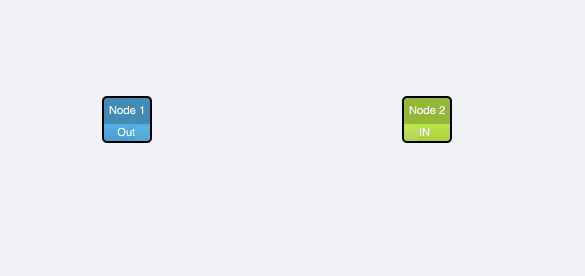
after set height,it show this.but can not see the link,the link just show when we hover
 khoaanh2212
on 19 Nov 2019
khoaanh2212
on 19 Nov 2019
import "@projectstorm/react-diagrams/dist/style.min.css"; is not working for the latest update, can anyone help me on it.
 maheshdeploy
on 2 Apr 2020
maheshdeploy
on 2 Apr 2020
Related issues
 duvet86
·
3Comments
duvet86
·
3Comments
 shortwavedave
·
3Comments
shortwavedave
·
3Comments
 Nesterov-Konstantin
·
4Comments
Nesterov-Konstantin
·
4Comments
 DanieLazarLDAPPS
·
3Comments
DanieLazarLDAPPS
·
3Comments
 jardg
·
3Comments
jardg
·
3Comments
Most helpful comment
import "@projectstorm/react-diagrams/dist/style.min.css"; is not working for the latest update, can anyone help me on it.