React-day-picker: DayPickerInput on mobile triggers focus, which brings the keyboard over the calendar
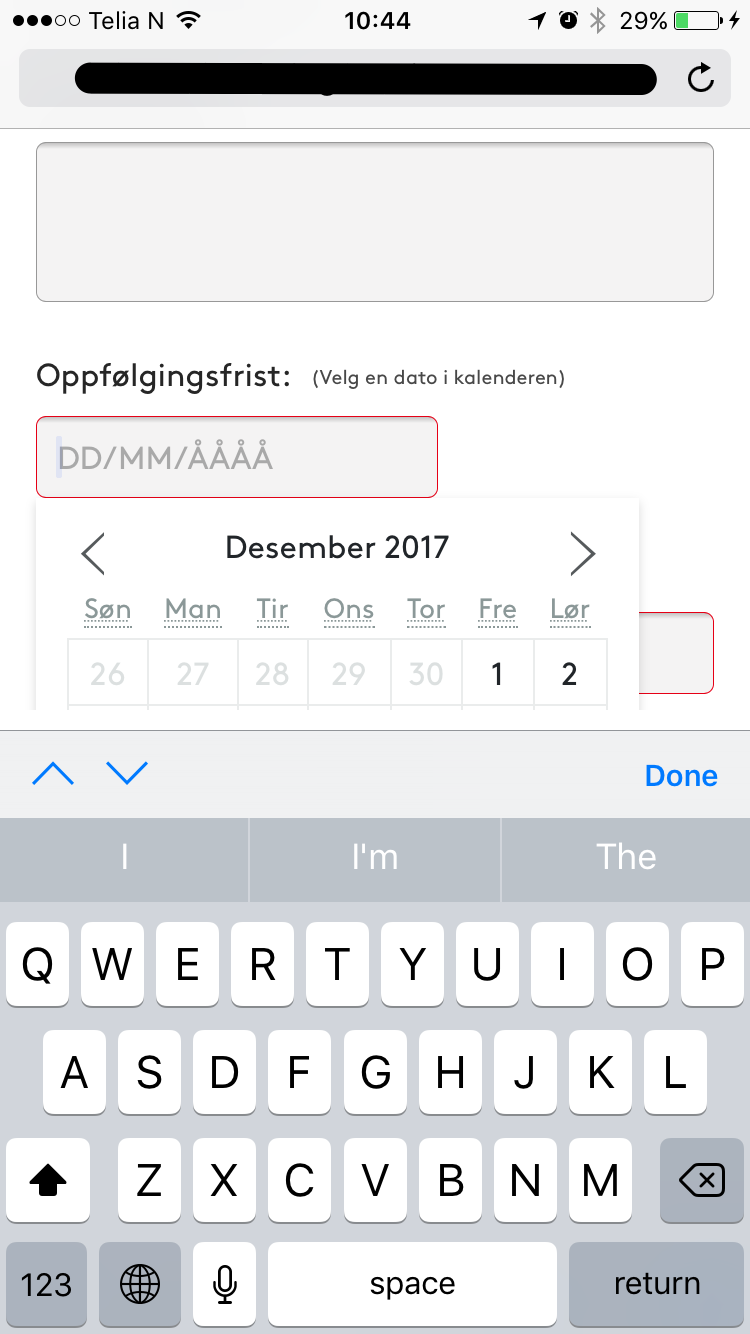
Strange... I see this problem was previously reported on #100, but I do get this problem with "react-day-picker": "^7.0.5" (upgraded from 6.2.1 30 mins ago).
Isn't anyone else getting this problem? The implementation is done through a DayPickerInput component.
 dreamyguy
All 5 comments
@dreamyguy the input component always worked like this on mobile. Could you show us the code that was working with v6? Maybe you were passing props to the input component that now should be passed via inputProps?
 gpbl
on 6 Dec 2017
gpbl
on 6 Dec 2017
Sorry I could have been clearer. It was not working on v6 either, so I upgraded to see if it was working with v7. So no changes there.
I got the impression on #100 that this was not an issue with DayPickerInput, as another user suggested the screenshot taken was from another component/project.
So I guess there's no way around it, then?
dreamyguy
on 6 Dec 2017
Duplicate of https://github.com/gpbl/react-day-picker/issues/583
gpbl
on 6 Dec 2017
For reference, I'd just like to point out that passing the property readOnly: true through inputProps made the input get the readonly attribute that prevents direct user input on the input field.
This is great because the keyboard will no longer be triggered on mobile, and therefore will not cover the calendar. This also improve input validation for those who must have it. ✨
<DayPickerInput
  inputProps={{ readOnly: true }}
  placeholder="DD/MM/YYYY"
  format="DD/MM/YYYY"
/>
Change the input style (like cursor: pointer) and you'll end up with an input that will be experienced more like a button.
Big thanks to @gpbl who guided me in the right direction.
dreamyguy
on 6 Dec 2017
Thanks for writing back @dreamyguy !
gpbl
on 6 Dec 2017
Related issues
 wenzoto
·
6Comments
wenzoto
·
6Comments
 matfork-belatrix
·
5Comments
matfork-belatrix
·
5Comments
 laidinidis
·
6Comments
laidinidis
·
6Comments
 NikitaSasin
·
5Comments
NikitaSasin
·
5Comments
 trevordmiller
·
4Comments
trevordmiller
·
4Comments
Most helpful comment
For reference, I'd just like to point out that passing the property
readOnly: truethroughinputPropsmade the input get thereadonlyattribute that prevents direct user input on the input field.This is great because the keyboard will no longer be triggered on mobile, and therefore will not cover the calendar. This also improve input validation for those who must have it. ✨
Change the input style (like
cursor: pointer) and you'll end up with an input that will be experienced more like a button.Big thanks to @gpbl who guided me in the right direction.