React-dates: Why do we need to click arrow down key before the calendar shows up?
I tried to copy this wrapper https://github.com/airbnb/react-dates/blob/master/examples/SingleDatePickerWrapper.jsx to my app but I noticed that upon on focus, there's no calendar, it only displays when I click on arrow down button.
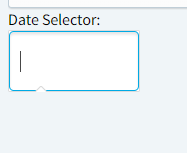
This is the initial interface
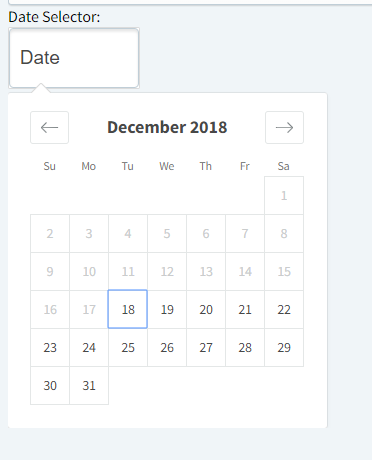
And then displays after arrow down
I learned that arrow key will work because of this paragraph hidden inside the component

 janjanarnaldo
All 16 comments
hope you can be of any help @ljharb @majapw thanks
janjanarnaldo
on 18 Dec 2018
Hi @janjanarnaldo, what is your onFocusChange callback look like? How are you maintaining focus state? It kind of looks like that's not being properly managed.
 majapw
on 18 Dec 2018
majapw
on 18 Dec 2018
HI @majapw it is focusing if you check the component's state.
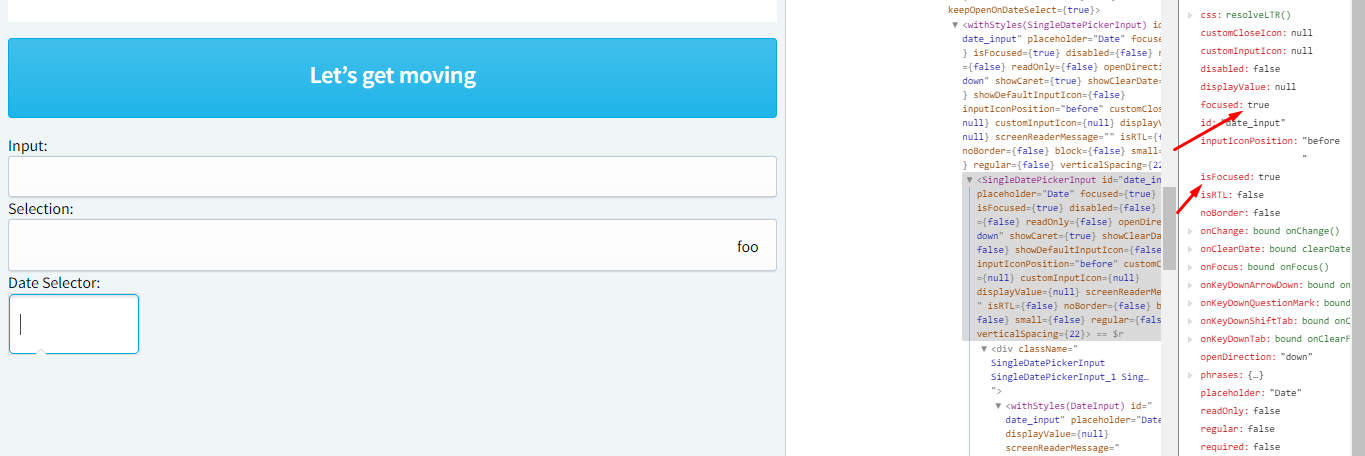
janjanarnaldo
on 18 Dec 2018
Is the ~DayPickerRangeController~ DayPickerSingleDateController rendering in the DOM?
majapw
on 18 Dec 2018
tried 2 ways of callbacks
onFocusChange = ({ focused }) => this.setState({ focused }) and
onFocusChange({ focused }) {
this.setState({ focused });
} // were onFocusChange is bound to .this at constructor.
janjanarnaldo
on 18 Dec 2018
No @majapw but I can see SingleDatePickerInputController
janjanarnaldo
on 18 Dec 2018
And what version of react-dates are you using?
majapw
on 18 Dec 2018
18.3.1 @majapw
janjanarnaldo
on 18 Dec 2018
also, after clicking arrow down which shows the calendar, the DayPickerSingleDateController as you mentioned is already mounted @majapw
janjanarnaldo
on 18 Dec 2018
Can you share your entire props configuration?
majapw
on 18 Dec 2018
sure I'll put the entire component instead
import React, { Component } from 'react';
import 'react-dates/initialize';
import 'react-dates/lib/css/_datepicker.css';

import moment from 'moment';

import { SingleDatePicker } from 'react-dates';

class DateSelector extends Component {
  static defaultProps = {
    // example props for the demo
    autoFocus: false,
    initialDate: null,

    // input related props
    id: 'date',
    placeholder: 'Date',
    disabled: false,
    required: false,
    screenReaderInputMessage: '',
    showClearDate: false,
    showDefaultInputIcon: false,
    customInputIcon: null,
    block: false,
    small: false,
    regular: false,
    verticalSpacing: undefined,
    keepFocusOnInput: false,

    // calendar presentation and interaction related props
    renderMonthText: null,
    // orientation: HORIZONTAL_ORIENTATION,
    // anchorDirection: 'right',
    horizontalMargin: 0,
    withPortal: false,
    withFullScreenPortal: false,
    // initialVisibleMonth: null,
    numberOfMonths: 1,
    keepOpenOnDateSelect: true,
    reopenPickerOnClearDate: false,
    isRTL: false,
    hideKeyboardShortcutsPanel: true,

    // navigation related props
    navPrev: null,
    navNext: null,
    onPrevMonthClick() {},
    onNextMonthClick() {},
    onClose() {},

    // day presentation and interaction related props
    // renderCalendarDay: undefined,
    // renderDayContents: null,
    enableOutsideDays: false,
    isDayBlocked: () => false,
    // isOutsideRange: day => !isInclusivelyAfterDay(day, moment()),0
    isDayHighlighted: () => {},

    // internationalization props
    monthFormat: 'MMMM YYYY',
    displayFormat: () => moment.localeData().longDateFormat('L'),
  }

  constructor(props) {
    super(props);
    this.state = {
      focused: props.autoFocus,
      date: props.initialDate,
    };
  }

  onDateChange = date => this.setState({ date })

  onFocusChange = ({ focused }) => this.setState({ focused })

  render() {
    const { focused, date } = this.state;

    const { autoFocus, initialDate, ...props } = this.props;

    return (
      <div className="DateSelector">
        <SingleDatePicker
          {...props}
          id="date_input"
          date={date}
          focused={focused}
          onDateChange={this.onDateChange}
          onFocusChange={this.onFocusChange}
        />
      </div>
    );
  }
}

export default DateSelector;
Hi @majapw it is now showing if I set appendToBody to true.
janjanarnaldo
on 18 Dec 2018
Ugh the issue is just because of styling where overflow is hidden. What a nice cut right there, it looks so much like a bug. Thanks for accommodating though @majapw will close now.
janjanarnaldo
on 18 Dec 2018
Glad you figured it out!
majapw
on 18 Dec 2018
@majapw I am experiencing a similar issue, but the fix by using appendToBody gives me the following error:
Uncaught Invariant Violation: Portal.render(): A valid React element (or null) must be returned. You may have returned undefined, an array or some other invalid object.
Versions:
"react": "^16.8.6",
"react-dates": "^20.1.0",
"react-dom": "^16.8.6",
"react-with-direction": "^1.3.0",
 elmargasimov
on 5 Apr 2019
elmargasimov
on 5 Apr 2019
@majapw I am experiencing a similar issue, but the fix by using appendToBody gives me the following error:
Uncaught Invariant Violation: Portal.render(): A valid React element (or null) must be returned. You may have returned undefined, an array or some other invalid object.Versions:
"react": "^16.8.6",
"react-dates": "^20.1.0",
"react-dom": "^16.8.6",
"react-with-direction": "^1.3.0",
@majapw Just bumping this up. Would you be able to give me some more direction into this issue?
elmargasimov
on 13 Apr 2019
Related issues
 aishwarya-bote
·
3Comments
aishwarya-bote
·
3Comments
 jpollard-cs
·
3Comments
jpollard-cs
·
3Comments
 krissalvador27
·
3Comments
krissalvador27
·
3Comments
 thomasdtucker
·
3Comments
thomasdtucker
·
3Comments
 ekohanyi
·
3Comments
ekohanyi
·
3Comments
Most helpful comment
Ugh the issue is just because of styling where overflow is hidden. What a nice cut right there, it looks so much like a bug. Thanks for accommodating though @majapw will close now.