React-dates: [Firefox/Edge] Performance issue while in development mode
We've been working on implementing react-dates for an internal project (love the components btw!), and we ran into a really weird performance quirk today. It appears after some use, react-dates slows down incrementally to the point where it's unusable. What's even weirder, is that it will degrade performance of the entire page. So far we know the following:
- Chrome 69 isn't affected.
- Firefox 62 and Edge 42.17134 have the issue.
- Not an issue in production. (!)
- Reproduced on multiple developer workstations.
- Incrementally gets worse with use, to the point where even hovering over days takes a while to show up, and it also affects performance on other parts of the page (in our internal code, we have text boxes which are really sluggish to type into once this starts - a refresh solves it).
- No react updates are happening outside of
react-dateswhile this happens. - Latest version of
react-datesandreact.
Our internal setup uses Babel 7/TypeScript among other things, so we decided to create a simple repro using create-react-app and react-dates - nothing else. We were able to reproduce the issue (un)fortunately, so we don't believe it's anything we're doing within our internal project. Here's the repo:
yarn
yarn start
Then go to http://localhost:3000 using Firefox/Edge.
You'll find all the code changes in App.js, including the style imports as well as the react-dates component usages.
We tried giving the profiler a shot, but we haven't had much luck. Before going into it any further, I was wondering if anybody here had ran into this situation?
Using create-react-app doesn't get rid of all variables of course, but at least it gets rid of ours. We figure create-react-app is a _reasonable_ starting point for someone working with React, so expecting this to work smoothly should be reasonable as well - but it would be understandable if we wanted to remove even more variables (such as webpack, for example).
It's also very possible we're just doing something wrong. It would be awesome if that was the case, but at this point we're a little lost and would really appreciate some guidance.
 ernestopye
All 11 comments
Huh, this is really interesting. Do you see this happening in airbnb.io/react-dates or just in your local repro? It feels like a memory leak given the behavior.
This is an interesting hint.
Not an issue in production. (!)
As are the fact that not all browsers are affected.
If you change all the functional props (isOutsideRange, onFocusChange, and onDatesChange) to be constants or class methods, does that change anything?
 majapw
on 13 Sep 2018
majapw
on 13 Sep 2018
Just pulled down this repo and ran the storybook at home. I can't really seem to notice it. It's maybe slightly there, but not nearly as clear as in my repo.
I changed the code in my repo per your suggestion. This is what you meant, right?
onDatesChange = ({ startDate, endDate }) => {
this.setState({
fromValue: startDate,
toValue: endDate
});
};
onFocusChange = focusedInput => {
this.setState({ focusedInput });
};
isOutsideRange = () => false;
<DateRangePicker
showDefaultInputIcon
showClearDates
small
startDateId={"fromDate"}
startDate={this.state.fromValue}
endDateId={"toDate"}
endDate={this.state.toValue}
focusedInput={this.state.focusedInput}
isOutsideRange={this.isOutsideRange}
onDatesChange={this.onDatesChange}
onFocusChange={this.onFocusChange}
/>
Not noticing much of a difference, it still gets really, really laggy, at least in Firefox. I also took out isOutsideRange as it's optional, just in case that has anything to do with it.
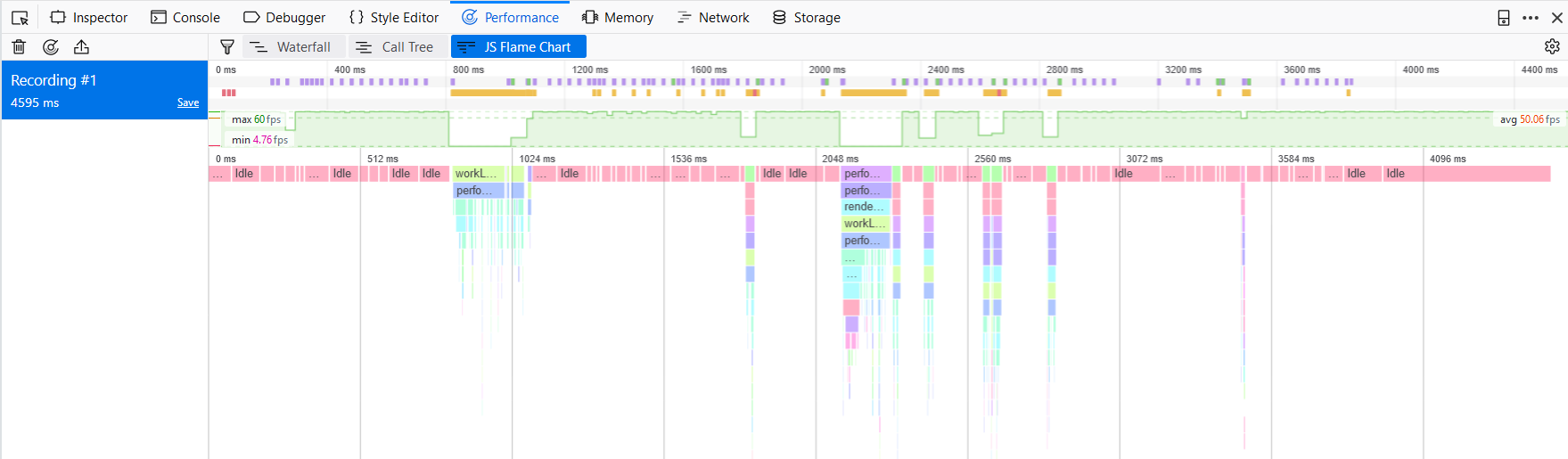
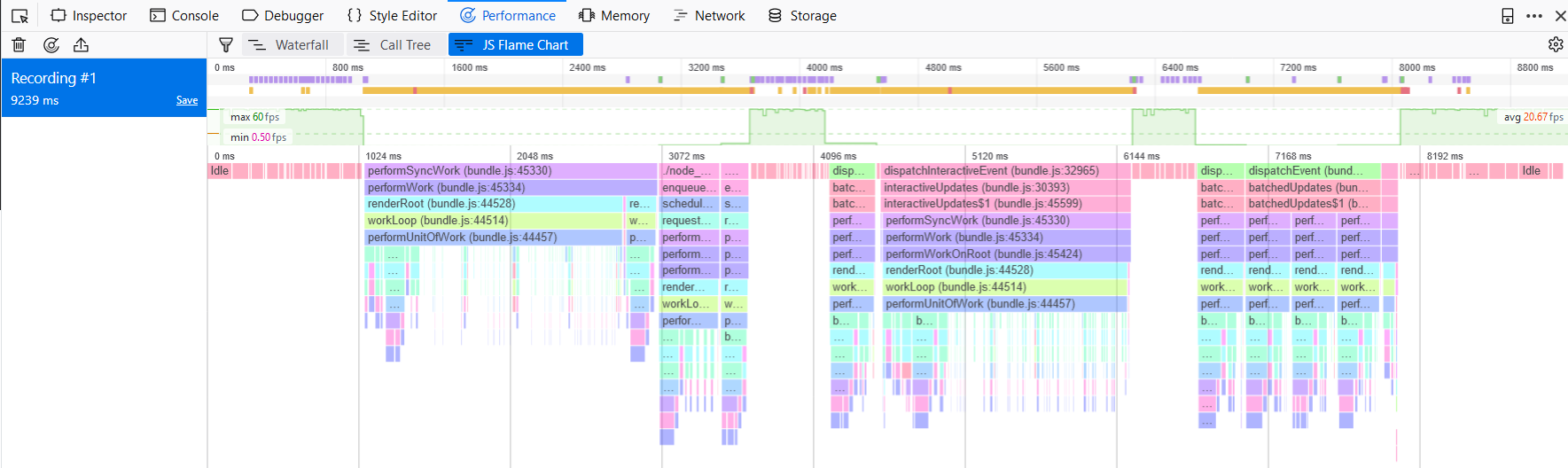
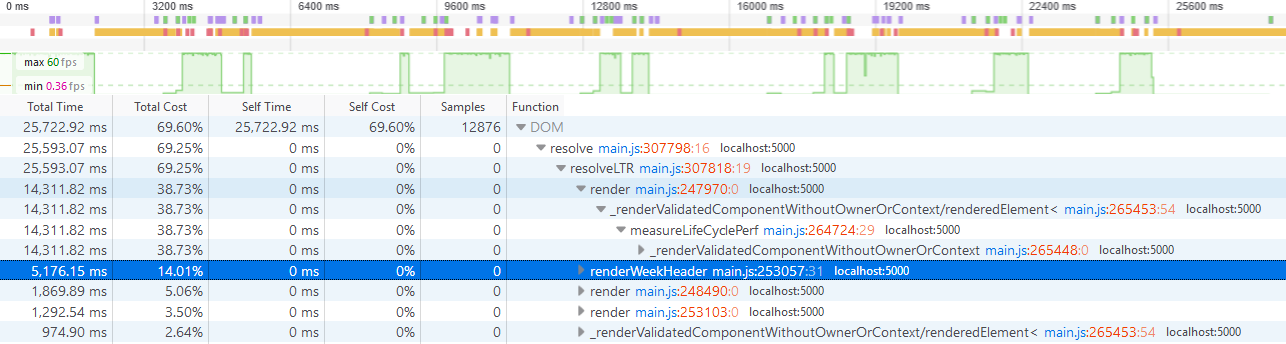
Within my repro, I've followed these steps to generate a flame chart:
- Start recording.
- Click on start date
- Hover over the 1st, then click.
- Move cursor down to the 29th, then click.
- Stop recording.
I did this right after a refresh, and then after messing with it for a while so that it's really laggy. Here are the results:
After refresh
After issue is repro'd and calendar is very laggy
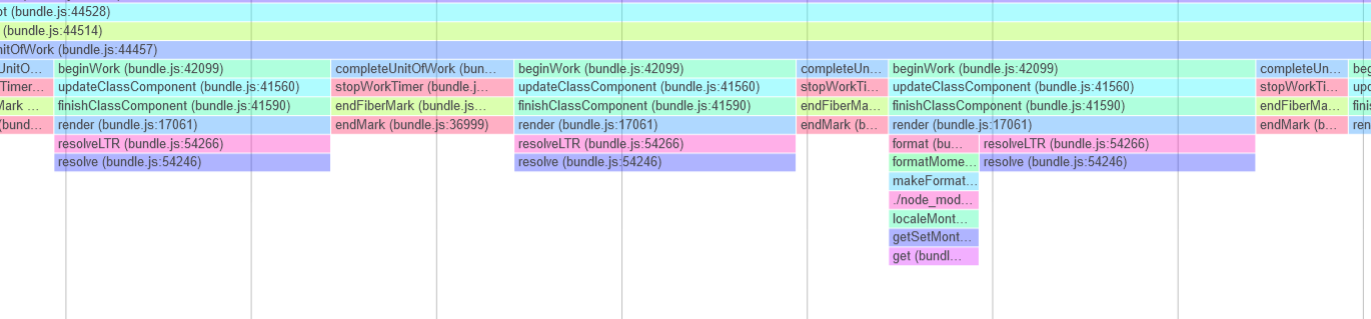
Zoomed in a little in a suspicious area
The following pattern repeats quite a bit.
Call Graph
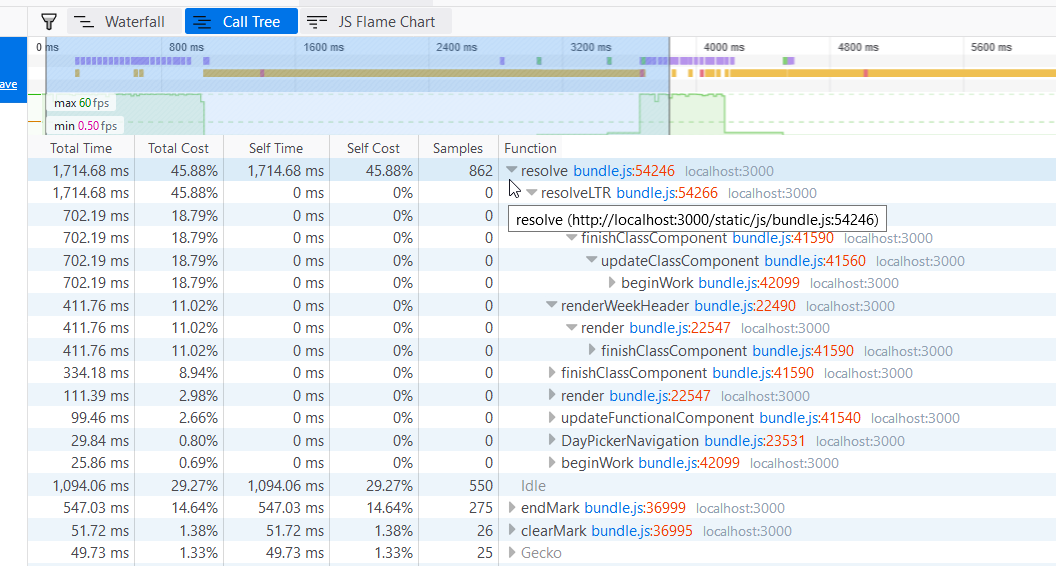
Possible hot path in resolveLTR or renderWeekHeader? resolveLTR seems to be coming from react-with-styles... I'm not familiar at all with react-dates's code base (or react-with-styles for that matter), so I'm not really sure where to go from here. Any thoughts? Thank you for your time!
Edit: Not sure if this matters, but the storybook is running on webpack 2.7, while my repro's using 3.8 from create-react-app. This is a fun one.
ernestopye
on 14 Sep 2018
I can confirm the same issue for Firefox 62.0 and Edge using DateRangePicker with create-react-app in development mode. The first one or two date picks are usually quite fast but it gets super slow after a while. Also, opening the date picker takes ~1 second.
However, production mode and Chrome seem to run fine.
 syxolk
on 17 Sep 2018
syxolk
on 17 Sep 2018
Taking a look at the renderWeekHeader method does seem to flag some possible unnecessary rerenders. I can take a look at that, but I don't know that that would cause anything as dramatic as is described here.
FYI @lencioni can you think of something that might be leaking in react-with-styles resolve method? Especially only in dev mode?
majapw
on 18 Sep 2018
Hm, interesting. I can confirm the same for Firefox Developer Edition 64.0b11 (64-Bit).
I first thought that it's something in my app, but given that I literally _switched_ the old date picker with Airbnb's DateRangePicker, I didn't really believe in that anyway.
This is the (stripped-down version of the) component using the date range picker:
import React, { Component } from 'react';

import 'react-dates/initialize';
import { DateRangePicker } from 'react-dates';
import 'react-dates/lib/css/_datepicker.css';

import _uniqueId from 'lodash/uniqueId';
import moment from 'moment';

const now = moment();
const isFutureDate = date => date.isAfter( now );

export default class DateField extends Component {
    state = {
        focusedInput: null,
    };

    setFocusedInput = focusedInput => {
        this.setState( { focusedInput } );
    };

    render() {
        const {
            after,
            before,
            onChangeDate,
        } = this.props;

        const startDate = after ? moment( after ) : null;
        const endDate = before ? moment( before ) : null;

        return (
            <DateRangePicker
                displayFormat="YYYY/MM/DD"
                endDate={ endDate }
                endDateId={ _uniqueId( 'date-picker-end-date-' ) }
                focusedInput={ this.state.focusedInput }
                isOutsideRange={ isFutureDate }
                minimumNights={ 0 }
                showClearDates
                startDate={ startDate }
                startDateId={ _uniqueId( 'date-picker-start-date-' ) }
                withPortal
                onClose={ onChangeDate }
                onDatesChange={ onChangeDate }
                onFocusChange={ this.setFocusedInput }
            />
        );
    }
}
Opening the calendar is somewhat slow, but then it gets worse on every click navigating through the months. It feels like _idle_ times (but actually also laggy rendering) is like 1 second on first navigation, and then growing to 2 seconds, 3 seconds, 5 seconds, 8 seconds, and more. As soon as I unmount the DateRangePicker (it is just one way to enter date, the other is to pick from a select with predefined values), all goes back to normal. Switching then to the date range picker again, all is _normally_ slow, and starts to get slower and slower again...
 tfrommen
on 22 Nov 2018
tfrommen
on 22 Nov 2018
Can confirm the same behavior on Firefox Developer Edition 65.0b3 - The code is roughly the same as this example here
Chrome works without issues.
 mkarklinsScout
on 16 Dec 2018
mkarklinsScout
on 16 Dec 2018
Still having the same behavior on Firefox Edition 67.0 even without development mode.
When downgrading from v20.2.0 to v18.5.0 it takes more time to slow down to the point where it's unusable
 luca-esse
on 28 May 2019
luca-esse
on 28 May 2019
Issue is still existing in Firefox (67.0.4) and Edge (42.17134.1.0) - nearly unusable. (in Production AND Development)
Chrome and Safari are working faster, but not perfect.
The more month visible, the slower it gets. Are there any updates? @majapw
 Larsrdev
on 28 Jun 2019
Larsrdev
on 28 Jun 2019
Related to:
https://github.com/airbnb/react-dates/issues/1442
Maybe:
https://github.com/airbnb/react-dates/issues/1371
https://github.com/airbnb/react-dates/issues/1387
Larsrdev
on 28 Jun 2019
@majapw this is react-with-styles issue.
https://github.com/airbnb/react-with-styles/blob/2709b94b12d752aa4d9497e3bd27e0d6a7ef5f22/src/ThemedStyleSheet.js#L29-L55
It's problem with performance.mark - i'll dive into react-with-styles to figure out how it can be fixed
 mmarkelov
on 29 Jun 2019
mmarkelov
on 29 Jun 2019
Thanks, @mmarkelov this fixed the issues!
Hint for the others:
To get the newest react-with-styles package dependency, remove your package-lock.json and node-modules directory, than run npm install. Now you have react-with-styles 3.2.3 installed.
Larsrdev
on 9 Jul 2019
Related issues
 krissalvador27
·
3Comments
krissalvador27
·
3Comments
 Adam-Pendleton
·
3Comments
Adam-Pendleton
·
3Comments
 Daniel15
·
3Comments
Daniel15
·
3Comments
 yokomizor
·
3Comments
yokomizor
·
3Comments
 prztrz
·
3Comments
prztrz
·
3Comments
Most helpful comment
Hm, interesting. I can confirm the same for Firefox Developer Edition 64.0b11 (64-Bit).
I first thought that it's something in my app, but given that I literally _switched_ the old date picker with Airbnb's
DateRangePicker, I didn't really believe in that anyway.This is the (stripped-down version of the) component using the date range picker:
Opening the calendar is somewhat slow, but then it gets worse on every click navigating through the months. It feels like _idle_ times (but actually also laggy rendering) is like 1 second on first navigation, and then growing to 2 seconds, 3 seconds, 5 seconds, 8 seconds, and more. As soon as I unmount the
DateRangePicker(it is just one way to enter date, the other is to pick from aselectwith predefined values), all goes back to normal. Switching then to the date range picker again, all is _normally_ slow, and starts to get slower and slower again...