React-dates: Couldn't Edit dates Manually on DateRangePicker
I am on react-dates version: 17.2.0
I am unable to edit dates manually in DateRangePicker.
My DateRangePicker looks like this:
<DateRangePicker
  startDate={this.state.dateRange[0]} // momentPropTypes.momentObj or null,
  startDateId="your_unique_start_date_id" // PropTypes.string.isRequired,
  endDate={this.state.dateRange[1]} // momentPropTypes.momentObj or null,
  endDateId="your_unique_end_date_id" // PropTypes.string.isRequired,
  onDatesChange={this.onDateRangeChanged} // PropTypes.func.isRequired,
  focusedInput={this.state.focusedDate}  // PropTypes.oneOf([START_DATE, END_DATE]) or null,
  onFocusChange={this.onDateRangeFocus} // PropTypes.func.isRequired,
  isOutsideRange = {() => false}
  orientation = {VERTICAL_ORIENTATION}
/>
I was watching an Issue where one of the Contributor mentioned to create a new issue if this happens in latest version: https://github.com/airbnb/react-dates/issues/79#issuecomment-375918552
Is this issue fixed. If so, How can I enable editing? as it is right now, I cannot edit the date range manually.
It is not performing as it is showed in the storybook: https://airbnb.io/react-dates/?selectedKind=DateRangePicker%20%28DRP%29&selectedStory=default&full=0&addons=1&stories=1&panelRight=0&addonPanel=storybook%2Factions%2Factions-panel.
Is there anyway to fix this?
 kaushik1094
All 10 comments
@kaushik1094 can you share a gif of the behavior you are seeing? Are you able to select a date by clicking on the calendar?
Can you also share what browser you are using?
 majapw
on 30 Aug 2018
majapw
on 30 Aug 2018
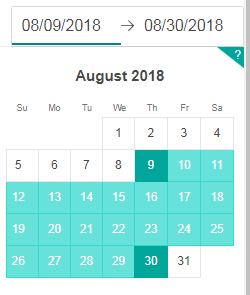
@majapw Yes I am able to select the date in the Calendar. But couldn't edit the input fields of the start date and end date manually. I am using Google Chrome. I tried to use the functionality in Mozilla Firefox too. But couldn't edit the dates manually in Mozilla as well.
kaushik1094
on 30 Aug 2018
@majapw Is there any solution for this issue yet? I am kind of wondering to add logic in the component I am using it to make it work dynamically instead if there is any update or a dependency I need to add that would be great as well :)
kaushik1094
on 26 Sep 2018
I have the same issue, can't manually update the input.
When I click on the input I can see the cursor, and I can use arrows left and right to move the cursor, but deleting value or typing something in doesn't work, and it doesn't throw an error :(
 Iulia-Soimaru
on 8 Dec 2018
Iulia-Soimaru
on 8 Dec 2018
@Iulia-Soimaru What version of react-dates are you using. May be updating it to the latest version might help. But, I think this is still a bug which needs to be addressed. @majapw
kaushik1094
on 11 Dec 2018
@kaushik1094 "react-dates": "^16.7.0" is current version I am using
Iulia-Soimaru
on 18 Dec 2018
@Iulia-Soimaru try to update to the latest version 18.3.1(Don't include ^) and see if it reproduces the same error.
If it reproduces the same error, I will try to fix this bug in the source code and create a pull request.
kaushik1094
on 18 Dec 2018
Definitely always include ^.
 ljharb
on 18 Dec 2018
ljharb
on 18 Dec 2018
I wonder if v16 had the code that automatically disabled typing in the vertical orientation. I think it's likely fixed in the latest.
majapw
on 19 Dec 2018
I wonder if v16 had the code that automatically disabled typing in the vertical orientation. I _think_ it's likely fixed in the latest.
@Iulia-Soimaru That might be the case. try to update to the latest version and see if that works
kaushik1094
on 19 Dec 2018
Related issues
 Jesus-Gonzalez
·
3Comments
Jesus-Gonzalez
·
3Comments
 krissalvador27
·
3Comments
krissalvador27
·
3Comments
 swaritkohli
·
3Comments
swaritkohli
·
3Comments
 sag1v
·
3Comments
sag1v
·
3Comments
 AsasinCree
·
3Comments
AsasinCree
·
3Comments
Most helpful comment
@majapw Yes I am able to select the date in the Calendar. But couldn't edit the input fields of the start date and end date manually. I am using Google Chrome. I tried to use the functionality in Mozilla Firefox too. But couldn't edit the dates manually in Mozilla as well.