React-dates: Input focusing on iOS causing keyboard animation
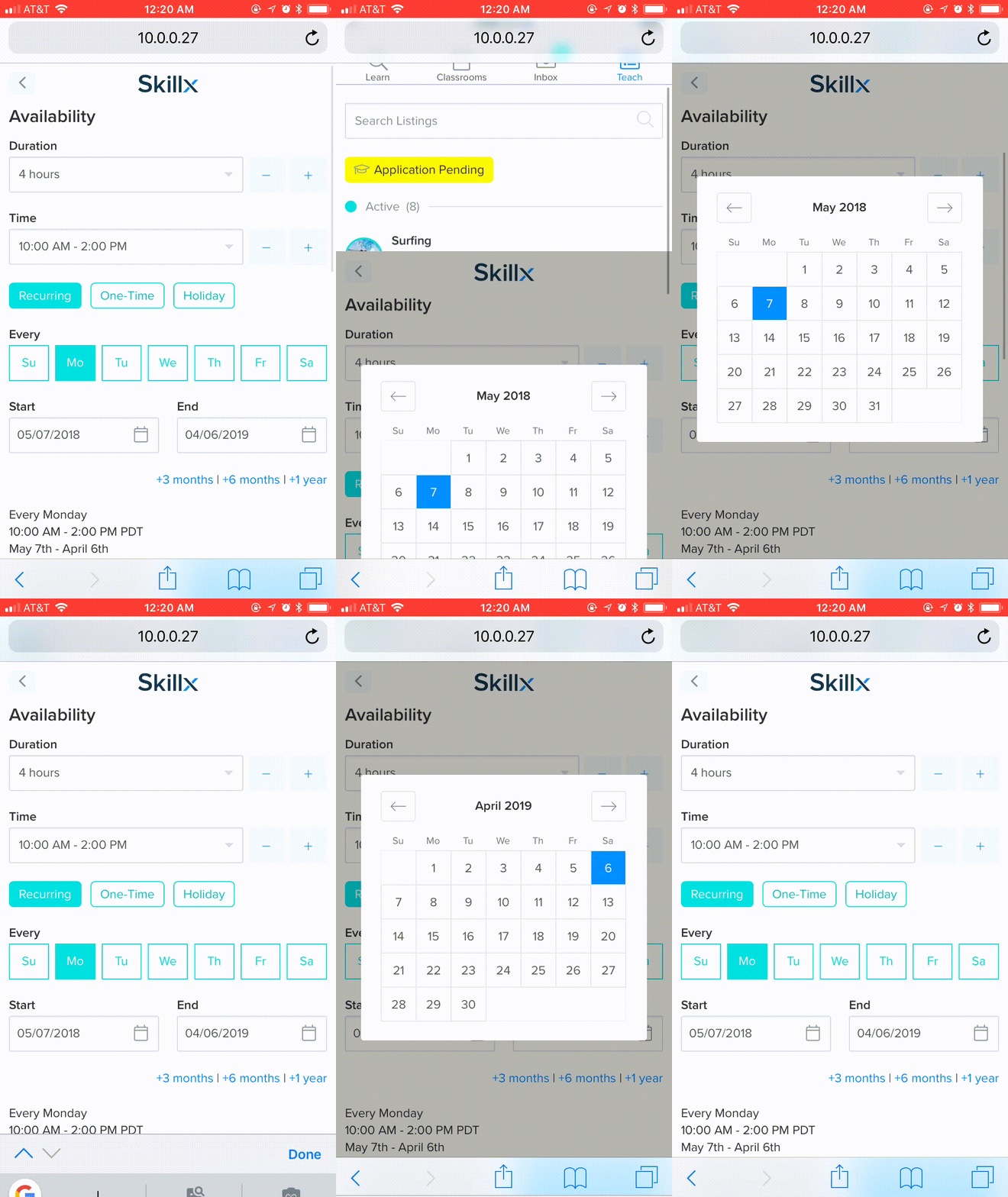
I have recently noticed that we get a weird "jump" when you click on a SingleDatePicker input in iOS safari. It appears that it is focusing in the input first which is causing the keyboard to attempt to show, but then the keyboard is dismissed. I originally thought it might be due to this so I tested out using a portal, which should skip this step and it still happened. Below is a gif of it happening.
One Note - this particular example is occurring in the modal so it's container is position: fixed. I am aware of some known issues in Safari iOS and inputs inside of fixed containers, but this still appears to be a keyboard issue
Is anyone else getting this?I haven't had time to recreate in a public repo, but I am happy to attempt that if it is necessary
 aray12
All 6 comments
This is happening for me as well, getting interesting results when the calendar is kept on with keepOpenOnDateSelect={true}
On desktop it will jump down to the inputs and on mobile I am getting the same side effects you are.
 eddieduro
on 17 Apr 2018
eddieduro
on 17 Apr 2018
@eddieduro @aray12 Did you find any solution?
 hemant3370
on 10 Aug 2018
hemant3370
on 10 Aug 2018
Is this reproducible with readOnly set to true?
 majapw
on 10 Aug 2018
majapw
on 10 Aug 2018
@hemant3370 I haven't yet.
@majapw I am not sure. I'll try it later today
aray12
on 10 Aug 2018
@aray12 here is how I've dealt with that, hope it helps:
onFocusChange = (focused) => {
  this.setState({ focused })
  document.activeElement.blur() // Do not prompt the keyboard on mobile.
}
 adammiribyan
on 6 Jan 2019
adammiribyan
on 6 Jan 2019
I also have the same weird behaviour, on iOS, only when input has readOnly: true (with readOnly: false it's okay).
@adammiribyan your workaround helps a little bit but it only hides the keyboard after it is being shown.
I'd like to have it not be shown at all.
Probably adding event.preventDefault() in DateInput would help, as in here https://codepen.io/jochemnabuurs/pen/PPVpWg , @majapw .
Probably related issue: https://github.com/airbnb/react-dates/issues/1476 .
 jack-sf
on 13 Jan 2019
jack-sf
on 13 Jan 2019
Related issues
 sag1v
·
3Comments
sag1v
·
3Comments
 jpollard-cs
·
3Comments
jpollard-cs
·
3Comments
 swaritkohli
·
3Comments
swaritkohli
·
3Comments
 Daniel15
·
3Comments
Daniel15
·
3Comments
 arthurvi
·
3Comments
arthurvi
·
3Comments
Most helpful comment
@aray12 here is how I've dealt with that, hope it helps: