React-dates: Disable preNav and nextPav
Hi is it possible to disabled the prevNav and nextNav buttons when reaching the end of allowed dates? For example isOutsideRange disables days after September, is it possible for when a user reaches September to disable nextNav so they can't scroll past it?
 vget98
All 14 comments
I recently solved this issue by using:
1/ Use onNextMonthClick and onPrevMonthClick to keep track of the current month.
2/ Use the current month to decide whether or not to render a navNext or navPrev
 jseminck
on 28 Aug 2017
jseminck
on 28 Aug 2017
Do you not render the navNext or navPrev? I just wanted to disable the nav buttons so make it so it is not clickable but still there.
vget98
on 28 Aug 2017
You can create custom buttons and put disabled on them when they shouldn't be clickable. I chose not to render them at all.
I'm not sure if you can do it with the buttons that come with the library.
jseminck
on 28 Aug 2017
Ahh ok thats pretty much all I needed, thank you for the help
vget98
on 28 Aug 2017
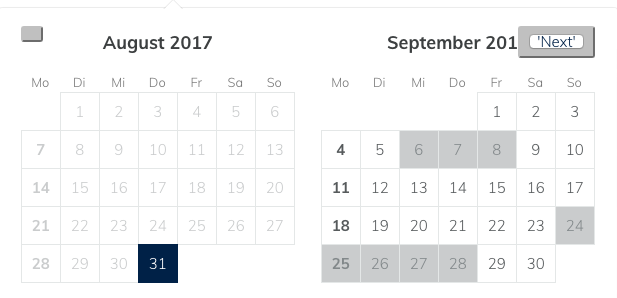
@jseminck I tried the following:
navPrev={
<button className={'MyCustomButton'} hidden={true}>
'Prev'
</button>
}
navNext={
<button className={'MyCustomButton'}>
'Next'
</button>
}
But I'm unable to set the hole button (only the inside), so I can't disable or hide it:
 laurenz-glueck
on 31 Aug 2017
laurenz-glueck
on 31 Aug 2017
In case anyone want to disable preNav and nextNav, here is my work arround
You can use onPrevMonthClick & onNextMonthClick these two props.
And pass a function like this.
checkMonthAvailability = month => {
...
const prevBtn = document.getElementsByClassName('DayPickerNavigation_button')[0]
const nextBtn = document.getElementsByClassName('DayPickerNavigation_button')[1]
// Use the prevBtn.style.display = 'none' or 'block' to controll the navBtn
}
 nosecoolie
on 26 Jul 2018
nosecoolie
on 26 Jul 2018
i feel like this should be reopened bc not rendering or rendering a completely different component when the desired outcome is a disabled button feels like a hacky workaround. it would be great to be able to pass down the click handler or prevent propagation when desired
 mlg87
on 7 Sep 2018
mlg87
on 7 Sep 2018
@mlg87 Is it something you are looking for? https://github.com/airbnb/react-dates/pull/1311
 elinskytap
on 8 Sep 2018
elinskytap
on 8 Sep 2018
@elinskytap that is exactly what im looking for. now for it to get merged/released
mlg87
on 8 Sep 2018
yes, I am looking forward to the PR #1311 being merged & released!
elinskytap
on 15 Sep 2018
Hey i had an urgent question. I am trying to click a button when using date picker.. but instead of the on click of the button, the focus out of the input text box gets triggered and my click is not getting triggered. Any help would be very much appreciated.
 meghnaraju
on 27 Sep 2018
meghnaraju
on 27 Sep 2018
The solution in that PR doesn't work for SingleDatePicker.
 bdrazen
on 11 Jun 2019
bdrazen
on 11 Jun 2019
The only working solution for this issue I found so far is to use "onNextMonthClick" and "onPrevMonthClick" to track currently opened month, then set classNames when needed, and remove buttons by css like so:
.nav-prev-month-unavailable .DayPickerNavigation .DayPickerNavigation_button:first-child,
.nav-next-month-unavailable .DayPickerNavigation .DayPickerNavigation_button:last-child {
display: none;
}
 constnazarenko
on 12 Sep 2019
constnazarenko
on 12 Sep 2019
Hi guys,
I found a solution to hide/unhide next button on the calendar.
<SingleDatePicker
   navNext={this.state.isCalendarNextButtonDisabled ? <div hidden="true">Next</div> : ''}
   onNextMonthClick={this.onNextMonthClick}
   ...
/>
 onNextMonthClick = (month) => {
    if (month.month() === 5) {
      this.setState({
        isCalendarNextButtonDisabled: true,
      });
    }
  };
//If the month reaches Jun then the next button will be hidden.
 gokulramkul
on 11 Feb 2020
gokulramkul
on 11 Feb 2020
Related issues
 Adam-Pendleton
·
3Comments
Adam-Pendleton
·
3Comments
 Daniel15
·
3Comments
Daniel15
·
3Comments
 ekohanyi
·
3Comments
ekohanyi
·
3Comments
 thomasdtucker
·
3Comments
thomasdtucker
·
3Comments
 Jesus-Gonzalez
·
3Comments
Jesus-Gonzalez
·
3Comments
Most helpful comment
Hi guys,
I found a solution to hide/unhide next button on the calendar.
<SingleDatePicker
   navNext={this.state.isCalendarNextButtonDisabled ? <div hidden="true">Next</div> : ''}
   onNextMonthClick={this.onNextMonthClick}
   ...
/>
 onNextMonthClick = (month) => {
    if (month.month() === 5) {
      this.setState({
        isCalendarNextButtonDisabled: true,
      });
    }
  };
//If the month reaches Jun then the next button will be hidden.