React-datepicker: selected date appears selected across all months
Describe the bug
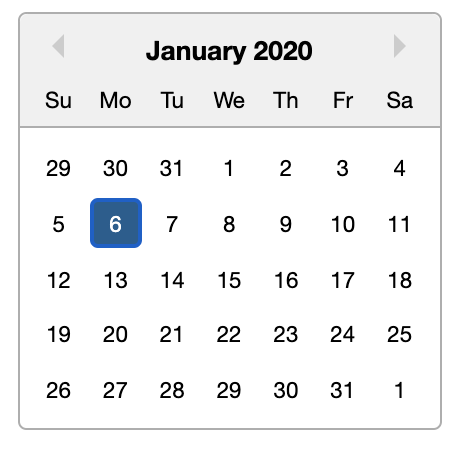
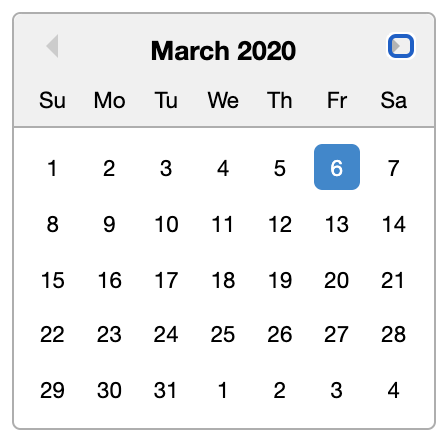
When using the datepicker to drive a date range with selectsRange prop, the selected day of the month appears to be selected across all months.
To Reproduce
Steps to reproduce the behavior:
- Go to https://reactdatepicker.com/#example-date-range-for-one-datepicker
- click a day
- then click to scroll left or right through months. You'll see the day remains selected.
Expected behavior
Would expect that only the specific day that the user selected is highlighted in the UI.
Screenshots
Desktop (please complete the following information):
- OS: MacOS
- Browser chrome
- Version 85
Smartphone (please complete the following information):
- Device: [e.g. iPhone6]
- OS: [e.g. iOS8.1]
- Browser [e.g. stock browser, safari]
- Version [e.g. 22]
Additional context
Add any other context about the problem here.
 wlblanchette
All 3 comments
Came across this same issue. Looks like it's caused by keyboard navigation. Passing this prop in worked for me-
disabledKeyboardNavigation
 ktonini
on 26 Oct 2020
ktonini
on 26 Oct 2020
I wouldn't recommend disabling keyboard navigation because it might interfere with accessibility. @wlblanchette You can solve the issue with CSS - give your react-datepicker a custom classname and then target the styles like this:
.react-datepicker__day--keyboard-selected {
      background-color: transparent;
      border-radius: unset;
      outline: unset;
      color: #000;

      &:focus {
        box-shadow: unset;
      }
    }
 nthurnau
on 9 Nov 2020
nthurnau
on 9 Nov 2020
@ktonini Solution worked for my use case. https://github.com/Hacker0x01/react-datepicker/issues/2456#issuecomment-716547497
 Hillsie
on 11 Nov 2020
Hillsie
on 11 Nov 2020
Related issues
 formigone
·
3Comments
formigone
·
3Comments
 kkras3
·
3Comments
kkras3
·
3Comments
 arturictus
·
3Comments
arturictus
·
3Comments
 lclemence
·
3Comments
lclemence
·
3Comments
 ro-savage
·
3Comments
ro-savage
·
3Comments
Most helpful comment
Came across this same issue. Looks like it's caused by keyboard navigation. Passing this prop in worked for me-
disabledKeyboardNavigation