React-datepicker: Css / Styling not working
Describe the bug
The styling seams to be missing, and when i click the input, all the dates just stack on top of the input.
To Reproduce
Steps to reproduce the behavior:
- npm install react-datepicker
- import react-datepicker
- Use default example from https://reactdatepicker.com/
- Styling gone
Expected behavior
I expect the styling / css to work as default.
Screenshots
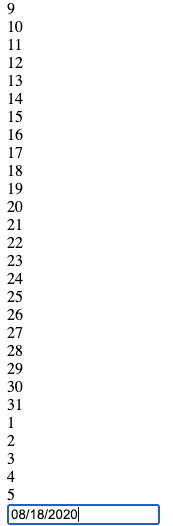
Desktop (please complete the following information):
- OS: [mcOS Catalina 10.15.6]
- Browser [Chrome]
- Version [^3.1.3]
 SimonGribert
All 4 comments
Experiencing the same behavior.
 coldapache
on 19 Aug 2020
coldapache
on 19 Aug 2020
This helped me: https://github.com/Hacker0x01/react-datepicker/issues/1707
import "react-datepicker/dist/react-datepicker.css";
https://github.com/Hacker0x01/react-datepicker/#installation
 tamj0rd2
on 20 Aug 2020
tamj0rd2
on 20 Aug 2020
This helped me: #1707
import "react-datepicker/dist/react-datepicker.css";https://github.com/Hacker0x01/react-datepicker/#installation
Still css not working :(
 umedsondoniyor
on 1 Sep 2020
umedsondoniyor
on 1 Sep 2020
This helped me: #1707
import "react-datepicker/dist/react-datepicker.css";https://github.com/Hacker0x01/react-datepicker/#installation
Still css not working :(
I had the same issue. Im guessing you ran the npm install procedure, included the css & import in your jsx and then just saved to see changes?
Try restarting the npm script, everything worked as expected for me.
 emmanuelay
on 7 Sep 2020
emmanuelay
on 7 Sep 2020
Related issues
 hoodsy
·
3Comments
hoodsy
·
3Comments
 jjjss94
·
3Comments
jjjss94
·
3Comments
 kkras3
·
3Comments
kkras3
·
3Comments
 ro-savage
·
3Comments
ro-savage
·
3Comments
 formigone
·
3Comments
formigone
·
3Comments
Most helpful comment
This helped me: https://github.com/Hacker0x01/react-datepicker/issues/1707
https://github.com/Hacker0x01/react-datepicker/#installation