React-datepicker: Make date picker full screen in mobile or small screen resolution
Is your feature request related to a problem? Please describe.
I'm always frustrated when in mobile/small screen, date picker is truncated and not correctly displayed.
Describe the solution you'd like
Make date picker fill the screen.
Describe alternatives you've considered
Or show popup dialog to select date.
Additional context

 topex-psy
All 6 comments
All you need is "withPortal" attribute
onChange={date => setStartDate(date)}
withPortal
/>
 RaudByorn
on 19 Mar 2020
RaudByorn
on 19 Mar 2020
Hi @RaudByorn, i've tried your solution and it works on ios devices, but it doesn't seem to work on android. any other work around?
 maurusrv
on 26 Jun 2020
maurusrv
on 26 Jun 2020
Hi @maurusrv, I've checked it just now on Android and it works fine. Try it here https://reactdatepicker.com/ on example with "withPortal" attribute.
RaudByorn
on 26 Jun 2020
Yes. my mistake. it is indeed working. thanks for the reply anyway @RaudByorn!
maurusrv
on 26 Jun 2020
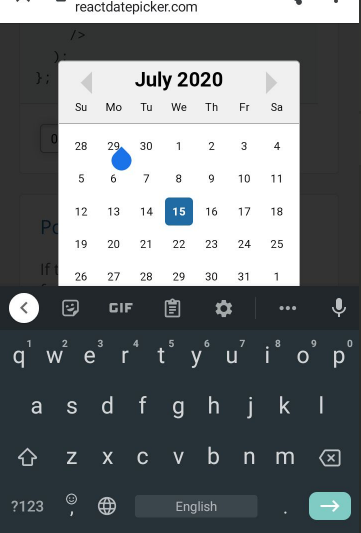
Portal is not helping much on devices. It's not 100% fullscreen, and it won't disable text input so a keyboard covers the calendar.
 softshape
on 15 Jul 2020
softshape
on 15 Jul 2020
@softshape here is solution #942
RaudByorn
on 20 Jul 2020
Related issues
 pinturic
·
3Comments
pinturic
·
3Comments
 dhruvparmar372
·
3Comments
dhruvparmar372
·
3Comments
 formigone
·
3Comments
formigone
·
3Comments
 sarav1234
·
3Comments
sarav1234
·
3Comments
 jcabrerazuniga
·
3Comments
jcabrerazuniga
·
3Comments
Most helpful comment
Portal is not helping much on devices. It's not 100% fullscreen, and it won't disable text input so a keyboard covers the calendar.