React-datepicker: locale property doesn't work with "pt-BR" locale
Describe the bug
I'm using locale pt-BR but component still in english (labels and formats)
Screenshots

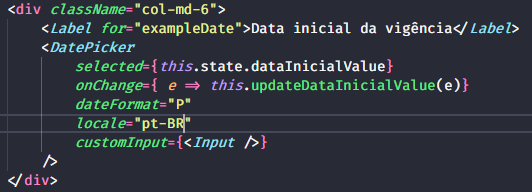
Desktop (please complete the following information):
- OS: Windows 10
- Browser: Opera
Version: 63.0.3368.107
OS: Windows 10
- Browser: Firefox
Version: 69.0.3
OS: Windows 10
- Browser: Chrome
- Version: 77.0.3865.120
 Cligor
All 4 comments
The same thing, but with 'ru' locale
 ShiiRochi
on 27 Nov 2019
ShiiRochi
on 27 Nov 2019
@Cligor, I made it work for 'ru' locale by installing date-fns as a dependency (maybe it is unnecessary as soon as date-fns is dep of react-datepicker) and importing of the desired local and passing it as locale prop into Datepicker component.
import ru from 'date-fns/locale/ru';
<Datepicker
selected={value}
onChange={date => onValueChange(date)}
showTimeSelect
showTimeSelectOnly
timeIntervals={10}
timeCaption="Time"
locale={ru}
dateFormat="hh:mm aa"
/>
👍1
@Cligor use 'ptBR' instead of 'pt-BR'
import ReactDatePicker,{registerLocale} from 'react-datepicker';
import ptBR from 'date-fns/locale/pt-BR';
registerLocale('ptBR', ptBR);

 <ReactDatePicker
        name='date'
        selected={selected}
        locale="ptBR"

      />
 lucaswx2
on 7 Jan 2020
lucaswx2
on 7 Jan 2020
👍5
@ShiiRochi @lucaswx2 Both solutions work. Thanks guys!
Cligor
on 8 Jan 2020
Was this page helpful?
0 / 5 - 0 ratings
Related issues
 arturictus
·
3Comments
arturictus
·
3Comments
 formigone
·
3Comments
formigone
·
3Comments
 jjjss94
·
3Comments
jjjss94
·
3Comments
 hoodsy
·
3Comments
hoodsy
·
3Comments
 ro-savage
·
3Comments
ro-savage
·
3Comments
Most helpful comment
@Cligor use 'ptBR' instead of 'pt-BR'