React-datepicker: Styling is broken
Expected behavior
Date picker to appear as preview
Actual behavior
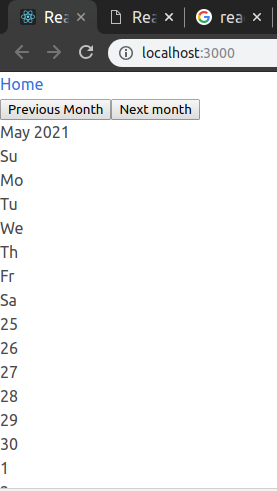
No formatting dates appear in a straight line up page
Steps to reproduce
I created a new project via npx create-react-app and only instead react-datepicker and was able to reproduce this issue.
Also happens in an existing project.
Both version 2.3.0
Screenshots:
The first screenshot is when added to an existing project with Bulma imported. The second has nothing but react-datepicker.
In second screenshot that little 4 you see on the right side is what appears when the date picker is selected.
Both tested on current Firefox and current Chromium.

 kalenpw
All 6 comments
were you able to fix it?
 ceciliaschiebel
on 24 Apr 2019
ceciliaschiebel
on 24 Apr 2019
Yes, I didn't realize the css was kept separate, but now I understand why.
kalenpw
on 24 Apr 2019
I am also getting the same view but I am unable to resolve. I am using datepicker with babel-plugin-react-css-modules. imported CSS from node modules dist folder still styling is not getting applied.
Created ticket #1809 .
Please let me know you also having the same config.
 Bhushankumar-pawar
on 27 Jun 2019
Bhushankumar-pawar
on 27 Jun 2019
In the README under 'Installation' it says:
import 'react-datepicker/dist/react-datepicker-cssmodules.css';
when it should be:
import "react-datepicker/dist/react-datepicker.css";
Thanks for pointing this out @kalenpw !
 refayathaque
on 31 Jul 2019
refayathaque
on 31 Jul 2019
Hi! Is this .css above also applies to "Select Time Only" react-datepicker. I can't get the same view as one in here.. https://reactdatepicker.com/
 imnobunny
on 7 May 2020
imnobunny
on 7 May 2020
Hi! Is this .css above also applies to "Select Time Only" react-datepicker. I can't get the same view as one in here.. https://reactdatepicker.com/
hi @imnobunny I think it's because you use both of todayButton and showTimeSelect, I fix that issue by hiding todayButton LOL. I think react-datepicker doesn't support yet if we use todayButton and showTimeSelect at the same place
 sgtkuncoro
on 27 Jun 2020
sgtkuncoro
on 27 Jun 2020
Related issues
 formigone
·
3Comments
formigone
·
3Comments
 sarav1234
·
3Comments
sarav1234
·
3Comments
 tamitutor
·
3Comments
tamitutor
·
3Comments
 jbccollins
·
3Comments
jbccollins
·
3Comments
 flaurida
·
3Comments
flaurida
·
3Comments
Most helpful comment
In the README under 'Installation' it says:
import 'react-datepicker/dist/react-datepicker-cssmodules.css';when it should be:
import "react-datepicker/dist/react-datepicker.css";Thanks for pointing this out @kalenpw !