React-datepicker: reactstrap (bootstrap 4 ) input-group
Steps to reproduce
I am using reactstrap (bootstrap 4) input group to add a calendar icon to the datePicker input
below is the markup i am using.

which in turn generates the following:

the outcome, is the following:
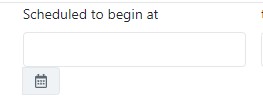
I found many posts suggesting to create a custom input component and pass it to datePickers customInput or even using CSS trickery like using a background image.
to me this all seems not right, am i doning something wrong? or adding an add on input group icon is not supported in react-datepicker!!!
 Mawaheb
All 5 comments

I'm also wondering how I can do this cleanly (using bootstrap 3 on a legacy project here).
I would like to add multiple addons, like in the example above. ☝️
 pepijnolivier
on 22 Mar 2019
pepijnolivier
on 22 Mar 2019
I got it to work using:
<div className="input-group" ref={datepickerRef}>
    <span className="input-group-addon" onClick={e => onLeftAngleClicked()}>
        <i className="fa fa-angle-left" />
    </span>
    <DatePicker
        style={{ width: '100%' }}
        className="form-control"
        name={name}
        id={name}
        selected={_value}
        onChange={handleChange}
        disabled={formField.shouldDisable}
        dateFormat="dd/MM/yyyy"
    />
    <span className="input-group-addon" onClick={e => onRightAngleClicked()}>
        <i className="fa fa-angle-right" />
    </span>
    <span className="input-group-addon" onClick={e => onDatePickerClicked()}>
        <i className="fa fa-calendar" />
    </span>
</div>
Combined with the following CSS:
.react-datepicker-popper {
    z-index: 2;
    top: 34px !important;
    /* needed because we made it inline */

}

.react-datepicker-wrapper,
.react-datepicker-wrapper .react-datepicker__input-container {
    /* https://github.com/Hacker0x01/react-datepicker/issues/1672 */
    width: 100%;

    /* to make it exactly the same height as the bootstrap input-group-addons */
    display: inline;
}

.react-datepicker__day-name,
.react-datepicker__day,
.react-datepicker__time-name {
    width: 2.7rem;
    line-height: 2.7rem;
    font-size: 1.1rem;
}


.react-datepicker__current-month,
.react-datepicker-time__header {
    font-size: 1.4rem;
}


.date.form-group .input-group-addon {
    cursor: pointer;
}

.date.form-group .input-group-addon:hover {
    opacity: 0.8;
}
This issue has been automatically marked as stale because it has not had recent activity. It will be closed if no further activity occurs. Thank you for your contributions.
![stale[bot] picture](https://avatars3.githubusercontent.com/in/1724?v=4&s=40) stale[bot]
on 18 Sep 2019
stale[bot]
on 18 Sep 2019
@pepijnolivier Thank you!
 czsyjss
on 26 Sep 2019
czsyjss
on 26 Sep 2019
This issue has been automatically marked as stale because it has not had recent activity. It will be closed if no further activity occurs. Thank you for your contributions.
stale[bot]
on 24 Mar 2020
Related issues
 dhruvparmar372
·
3Comments
dhruvparmar372
·
3Comments
 evolve2k
·
3Comments
evolve2k
·
3Comments
 flaurida
·
3Comments
flaurida
·
3Comments
 jjjss94
·
3Comments
jjjss94
·
3Comments
 arturictus
·
3Comments
arturictus
·
3Comments
Most helpful comment
I got it to work using:
Combined with the following CSS: