React-datepicker: Time values CSS broken out of the box?
Expected behavior
Times to be visible
Actual behavior
Times not visible
Steps to reproduce
import 'react-datepicker/dist/react-datepicker.css';
//...
<DatePicker showTimeSelect />

 tomtwttr
All 10 comments
i meet the same issue.
 yangxiaoyao1983
on 5 Mar 2018
yangxiaoyao1983
on 5 Mar 2018
i modify it by follow:
yangxiaoyao1983
on 5 Mar 2018
find the file react-datepicker.css
.react-datepicker__time-box {
width: 120px;
overflow-x: hidden;
margin: 0 auto;
text-align: center;
margin-left: -58px;
}
yangxiaoyao1983
on 5 Mar 2018
I use an overwrite:
.react-datepicker__time-list {
  padding: 0;
}
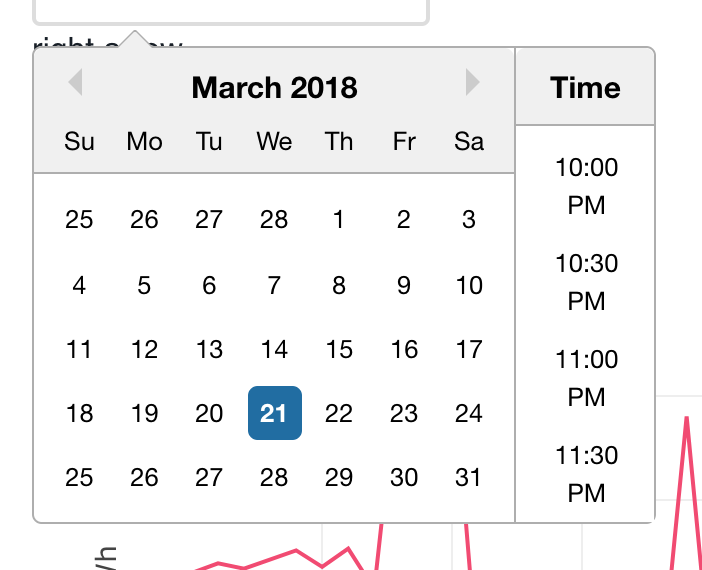
Depending on the project you may need to add more specificity to the selector.
 christiantakle
on 21 Mar 2018
christiantakle
on 21 Mar 2018
+1 also experiencing this issue
 kaitmore
on 26 Mar 2018
kaitmore
on 26 Mar 2018
I'm having this issue as well. Good call on the override @christiantakle!
 apbendi
on 27 Apr 2018
apbendi
on 27 Apr 2018
Same here, it happens because the datepicker actually requires some kind of reset.css and it's included in styles on the examples page, but is not mentioned in docs at all. The style should either be included in the selector or there should be additional line in docs
 beshanoe
on 18 May 2018
beshanoe
on 18 May 2018
@beshanoe I'm looking at the examples page (aka the main site) and see no reference to styles or reset.css. Can you be more specific?
 davegravy
on 18 May 2018
davegravy
on 18 May 2018
@davegravy sure, here https://github.com/Hacker0x01/react-datepicker/blob/e052b4ad349c92670b63c0a19d69a6a5f1fb6396/docs-site/style.css#L727 starting from line 645 there's kinda reset styles, and specifically on 727 padding: 0 is what makes examples work. You can see it when inspect as well
beshanoe
on 18 May 2018
This issue has been automatically marked as stale because it has not had recent activity. It will be closed if no further activity occurs. Thank you for your contributions.
![stale[bot] picture](https://avatars3.githubusercontent.com/in/1724?v=4&s=40) stale[bot]
on 30 Aug 2019
stale[bot]
on 30 Aug 2019
Related issues
 sarav1234
·
3Comments
sarav1234
·
3Comments
 jcabrerazuniga
·
3Comments
jcabrerazuniga
·
3Comments
 jjjss94
·
3Comments
jjjss94
·
3Comments
 lclemence
·
3Comments
lclemence
·
3Comments
 rsouthpaw
·
3Comments
rsouthpaw
·
3Comments
Most helpful comment
I use an overwrite:
Depending on the project you may need to add more specificity to the selector.