React-datepicker: TimeSelect not show?
Why TimeSelect not show?
 permadiwibisono
All 13 comments
I have the same issue. Using v0.55.0. showTimeSelect breaks the datepicker and shows a poorly formatted list of times

 jessica-pixvana
on 5 Oct 2017
jessica-pixvana
on 5 Oct 2017
This looks like a CSS bug. Are you using the CSS provided by the component?
 martijnrusschen
on 5 Oct 2017
martijnrusschen
on 5 Oct 2017
Am I supposed to copy the file react-datepicker/dist/react-datepicker.css into my directory to use it?
jessica-pixvana
on 6 Oct 2017
Currently I haveimport 'react-datepicker/dist/react-datepicker.css'; at the top of my file
jessica-pixvana
on 6 Oct 2017
@permadiwibisono I had the same issue on the 0.54 version, updating to 0.55 resolved it for me.
 nali
on 10 Oct 2017
nali
on 10 Oct 2017
@nali i got it, but now there is bug in css, not show properly same problem with @jessica-pixvana

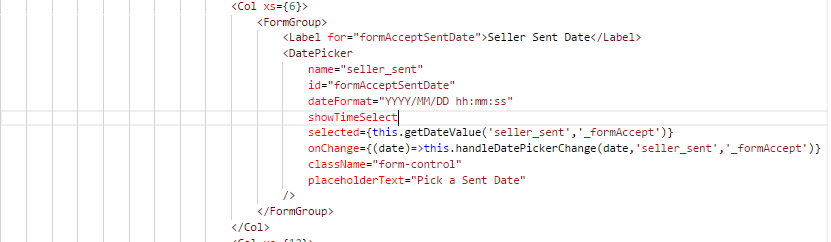
And its my code:

permadiwibisono
on 11 Oct 2017
@permadiwibisono Whats your operating system and browser?
 shadrech
on 30 Oct 2017
shadrech
on 30 Oct 2017
@shadrech I'm using Windows 10 and with Google Chrome.
permadiwibisono
on 31 Oct 2017
@shadrech the same issue,windows 7 and Chrome.
how to solve it?
 codepandy
on 8 Nov 2017
codepandy
on 8 Nov 2017
@shadrech I have the same issue on ubuntu and Chromium.
current versions react v15.5.4 react-datepicker v0.60.2 (on previous versions was the same issue)
- https://github.com/Hacker0x01/react-datepicker/issues/1056#issuecomment-334628577
- add some inline styles
.react-datepicker__time-container .react-datepicker__time .react-datepicker__time-box ul.react-datepicker__time-list {
padding-left: 0;
padding-right: 0;
}
it's solve display issues
 orx0r
on 8 Nov 2017
orx0r
on 8 Nov 2017
One thing I noticed is that the time list does not have padding set to 0, so it takes the browser defaults which results in issues: See a simple example here: https://codesandbox.io/s/l5oz7rvrzq
( edit: I meant padding not margin )
 hugozap
on 8 Dec 2017
hugozap
on 8 Dec 2017
I have the same issue with react semantic ui
.react-datepicker {
    display: flex  !important;
}
 jfajardo
on 3 Mar 2018
jfajardo
on 3 Mar 2018
This issue has been automatically marked as stale because it has not had recent activity. It will be closed if no further activity occurs. Thank you for your contributions.
![stale[bot] picture](https://avatars3.githubusercontent.com/in/1724?v=4&s=40) stale[bot]
on 30 Aug 2019
stale[bot]
on 30 Aug 2019
Related issues
 tamitutor
·
3Comments
tamitutor
·
3Comments
 jbccollins
·
3Comments
jbccollins
·
3Comments
 kkras3
·
3Comments
kkras3
·
3Comments
 lclemence
·
3Comments
lclemence
·
3Comments
 hoodsy
·
3Comments
hoodsy
·
3Comments
Most helpful comment
I have the same issue with react semantic ui