React-datepicker: Position of the month container
What should I do if I place date picker at the top-right corner of the page ? Month container becomes half-hidden to the right border of the browser window. Is there any solution?
bug_demo
P.S. I've tried to use popoverAttachment="top right". But it looks like it works incorrect
bug_demo_2
 epsyan
All 11 comments
Also seeing this behavior, the docs are not clear on what the options for the position props actually impact
 ian-moore
on 23 Jan 2017
ian-moore
on 23 Jan 2017
Latest example contains popperPlacement example. It might work for you guys!
https://hacker0x01.github.io/react-datepicker/
<DatePicker
selected={this.state.startDate}
onChange={this.handleChange}
popperPlacement="top-end"
popperModifiers={{
offset: {
enabled: true,
offset: '5px, 10px'
},
preventOverflow: {
enabled: true,
escapeWithReference: false, // force popper to stay in viewport (even when input is scrolled out of view)
boundariesElement: 'viewport'
}
}}
/>
These values are valid for popperPlacement :)
export const popperPlacementPositions = [
'auto',
'auto-left',
'auto-right',
'bottom',
'bottom-end',
'bottom-start',
'left',
'left-end',
'left-start',
'right',
'right-end',
'right-start',
'top',
'top-end',
'top-start'
]
 subuta
on 30 Aug 2017
subuta
on 30 Aug 2017
hi, wanted to check in. Really love this datepicker, though it seems that the popperPlacement is not working. Not even in the demo. if you scroll the popperPlacement example a lil higher than the midline of the window, it will drop below the input
 iisa
on 28 Sep 2017
iisa
on 28 Sep 2017
The popper position seems to work fine for me, but the triangle isn't scooting over to the other side (for bottom-end). It looks like the CSS in react-datepicker.css is missing special styles for "end".
 caitlin
on 20 Oct 2017
caitlin
on 20 Oct 2017
I was experiencing the same thing as @iisa.
After a ton of searching, it seems that you need to set the flip modifier to enabled: false to prevent it from flipping when it reaches the boundaries of the page.
https://popper.js.org/popper-documentation.html#modifiers..flip
I updated my props to:
<DatePicker
  popperPlacement="botom-start"
  popperModifiers={{
    flip: {
      enabled: false
    },
    preventOverflow: {
      enabled: true,
      escapeWithReference: false
    }
  }}
/>
 carmouche
on 14 Dec 2017
carmouche
on 14 Dec 2017
Facing the same issue with react-datepicker placed on top-right corner of the screen.
The below CSS code worked for me check it out:
.react-datepicker-popper[data-placement^=bottom] .react-datepicker__triangle {
    margin-left: 8em;
}
 evepen1
on 13 Jul 2018
evepen1
on 13 Jul 2018
Basically, @carmouche 's solution works. However, when it comes into time picker, it doesn't work correctly: the time picker is still hidden (see red rectangle at the top right)
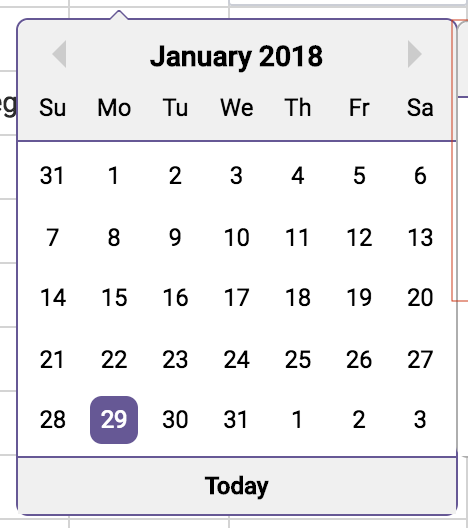
This is b/c the time container element is positioned as absolute and thus taken out of the normal flow. Therefore, the popper only takes date (in red)
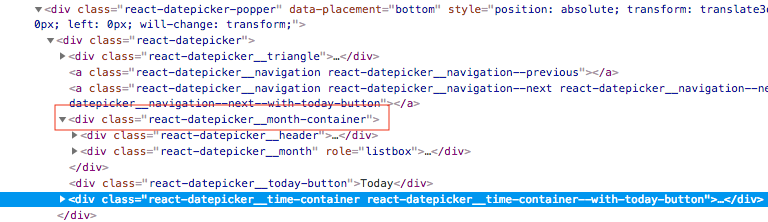
container's width into account.
Modifying the CSS may solve the issue but it has the risks of introducing other regression issues if not careful.
 canhoviet-zz
on 1 Aug 2018
canhoviet-zz
on 1 Aug 2018
This issue has been automatically marked as stale because it has not had recent activity. It will be closed if no further activity occurs. Thank you for your contributions.
![stale[bot] picture](https://avatars3.githubusercontent.com/in/1724?v=4&s=40) stale[bot]
on 30 Aug 2019
stale[bot]
on 30 Aug 2019
Coming in late for the party, so perhaps things have changed since this thread was last updated.
I am having the issues of the DatePicker's popper being rendered off screen when I open it. The popperPlacement and popperModifiers props do nothing for me.
This is roughly what my code looks like:
 <DatePicker
            popperPlacement='top'
            showTime={true}
            value={date}
            onChange={date => setDate(date)}
          />
This is how it looks when being rendered:
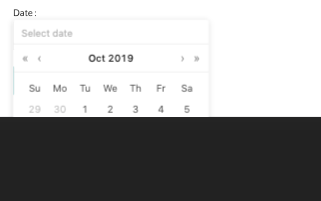
Not sure where to take it from here.
 JulsRicketti
on 23 Oct 2019
JulsRicketti
on 23 Oct 2019
@JulsRicketti What's that dark box represent, the edge of the screen?
From what I can tell the library still uses the popperPlacement variable and defaults to 'bottom-start' placement:
https://github.com/Hacker0x01/react-datepicker/blob/master/src/popper_component.jsx#L22
 maedi
on 29 Jul 2020
maedi
on 29 Jul 2020
use popperPlacement='top-start' to open it on the top side.

 yosagar
on 16 Sep 2020
yosagar
on 16 Sep 2020
Related issues
 ashishlal91
·
21Comments
ashishlal91
·
21Comments
 tkawachi
·
26Comments
tkawachi
·
26Comments
 delijah
·
38Comments
delijah
·
38Comments
 yp
·
24Comments
yp
·
24Comments
 tadjohnston
·
42Comments
tadjohnston
·
42Comments
Most helpful comment
I was experiencing the same thing as @iisa.
After a ton of searching, it seems that you need to set the flip modifier to
enabled: falseto prevent it from flipping when it reaches the boundaries of the page.https://popper.js.org/popper-documentation.html#modifiers..flip
I updated my props to: