React-date-picker: Keyboard input not correct with leading zero
When i try to enter some date with leading zero, the result is not correct.
For example:
Testing with chrome (In MM/dd/yyyy format):
When press "01012019", the result become "010/12/019". What I expect is "01/01/2019".
Testing with Edge (In yyyy-MM-dd format):
Press "2019(right key)0101", result is 2019-010-01.
By the way, when i type 0020190 in the year part, it will become blank page with error in console.
Only occur in Edge, not sure why.
You can try with the demo page:
http://projects.wojtekmaj.pl/react-date-picker/
I found you had already answered another issue which may be related to this?
https://github.com/wojtekmaj/react-date-picker/issues/156#issuecomment-515692395
Anyway, thanks for the work. It saved me from so many headache when facing the native html input type="date".
 gardengardengarden
All 10 comments
Any news on this bug?
 Genenenenaam
on 28 Oct 2019
Genenenenaam
on 28 Oct 2019
Hi,
I expose a possible solution to the extra zero problem when showLeadingZeros is being used and a zero is entered first. ( PR #241 ).
Regards
 antoniojmartnez
on 10 Mar 2020
antoniojmartnez
on 10 Mar 2020
This will be fixed, but it needs https://github.com/wojtekmaj/react-date-picker/pull/272 to be merged first. For now, we rely on number inputs (from today's point of view I think that was a mistake), which don't report leading zeros in values, so we're technically unaware of them.
 wojtekmaj
on 9 Jul 2020
wojtekmaj
on 9 Jul 2020
Hey, any updates on when this is going to get deployed?
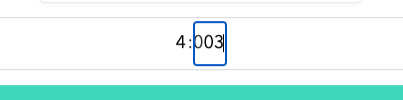
:(
 Liel208
on 26 Jul 2020
Liel208
on 26 Jul 2020
Any update on this bug or a workaround @wojtekmaj ?
 sirsaula
on 30 Jul 2020
sirsaula
on 30 Jul 2020
272 is not merged yet because it's missing required input validation. I don't have a lot of free time these days. Sorry!
wojtekmaj
on 30 Jul 2020
any updates @wojtekmaj ?
 MihaelaTIMIS
on 28 Dec 2020
MihaelaTIMIS
on 28 Dec 2020
@MihaelaTIMIS Well this worked for me format="M/d/y". Now it takes only a single zero.
 arehman97
on 28 Dec 2020
arehman97
on 28 Dec 2020
We solved the problem on our project by explicitly passing the date format: format='d.M.yyyy'
 elemeNtk0
on 10 Mar 2021
elemeNtk0
on 10 Mar 2021
Fixed in v8.1.0.
wojtekmaj
on 10 Mar 2021
Related issues
 adityatandon007
·
4Comments
adityatandon007
·
4Comments
 JMS-1
·
7Comments
JMS-1
·
7Comments
 leo-iomer
·
8Comments
leo-iomer
·
8Comments
 frankhn
·
5Comments
frankhn
·
5Comments
 RubberChickenParadise
·
6Comments
RubberChickenParadise
·
6Comments
Most helpful comment
Fixed in v8.1.0.