React-date-picker: Old version of React-Date-Picker allows too new version of React-Calendar
I installed using:
npm i [email protected]
With react 15.5.4
When I try to do the simple example:
state = {
    date: new Date(),
  }

  onChange = date => this.setState({ date })

  render() {
    return (
        <DatePicker
          onChange={this.onChange}
          value={this.state.date}
        />
   }
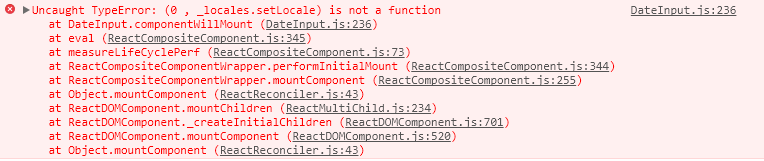
I get this error in the console:

 LuisEgan
All 11 comments
Hey there,
it seems like the version of react-calendar got installed. Which is odd, because it means package-lock.json did not work properly :(
Please try the following:
npm uninstall react-date-picker
npm install [email protected]
npm install [email protected]
I think this will ensure the correct version of dependencies is installed.
 wojtekmaj
on 9 Mar 2018
wojtekmaj
on 9 Mar 2018
Thanks!
It turned out that the packages weren't installing correctly ( some windows errors ), fixed them and now it works like a charm :)
LuisEgan
on 10 Mar 2018
Happy to hear that! Don't hesitate to write if you have any other issues :)
wojtekmaj
on 11 Mar 2018
Hey there,
I installed (for React 15) version 6.7.0 and get this same issue.
I am using the library in an Electron app by the way.
I have the following versions installed:
    ...
    "react-calendar": "^2.11.0",
    "react-date-picker": "^6.7.0",
    ...
Using the following example:
import DatePicker from 'react-date-picker';
...
render(){
    return <DatePicker
        onChange={this.onChange}
        value={this.state.date}
        locale="en-GB"
    />
}
I am getting the following:
npm install looks like the following:

any ideas?
 m-o-leary
on 24 May 2018
m-o-leary
on 24 May 2018
Hmmm. I checked and it should work with [email protected] even. It's the last version that used setLocale and exported it. Strange it did not work :(
wojtekmaj
on 24 May 2018
@buddythumbs are you sure everything installed correctly, both of the packages appear in your package.json?? Perhaps you could try deleting your package-lock.json and your node_modules folder and then running npm install
LuisEgan
on 24 May 2018
Thanks for the help @LuisEgan - that got the library to load.
Now I am faced with no styling being imported - I will open/look for an issue
m-o-leary
on 25 May 2018
package.json for [email protected] has "react-calendar": "^2.11.0" (note the caret) There is no package-lock or yarn.lock.
A clean install (deleted node_modules) results in [email protected] to be installed and the call to setLocale fails as it does not exist.
I believe package.json should read:
"react-calendar": "~2.11.0"
Note the tilde
 dannyshaw
on 5 Aug 2018
dannyshaw
on 5 Aug 2018
You are right. This should be as you wrote. I'll try and make a fix for you guys, but I don't know how long it will take for me to find the time.
For now you can use Yarn selective version resolutions to make it work without any fix.
wojtekmaj
on 7 Aug 2018
Just noting that this also doesn't work with [email protected], the onChange handler never calls, so I've removed the tilde in my resolution and just pinning 2.11.0.
perhaps there was a bug at this version
https://github.com/wojtekmaj/react-calendar/compare/v2.11.0...v2.11.2
dannyshaw
on 19 Sep 2018
I reviewed the code and it doesn't look like it could break anything that is a browser environment. Happy to hear that my initial solution in one of the first comments worked for you!
wojtekmaj
on 19 Sep 2018
Related issues
 RubberChickenParadise
·
6Comments
RubberChickenParadise
·
6Comments
 JMS-1
·
7Comments
JMS-1
·
7Comments
 Omortis
·
4Comments
Omortis
·
4Comments
 hyxos
·
4Comments
hyxos
·
4Comments
 allys00
·
4Comments
allys00
·
4Comments
Most helpful comment
Hey there,
it seems like the version of react-calendar got installed. Which is odd, because it means package-lock.json did not work properly :(
Please try the following:
I think this will ensure the correct version of dependencies is installed.