React-data-grid: sort arrows not being displayed
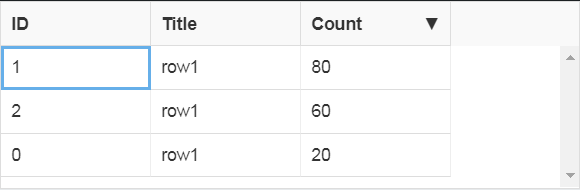
Hi, good day, following the example of sorting columns I get this table

when I click over the column tittle always sort in "ASC" order, the arrows are not displayed, actually, where must be displayed the arrows seems to be empty

my code is the follow...it's pretty much similar to the example, not sure if I'm doing some mistake
import React, { useState } from 'react';
import ReactDataGrid from 'react-data-grid';

const columns = [
  { key: 'id', name: 'ID' },
  { key: 'title', name: 'Title' },
  { key: 'count', name: 'Count' },
];

const initialDataRows = [
  { id: 0, title: 'row1', count: 20 },
  { id: 1, title: 'row1', count: 40 },
  { id: 2, title: 'row1', count: 60 },
];

const Grid = ({ initialData, columns: gridColumns }) => {
  const [rows, setRows] = useState(initialData);

  const sortRows = (_initialRows, sortColumn, sortDirection) => _rows => {
    // eslint-disable-next-line consistent-return
    const comparer = (a, b) => {
      if (sortDirection === 'ASC') {
        return a[sortColumn] > b[sortColumn] ? 1 : -1;
      }
      if (sortDirection === 'DESC') {
        return a[sortColumn] < b[sortColumn] ? 1 : -1;
      }
    };
    return sortDirection === 'NONE' ? _initialRows : [..._rows].sort(comparer);
  };

  return (
    <ReactDataGrid
      columns={gridColumns}
      rowGetter={i => rows[i]}
      rowsCount={rows.length}
      minHeight={150}
      onGridSort={(sortColumn, sortDirection) =>
        setRows(sortRows(initialData, sortColumn, sortDirection))
      }
    />
  );
};

const sortableProperties = {
  sortable: true,
  width: 120,
};

const Prueba = () => {
  const columnsSortables = columns.map(column => ({ ...column, ...sortableProperties }));
  return <Grid columns={columnsSortables} initialData={initialDataRows} />;
};

export default Prueba;
do you notice any mistake here?...also I had to import react-data-grid.css because originally the style wasn't displayed correctly, not sure if this could be related to that
thank you so much hope you will notice the issue, have a great day
 cocodrino
All 5 comments
Your code works... I don't know what you mean...
Did you add "bootstrap" dependency?
Actually i think it should work even without bootstrap
 emsi-iggy
on 20 Feb 2020
emsi-iggy
on 20 Feb 2020
@emsi-iggy ok that is weird, I'll try adding bootstrap to my dependencies, my code doesn't show the arrows in the column name
Ive uploaded a sample project here
https://github.com/cocodrino/error-react-data-grid
this project was created with create-react-app and it was a bit weird that I'd to require the css file in my code but the documentation doesn't say nothing about that
thank you so much
UPDATE: I've tested installing bootstrap and didn't make any difference
cocodrino
on 20 Feb 2020
@cocodrino I had the same problem. But after looking at the sample code for column sorting, I found that I had to pass sortDirection and sortColumn to the grid as well. Now sorting works as expected and the arrow shows up.
 gernotkogler
on 21 Feb 2020
gernotkogler
on 21 Feb 2020
@cocodrino the examples on codesandbox.io (https://codesandbox.io/s/rdg-column-sorting-8y0xp) appear to be running version 5.x
you can see the latest column sort example here: https://github.com/adazzle/react-data-grid/blob/alpha/examples/demos/example08-sortable-cols.js
 mvberg
on 25 Feb 2020
mvberg
on 25 Feb 2020
thanks @gernotkogler @mvberg I was able to fix the code and it's working right. Please update the code example https://adazzle.github.io/react-data-grid/docs/examples/column-sorting this can be confusing...
cocodrino
on 26 Feb 2020
Related issues
 jlarso11
·
3Comments
jlarso11
·
3Comments
 ryanwtyler
·
3Comments
ryanwtyler
·
3Comments
 alvaro1728
·
4Comments
alvaro1728
·
4Comments
 martinnov92
·
3Comments
martinnov92
·
3Comments
 oliverwatkins
·
4Comments
oliverwatkins
·
4Comments
Most helpful comment
@cocodrino I had the same problem. But after looking at the sample code for column sorting, I found that I had to pass sortDirection and sortColumn to the grid as well. Now sorting works as expected and the arrow shows up.