React-data-grid: Help with editable grid
Is it possible to get an working example of how to construct the editable table-grid example using the "new" react hooks ?
 burton666
All 7 comments
Just replace the Class component with a functional component and use the useState hook: https://codesandbox.io/s/rdg-cell-editing-1omwh
 partynikko
on 29 Oct 2019
partynikko
on 29 Oct 2019
Like @partynikko mentioned, here is what you need to do.
- convert the
class componentto afunctional componentby usinguseState,useImperativehandle(forgetInputNodeandgetValue). - use
forwardRefto make sure yourfunctional componentcan be passed a ref from parent component
 qili26
on 5 Nov 2019
qili26
on 5 Nov 2019
Can you go into a bit more detail on using hooks?
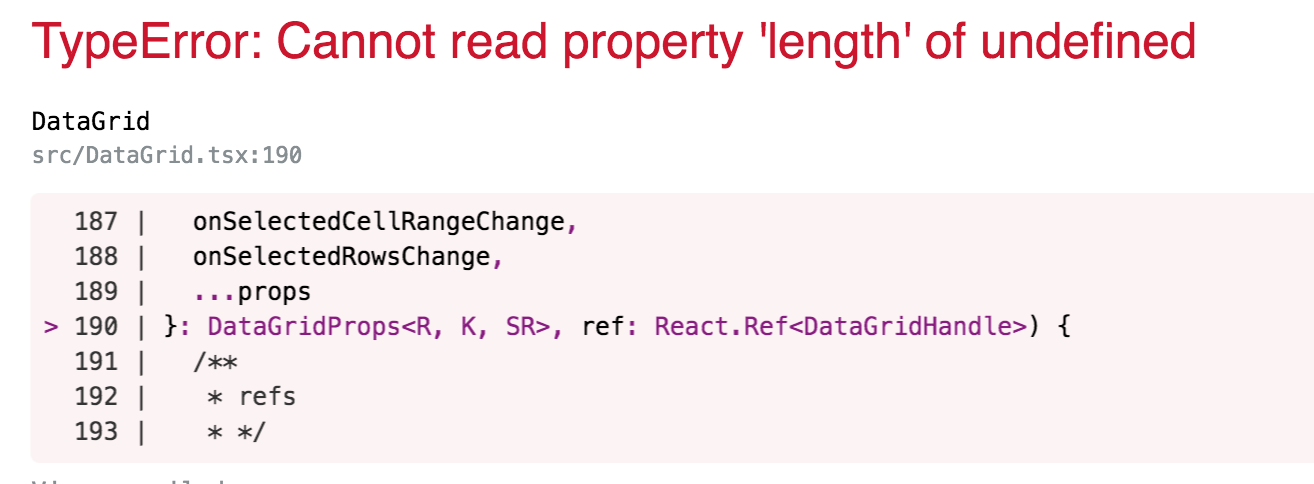
I'm getting an error 'Cannot read property 'length' of undefined' and I'm unsure of the context.
 dgdosen
on 22 Apr 2020
dgdosen
on 22 Apr 2020
@dgdosen
In what stage did you see the issue? After editing? Upon Grid loading? Upon the editors are opening , etc..?
qili26
on 22 Apr 2020
FYI - I'm using typescript and react hooks.
This error is a runtime error when trying to load the initial grid.
I think I'm looking for more detail on using references with getInputNode and getValue - I think I'd be able to understand it better if there was an example that just used hooks and nested functional components.

I can look at the source code, and see that the component is trying to access rows.length - but the API doesn't pass in rows, it passes in a rowGetter...

Further, If I look at a sample in the code (CommonFeatures.tsx) I can see a DataGrid crufted up when passing in rows...
Any ideas?
dgdosen
on 22 Apr 2020
I found my issue - I added types (@types/react-data-grid) to my project separately from react-data-grid - and it had an older api - which made me write code like in the current docs, which isn't similar to the current code.
I removed types from my package, and followed the lead from CommonFeatures.tsx
dgdosen
on 24 Apr 2020
@dgdosen thanks for this comment, i had the same issue.
 dcsan
on 26 Nov 2020
dcsan
on 26 Nov 2020
Related issues
 SupernaviX
·
3Comments
SupernaviX
·
3Comments
 oliverwatkins
·
4Comments
oliverwatkins
·
4Comments
 GenoD
·
3Comments
GenoD
·
3Comments
 ryanwtyler
·
3Comments
ryanwtyler
·
3Comments
 Thilagm
·
3Comments
Thilagm
·
3Comments