React-data-grid: how translate buttons
Hello,
how translate buttons "filter rows" and others ???
Question
 Deboracgs
All 5 comments
@amanmahajan7 any solution?
Deboracgs
on 25 May 2018
There is no built it support for translations at the moment. You can however customize Toolbar and pass custom text props
toolbar={<Toolbar enableFilter={true} [filterRowsButtonText](url)={translate('FilterRow')}/>}
For Search you can specify a custom column.filterRenderer and customize the text.
 amanmahajan7
on 25 May 2018
amanmahajan7
on 25 May 2018
🎉1
👍1
@amanmahajan7 you have example to search?
Deboracgs
on 25 May 2018
@amanmahajan7 i not have idea to translate search field, you have any example for this??
Deboracgs
on 28 May 2018
@amanmahajan7 thanks for the solution workds perfectly :ok_hand: . One thing though the searchable fields are still not translated and that I suppose will be slightly more difficult to deal with. (and possibly the only solution is to get a custom Toolbar going)
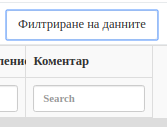
 vpolimenov
on 13 Oct 2019
vpolimenov
on 13 Oct 2019
Was this page helpful?
0 / 5 - 0 ratings
Related issues
 alvaro1728
·
4Comments
alvaro1728
·
4Comments
 soma83
·
4Comments
soma83
·
4Comments
 Suprit-S-M
·
4Comments
Suprit-S-M
·
4Comments
 oliverwatkins
·
4Comments
oliverwatkins
·
4Comments
 JordanBonitatis
·
4Comments
JordanBonitatis
·
4Comments
Most helpful comment
There is no built it support for translations at the moment. You can however customize
Toolbarand pass custom text propsFor
Searchyou can specify a customcolumn.filterRendererand customize the text.