React-data-grid: Improve cell rendering performance
Background
Cell rendering, is notably laggy on grids with large amounts of rows or columns, especially when its a result of keyboard navigation or scrolling in particular. This is an umbrella issue will attempt to outline ideas and strategies for tackling the problem. All thoughts welcome :)
Previous work in this area
The initial version of this grid was built with basic virtualization. Since then, the following attempts have been made to tweak and improve performance
- ShouldComponentUpdate functions - many are now overly complex, and slow, actually hindering performance rather than improving it.
- Avoiding off screen work - placeholder empty cells are generated off screen in an effort to reduce the amount of rendering required. This has resulted in occasional display bugs whereby cell content appears blank. Also, upon scrolling the grid, large amounts of real cell components now need to be freshly mounted, resulting in a janky experience, whereas before a generous buffer of real cell components existed as they were loaded up front.
Example analysis
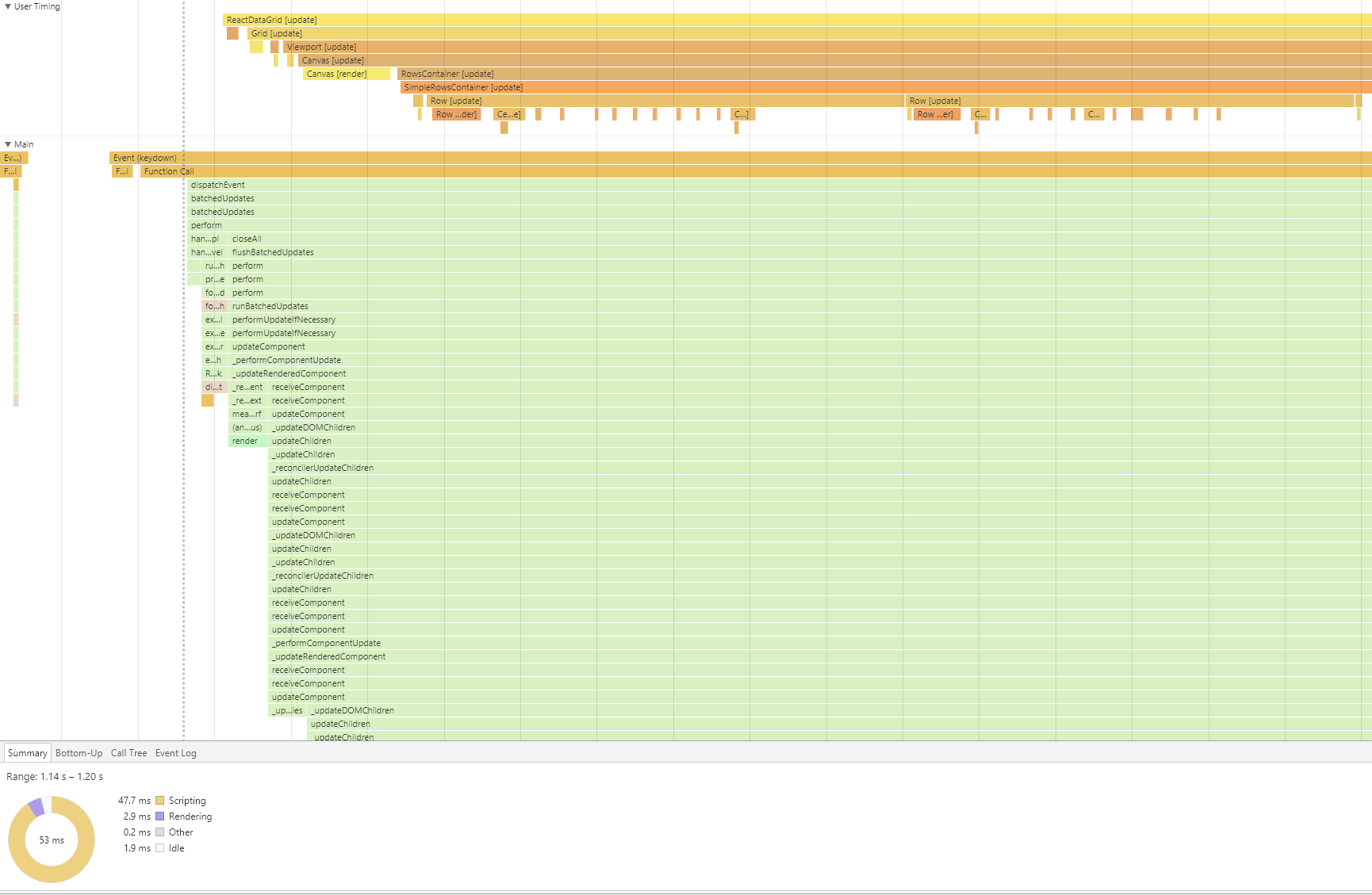
The chrome flamechart below is taken from using the keyboard to navigate downwards from one cell to the cell below. As can be seen, the rendering work that is done is minimal 2.9ms whereas the majority of the time 47.7ms is spent scripting. If this is expanded to navigating multiple cells, the time spent in scripting causes notable performance degradation.
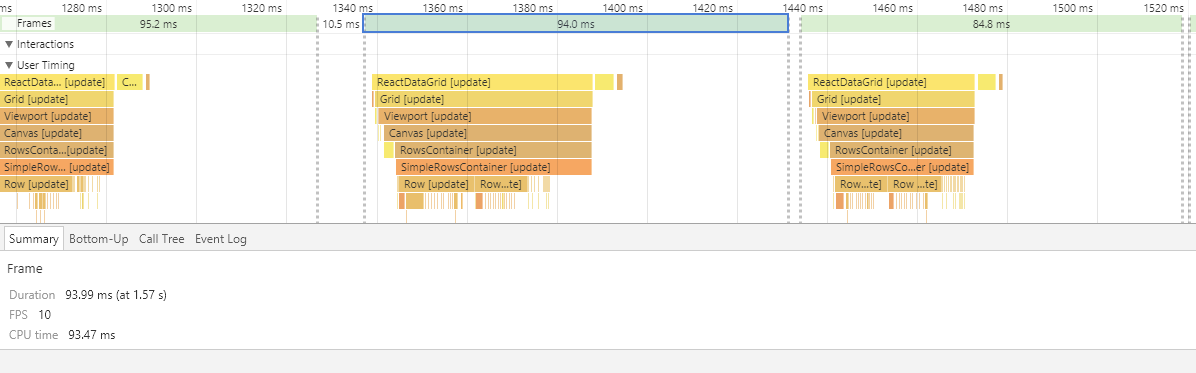
For a smooth user experience, web applications should aim to acheive 60fps, but it can be seen here that we are averaging only 10fps from this action.
Potential strategies
1. Avoid passing props through deeply nested components by adopting a state container like Redux.
When navigating from one cell to another, unless a scroll needs to happen, only two components should need to re-render - the cell you are moving from, and the cell you are moving to. As can be seen in the flame chart above, we see the following for a single keypress
ReactDataGrid (update)
=> Grid (update)
=> Viewport (update)
=> Canvas (update) => Canvas (render)
=> RowsContainer (update)
=> SimpleRowsContainer (update)
=> Row (update x2) => Row (render x2)
=> Cell (Update x 11) => Cell (Render x2)
There is so much unnecessary work happening here, and performance is suffering as a result.
Were we to by-pass passing props all the way from ReactDataGrid to Cell components, and connect each cell directly to a store (eg. Redux store, then we would bypass all the work that React is doing in order to render two components, as well as avoid all the custom shouldComponentUpdate functions. I think this strategy could be applied to many component on the grid, meaning that component only subscribe to the state that they need, and greatly reducing scripting time.
2. Dynamic shared styles
I read about this here, and it seemed like quite an unusual strategy at first. The idea is that you don't necessarily need to call render to update styles, and where many styles are required to update in a short amount of time, this could also greatly improve performance.
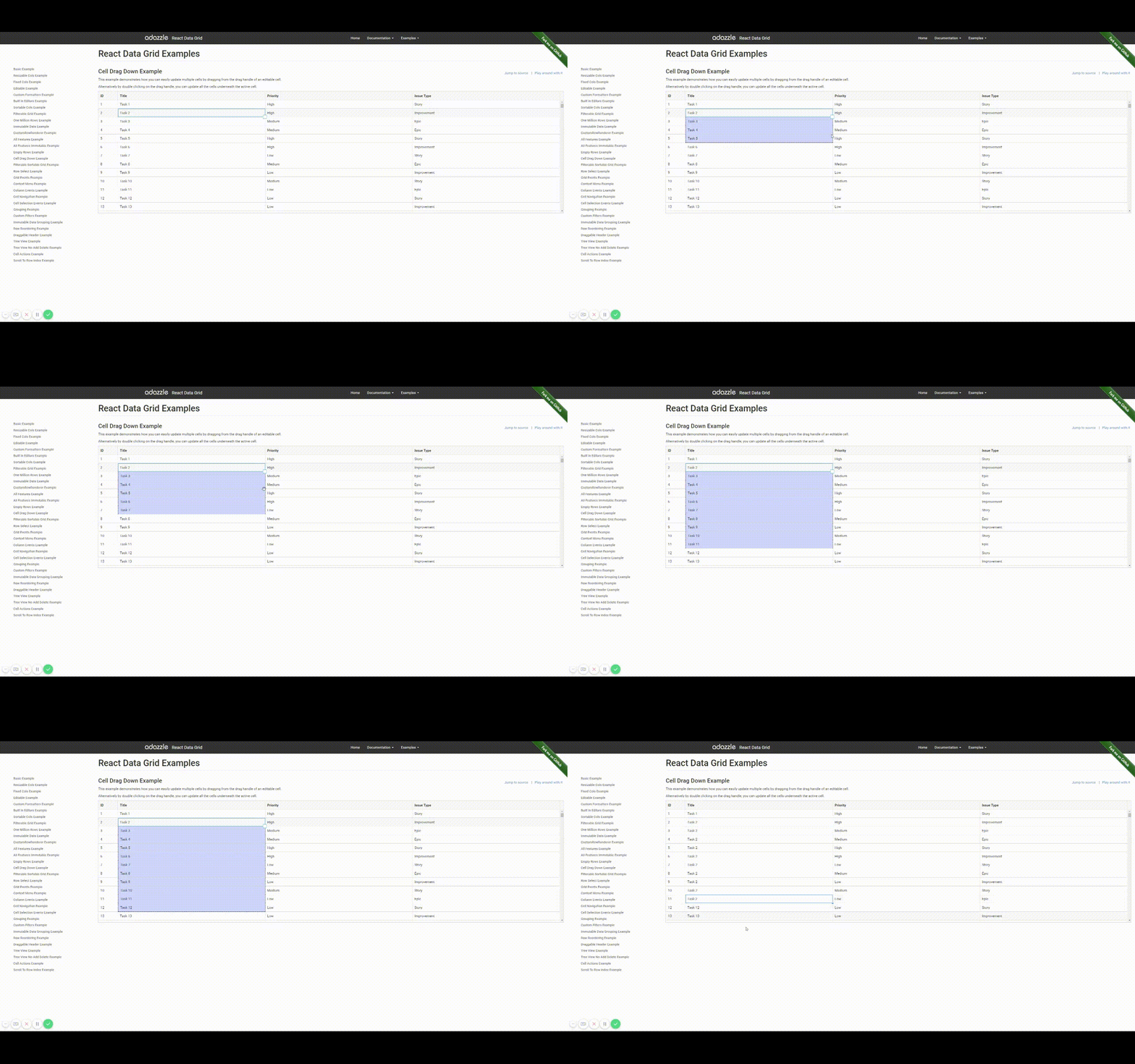
Take for example, a cell drag down (this is really unperformant on large data sets, and makes the experience awful, as the cells often become unresponsive).
Here is the corresponding flamechart. This action drags the performance down to 1FPS, due to the amount of unnecessary updates, and large amount of unneccesary cell renders.
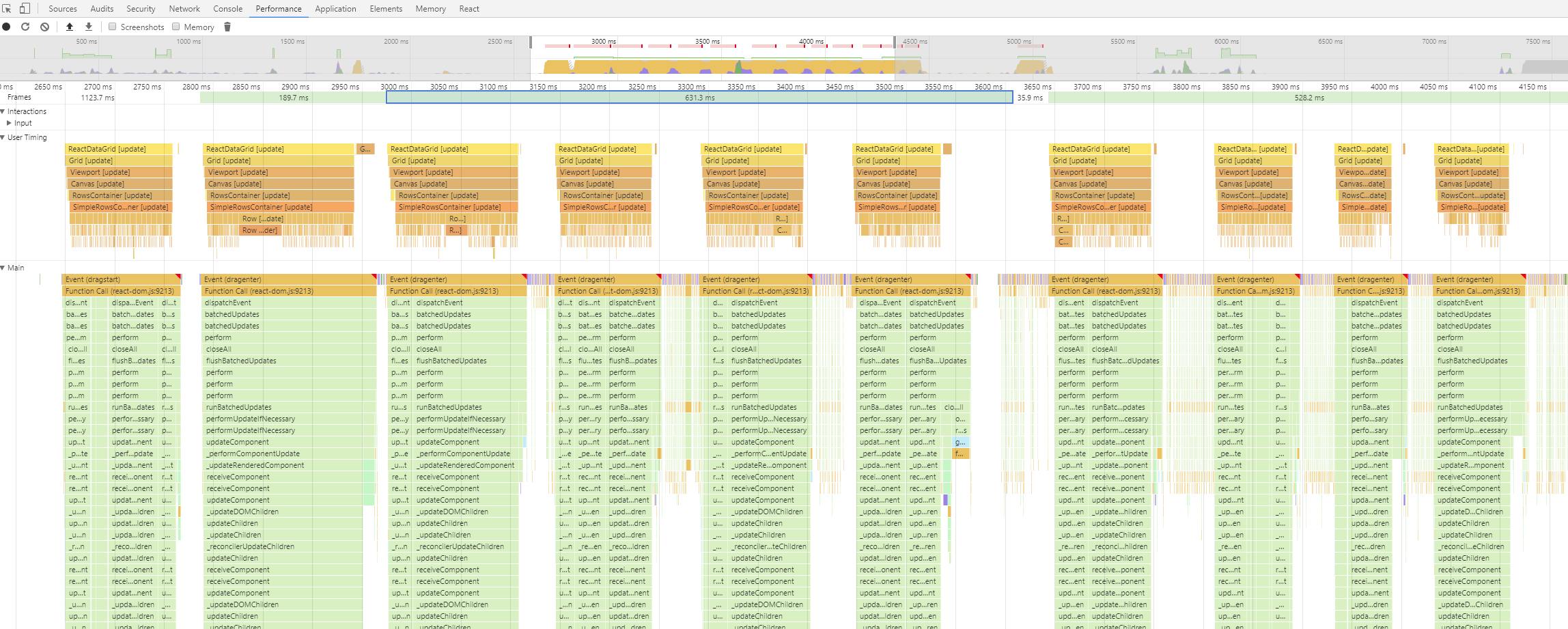
By applying the techniques in the here in Issue 2: Style Updates, this could makes this action much smoother.
3. Simplify shouldComponentUpdate functions
shouldComponentUpdate functions especially those around Cell, Row and Canvas are needlessly complex and time consuming. We should look to simplify these as much as possible
4. Memoise
Investigate any expensive functions that are repetitively run, and memoise them.
Related Reading:
https://medium.com/@alexandereardon/dragging-react-performance-forward-688b30d40a33
https://medium.com/myheritage-engineering/how-to-greatly-improve-your-react-app-performance-e70f7cbbb5f6
 malonecj
All 6 comments
@malonecj good sum up.
Just don't predict many improvements by using redux, always keep in mind that the full state tree will need refresh and it will be easy to make a lot of mistakes that may even degrade performance further.
I've been investigation a solution that looks perfect in paper, each is using RXJS to wait for cell updates and try to do as less updates in the DOM tree as possible, it requires some deeper investigation an probably some initial POC.
Reactive programming is something I will go deeper over the course of this year and it looks really clean, although it is a huge switch in mentality and most people won't easily understand the code in 5 minutes I would argue that there aren't any meaningful contributions to that part of the system in the last 2 years.
Have a look int this https://michalzalecki.com/use-rxjs-with-react/
 diogofcunha
on 23 Jan 2018
diogofcunha
on 23 Jan 2018
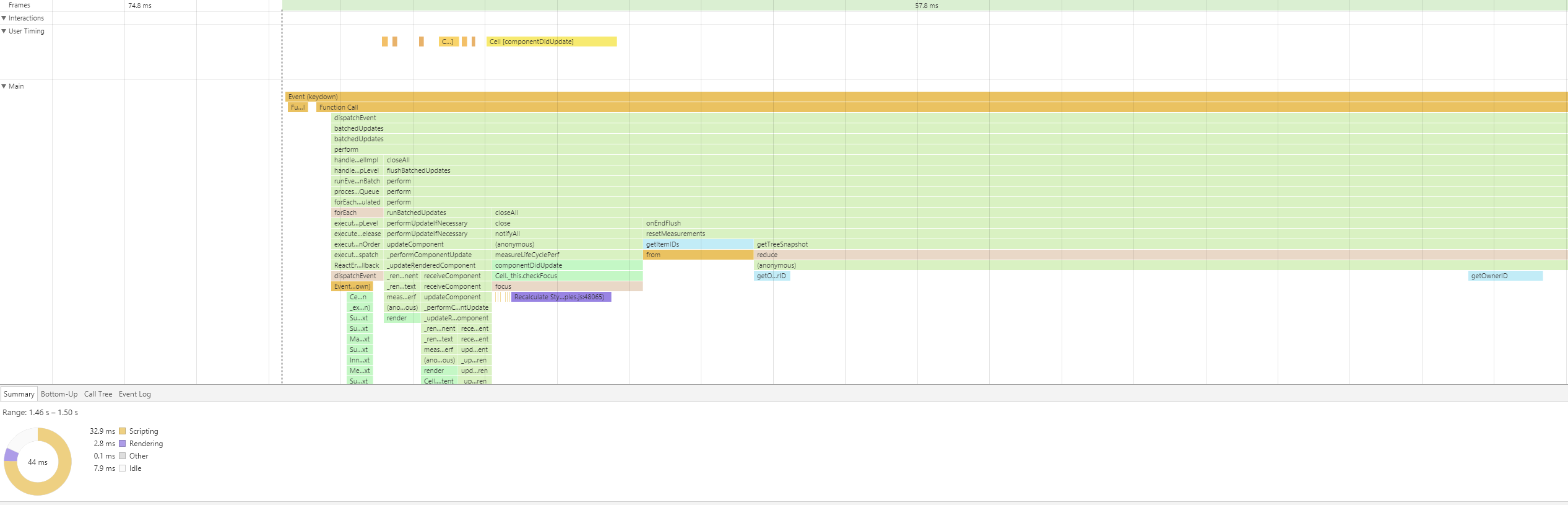
@diogofcunha Here is a very rough proof of concept which allows us to subscribe to certain events to only update the cells we need. You can see in the flame chart that we render way less. There is still quite a bit of scripting going on after the cells are rendered so will need to investigate that to find out what is going on. The average FPS is roughly increased x2
malonecj
on 26 Jan 2018
@malonecj this is amazing news!
Now hopefully we can start getting rid of the scu and see if the performance gets better or worse and if it gets worse we can sit together and come up with another plan to make subscriptions even deeper down our component tree!
diogofcunha
on 26 Jan 2018
Great work guys 👏 I am totally down for using RxJS. I played with it a little bit and once you get a hang of it, it makes some really complex tasks trivial.
I did some profiling as well and here are some results (all profiles are using all-features example)
Grid Scrolling
Grid scrolling is extremely slow and rendering at about 3fps due to large number or mounts/unmounts and as expected the majority of the time is spent on scripting
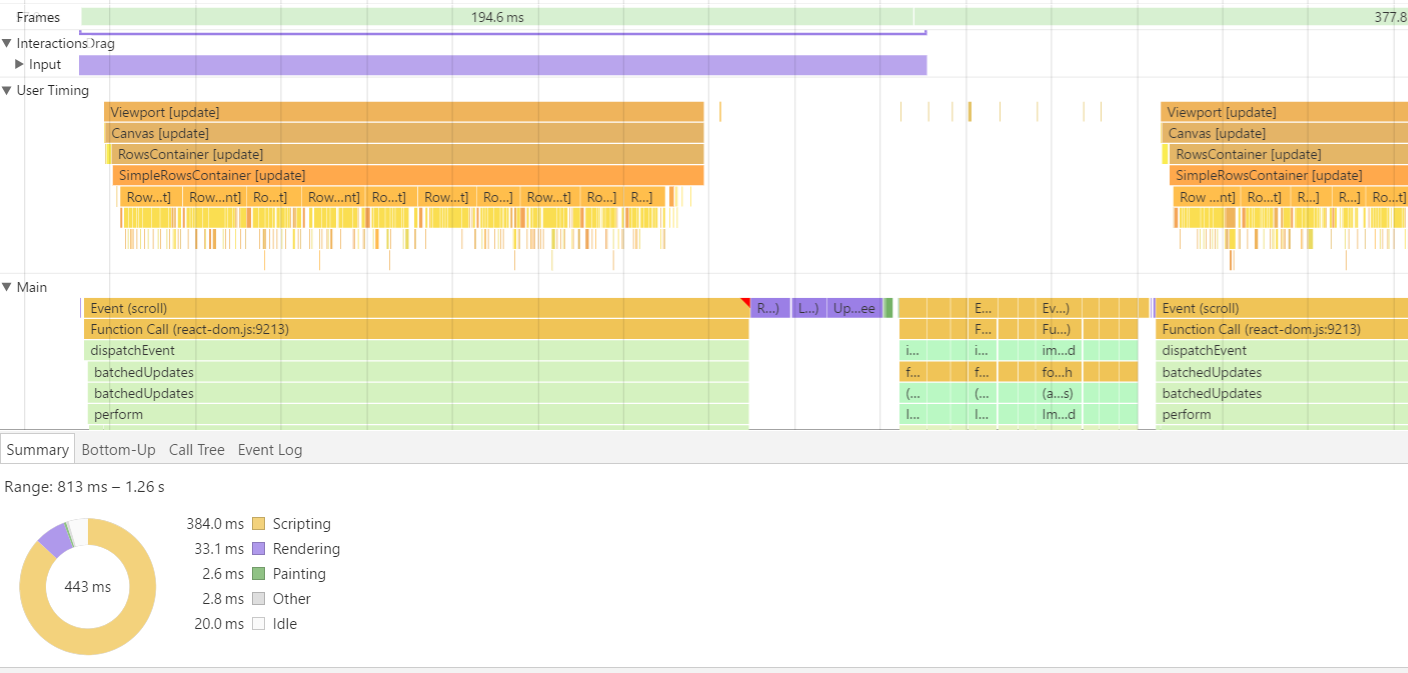
react-virtualized List component can be used to improve virtual scrolling. List is a generic component that takes care of efficiently rendering a list. All it needs is a rowRenderer, here is an example. We might be able to plug it in and use the existing row rendering logic and let the List handle the scrolling
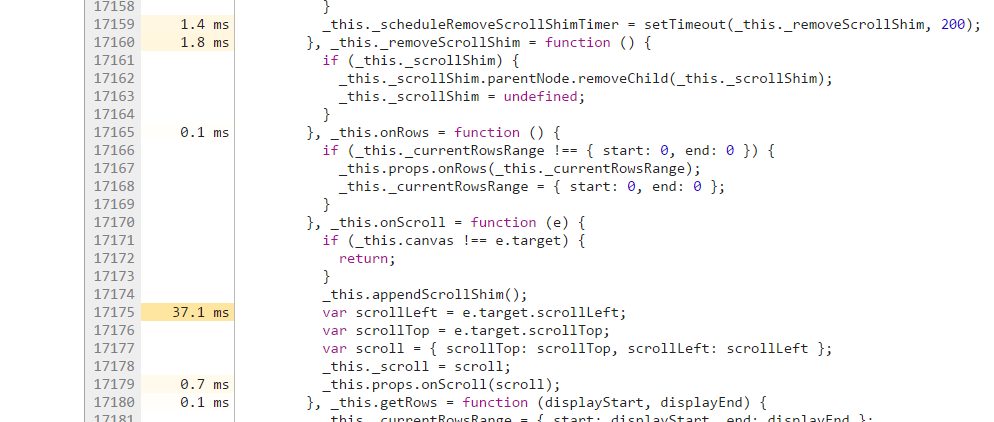
Or we can always improve the current windowing logic (reading scrollLeft is fairly expensive here)
Cell Navigation
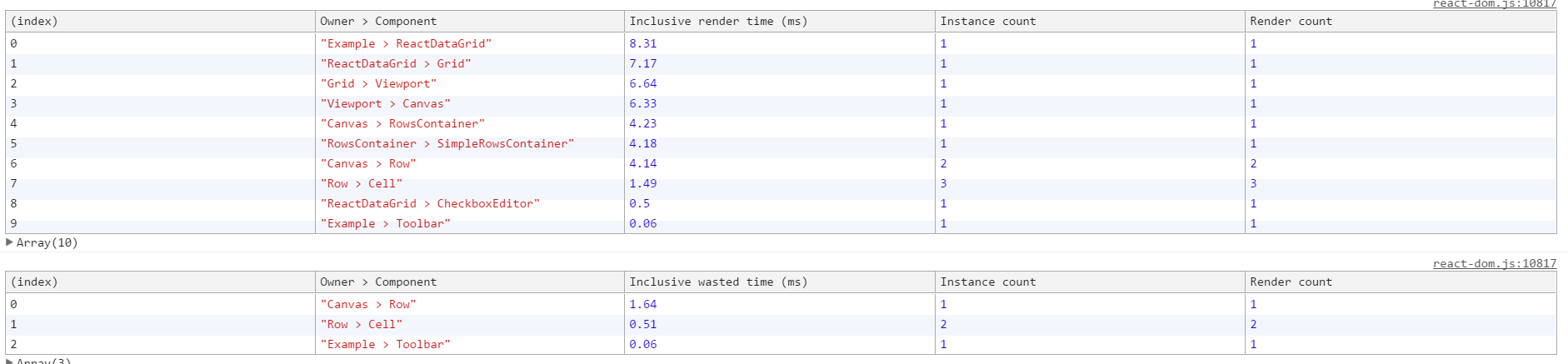
Similar to @malonecj findings, for each cell navigation the whole grid is re-rendered
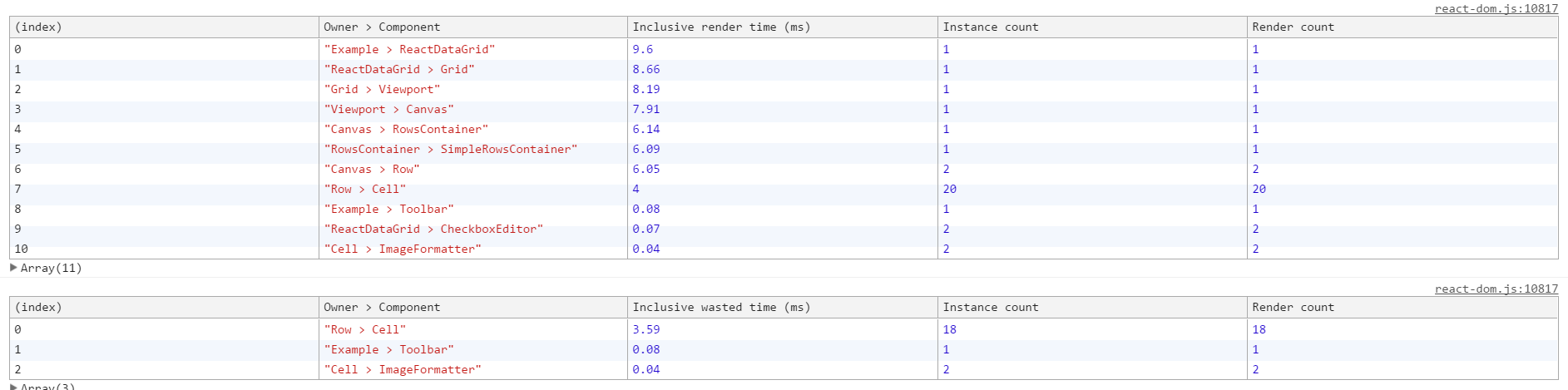
In this particular case both row and cell have changed so 2 rows are rendered but instead of 2 cells, 20 cells are rendered. 18 cells were re-rendered without any change. This line is the culprit as objects are strictly compared and they will always be different.
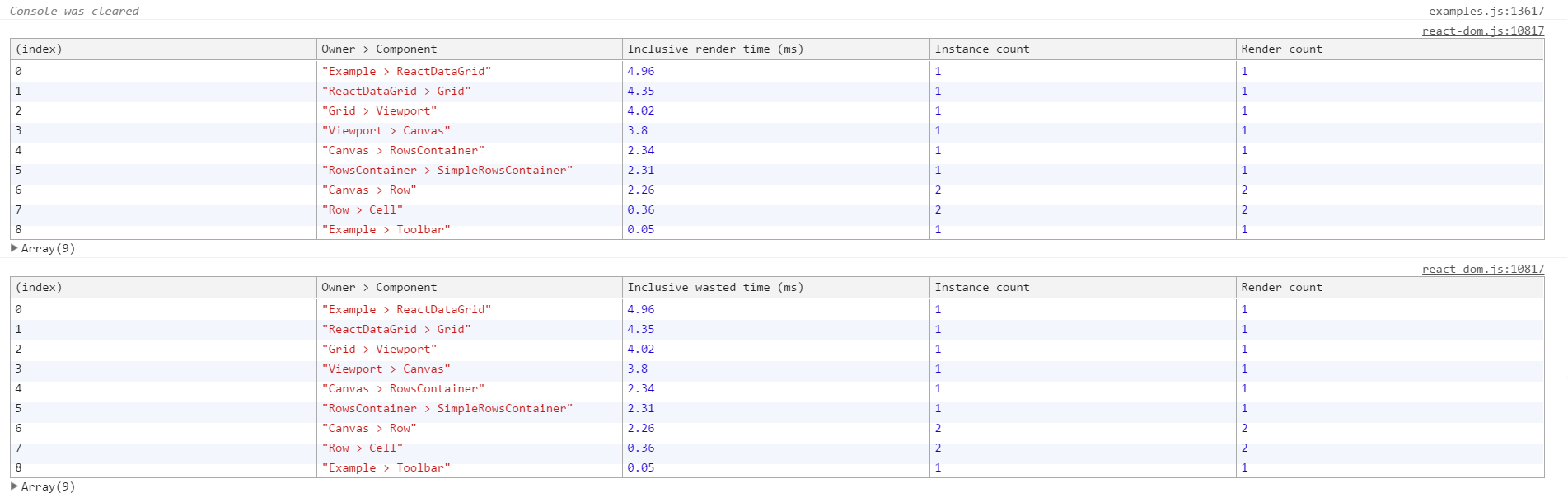
With a small fix now only 3 cells are rendered
|| !_.isEqual(this.props.expandableOptions, nextProps.expandableOptions)
In other cases, the whole tree does not need to be re-rendered which makes sense as the cell is focused using the DOM method
Minor improvements
Header Resizing
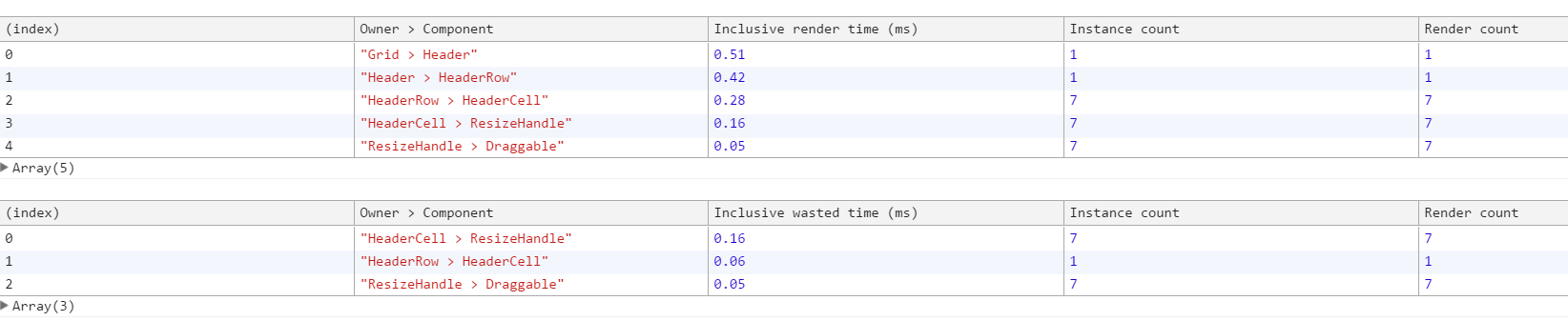
ResizeHandle does not need to be re-rendered again. It can be a PureComponent

 amanmahajan7
on 30 Jan 2018
amanmahajan7
on 30 Jan 2018
Thanks @amanmahajan7 I would really like to look at improving the current windowing logic next. From your analysis it looks like there is plenty that can be done
As for the cell navigation, I have done two new proof of concepts. Both extract the Selection responsibility out of the Cell and move it to a SelectionMask component, which really speeds up the navigation. Especially when wrapping the SelectionMask in a React Motion wrapper, we get smooth animation at a constant 60 FPS.
- Improve Cell navigation Performance (using rxjs proof of concept)
- Improve Cell navigation Performance (using provider pattern with pub/sub)
I think rxjs is really powerful. However, I think maybe it is overkill for what we need. And I dont want to add such a large dependency to the grid if we can avoid it, and there is another simpler way.
Which is why I'm favoring the second solution which uses the provider pattern and pub/sub system to allow the SelectionMask to listen to events from cells or any component that is wrapped in the required higher order component. We still have the same smooth animation results but adding less bloat to the library.
@diogofcunha @amanmahajan7 @bakesteve
malonecj
on 6 Feb 2018
This issue has been automatically marked as stale because it has not had recent activity. It will be closed if no further activity occurs. Please reopen this if you feel it has been incorrectly closed and we will do our best to look into it. Thank you for your contributions.
![stale[bot] picture](https://avatars3.githubusercontent.com/in/1724?v=4&s=40) stale[bot]
on 12 Jul 2018
stale[bot]
on 12 Jul 2018
Related issues
 martinnov92
·
3Comments
martinnov92
·
3Comments
 gauravagam
·
3Comments
gauravagam
·
3Comments
 Thilagm
·
3Comments
Thilagm
·
3Comments
 oliverwatkins
·
4Comments
oliverwatkins
·
4Comments
 ryanwtyler
·
3Comments
ryanwtyler
·
3Comments
Most helpful comment
@diogofcunha Here is a very rough proof of concept which allows us to subscribe to certain events to only update the cells we need. You can see in the flame chart that we render way less. There is still quite a bit of scripting going on after the cells are rendered so will need to investigate that to find out what is going on. The average FPS is roughly increased x2