React-data-grid: group columns
Hi !
Is it possible to have headers with grouped columns and how activate that option ?
Thanks
 antoine35
All 24 comments
hey @antoine35, i'm not sure what you mean by "grouped columns".
we have the ability to group rows by a particular Column -- is that what you want to do?
ps. in future, please don't delete the Issue template when you're opening a New Issue. it helps us stay organised and keep track of things. thank you!
 jpdriver
on 26 Apr 2017
jpdriver
on 26 Apr 2017
ok, sorry to delete the issue template.
By group entries, I would like to have for example columns with multiple entries, for example instead of having three columns as number of participants 2012 / number of participants 2013 / number of participants 2014, a single column that would be the number of participants But split into three sub-columns which would be the years.
Thanks
antoine35
on 26 Apr 2017
My team would also like a solution like this if possible!
Header: Company Name
Sub-columns: price column, quote column, checkbox column
It would help greatly to reduce number of headers and would allow our users to understand the grouping system we use.
Note: Normally we would just use a custom cell renderer. However, in this use case one of the sub-columns needs to be editable.
 GenoD
on 27 Apr 2017
GenoD
on 27 Apr 2017
Yep, that would be cool feature. We also need that kind of columns.
 pizzadev
on 2 May 2017
pizzadev
on 2 May 2017
@GenoD how can I use a custom cell renderer? Can you show an example? Thanks
 LuisGAngel
on 16 May 2017
LuisGAngel
on 16 May 2017
@LuisGerardoAngel for instance if needed we would create a customer formatter.
This code represents the column we wish to have a custom format. (This is a delete button):
  const columns = [
            {
                name: <Translate value="delete" />,
                width: 50,
                formatter: DeleteFormatter,
                getRowMetaData: (row) => row
            },
_getRowMetaData_ allows us to pass through all the attributes (including info in other collumns) from the current row this cell resides in.
This code returns our custom cell contents:
const DeleteFormatter = React.createClass({
            render() {
              return <span><Button
                bsStyle="danger"
                className="textAlignStyle" style={{ height: '23px', width: '39px', padding: '0px' }}
                onClick={() => {
                  var ProductNum = this.props.dependentValues.ProductNum;
                  that.removeRow(ProductNum);
                }}>X</Button></span>;
              }
        });
As you can see we add in some custom styling to our button and even pass it a function to call on click. So technically we can display all sorts of data at once but for our use case we need only 1 field to be editable.
Note:
We use "this" to get the props passed through from the previously mentioned _getRowMetaData_ function. "that" is a workaround used to gain the context necessary to access the call to delete row as each of the cells is actually an individual component.
GenoD
on 16 May 2017
@GenoD Thanks for the response, but how can achieve the grouped columns with this?

LuisGAngel
on 16 May 2017
@LuisGerardoAngel Have you found some solution to this problem? I'm facing exactly the same right now...
 slawkow68
on 29 Jun 2017
slawkow68
on 29 Jun 2017
any solution for grouped columns yet?
 JimLynchCodes
on 13 Sep 2017
JimLynchCodes
on 13 Sep 2017
me too!
 cwiese
on 2 Jan 2018
cwiese
on 2 Jan 2018
I'm guessing this is not being worked on since no one answered since I asked four months ago. My team and I really needed this feature, and we ultimately ended up switching to ag-grid: https://www.ag-grid.com
JimLynchCodes
on 2 Jan 2018
Wow!!!!!!!!
On Jan 2, 2018, at 4:26 PM, Jim Lynch notifications@github.com wrote:
I'm guessing this is not being worked on since no one answered since I asked four months ago. My team and I really needed this feature, and we ultimately ended up switching to ag-grid: https://www.ag-grid.com https://www.ag-grid.com/
—
You are receiving this because you commented.
Reply to this email directly, view it on GitHub https://github.com/adazzle/react-data-grid/issues/765#issuecomment-354879429, or mute the thread https://github.com/notifications/unsubscribe-auth/AAK5X_Yf8UsdBX5x0dyoOPEX_PVqF_Hxks5tGp8ZgaJpZM4NImZM.
cwiese
on 3 Jan 2018
ag-grid is not open source.
On Jan 2, 2018, at 4:26 PM, Jim Lynch <[email protected]notifications@github.com> wrote:
I'm guessing this is not being worked on since no one answered since I asked four months ago. My team and I really needed this feature, and we ultimately ended up switching to ag-grid: https://www.ag-grid.comhttps://www.ag-grid.com/
—
You are receiving this because you commented.
Reply to this email directly, view it on GitHubhttps://github.com/adazzle/react-data-grid/issues/765#issuecomment-354879429, or mute the threadhttps://github.com/notifications/unsubscribe-auth/AAK5X_Yf8UsdBX5x0dyoOPEX_PVqF_Hxks5tGp8ZgaJpZM4NImZM.
Confidentiality Notice:
This e-mail, including any attachments is the property of Trinity Health and is intended for the sole use of the intended recipient(s). It may contain information that is privileged and confidential. Any unauthorized review, use, disclosure, or distribution is prohibited. If you are not the intended recipient, please delete this message, and reply to the sender regarding the error in a separate email.
cwiese
on 3 Jan 2018
is there any progress on group column
 OmerAli
on 30 Mar 2018
OmerAli
on 30 Mar 2018
If I use the
``
const columns = [
{
name:
width: 50,
formatter: DeleteFormatter,
getRowMetaData: (row) => row
},
```
what does the static propTypes {} block look like?
within the formatter get this.props.dependentValues to get the row data
 jamesajones
on 13 Apr 2018
jamesajones
on 13 Apr 2018
This issue has been automatically marked as stale because it has not had recent activity. It will be closed if no further activity occurs. Please reopen this if you feel it has been incorrectly closed and we will do our best to look into it. Thank you for your contributions.
![stale[bot] picture](https://avatars3.githubusercontent.com/in/1724?v=4&s=40) stale[bot]
on 12 Jul 2018
stale[bot]
on 12 Jul 2018
When will this all be on React 16?
On Jul 12, 2018, at 7:33 AM, stale[bot] notifications@github.com wrote:
This issue has been automatically marked as stale because it has not had recent activity. It will be closed if no further activity occurs. Please reopen this if you feel it has been incorrectly closed and we will do our best to look into it. Thank you for your contributions.
—
You are receiving this because you commented.
Reply to this email directly, view it on GitHub https://github.com/adazzle/react-data-grid/issues/765#issuecomment-404481920, or mute the thread https://github.com/notifications/unsubscribe-auth/AAK5XzyqweBdDEBzXaocVJgIaiisXp4Oks5uFzQAgaJpZM4NImZM.
cwiese
on 12 Jul 2018
@cwiese, it won't be happen as the project is stale
 Se0ng11
on 13 Jul 2018
Se0ng11
on 13 Jul 2018
@Se0ng11 do you know any new project like this?
 mervick
on 13 Jul 2018
mervick
on 13 Jul 2018
@mervick, have a look on the community who love this plugin
https://github.com/adazzle/react-data-grid/issues/1049
Se0ng11
on 13 Jul 2018
@Se0ng11 and there is nothing happen there, just a proposal without any solution
mervick
on 13 Jul 2018
This issue has been automatically marked as stale because it has not had recent activity. It will be closed if no further activity occurs. Please reopen this if you feel it has been incorrectly closed and we will do our best to look into it. Thank you for your contributions.
stale[bot]
on 12 Aug 2018
hey @antoine35, i'm not sure what you mean by "grouped columns".
we have the ability to group rows by a particular Column -- is that what you want to do?
ps. in future, please don't delete the Issue template when you're opening a New Issue. it helps us stay organised and keep track of things. thank you!
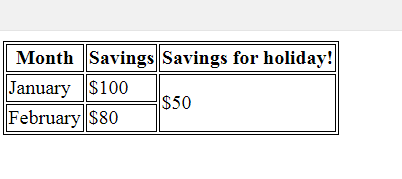
Hi @jpdriver - I want to group rows by a particular column (Refer image- like rowspan). Is there a way to handle this?
 ks549
on 19 Apr 2019
ks549
on 19 Apr 2019
This is grouped columns
On Apr 18, 2019, at 8:33 PM, Keerthana notifications@github.com wrote:
hey @antoine35 https://github.com/antoine35, i'm not sure what you mean by "grouped columns".
we have the ability to group rows by a particular Column -- is that what you want to do?
ps. in future, please don't delete the Issue template when you're opening a New Issue. it helps us stay organised and keep track of things. thank you!
Hi @antoine35 https://github.com/antoine35 - I want to group rows by a particular column (Refer image). Is there a way to handle this?
https://user-images.githubusercontent.com/14854604/56398916-2a022980-6219-11e9-9906-1b58a3069ed9.png
—
You are receiving this because you were mentioned.
Reply to this email directly, view it on GitHub https://github.com/adazzle/react-data-grid/issues/765#issuecomment-484731871, or mute the thread https://github.com/notifications/unsubscribe-auth/AABLSX7RP6W3HUY6FE7H34LPREHMRANCNFSM4DJCMZGA.
cwiese
on 19 Apr 2019
Related issues
 ryanwtyler
·
3Comments
GenoD
·
3Comments
ryanwtyler
·
3Comments
GenoD
·
3Comments
 Suprit-S-M
·
4Comments
Suprit-S-M
·
4Comments
 oliverwatkins
·
4Comments
oliverwatkins
·
4Comments
 localhosted
·
4Comments
localhosted
·
4Comments
Most helpful comment
any solution for grouped columns yet?