React-color: Addition/Deletion of number for Saturation or Lightness in the ChromePicker replaces the value with "%%".
Steps to reproduce:
1) Using the ChromePicker component, assuming saturation/lightness value to be 100%, delete the two 0's from the number.
Expected Saturation/Lightness value: 1% , Result Saturation/Lightness value: 1%%
2) Now click anywhere on the screen, the value changes to 100%. Expected value was 1%.
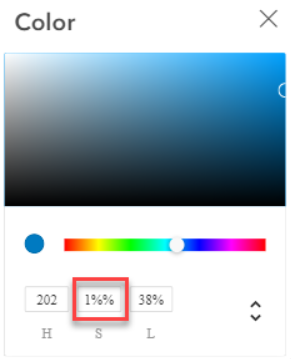
3) Similarly, when entered a number in the Saturation/ /Lightness the number is appended by two percentages "1%%" or "12%%" or "122%%". This is also reproducible for Hue component.
 pshirodkar20
All 6 comments
I can confirm same issue - I'm having it with using https://www.npmjs.com/package/material-ui-color-picker package and You can easily reproduce it.
 maksym-plotnikov
on 19 Nov 2019
maksym-plotnikov
on 19 Nov 2019
I also have the same issue! Please, fix it!
 VolodymyrKornetskyi
on 19 Nov 2019
VolodymyrKornetskyi
on 19 Nov 2019
And I have the same issue
 alexyanchuk
on 19 Nov 2019
alexyanchuk
on 19 Nov 2019
Hah, looks like I had such issue too
 VolodymyrKor
on 19 Nov 2019
VolodymyrKor
on 19 Nov 2019
I had the same problem
 Konro1
on 19 Nov 2019
Konro1
on 19 Nov 2019
现在已经解决了吗
 wu-ctrl
on 19 Jan 2020
wu-ctrl
on 19 Jan 2020
Related issues
 stevenxxiu
·
6Comments
stevenxxiu
·
6Comments
 nevendyulgerov
·
3Comments
nevendyulgerov
·
3Comments
 rpearce
·
4Comments
rpearce
·
4Comments
 scottbarrow
·
6Comments
scottbarrow
·
6Comments
 foreverpinetree
·
3Comments
foreverpinetree
·
3Comments
Most helpful comment
I can confirm same issue - I'm having it with using https://www.npmjs.com/package/material-ui-color-picker package and You can easily reproduce it.