React-color: Display Multiple Independent Color Pickers in the Same Component
how can i use 2 or more on same component.. when i use 2 pickers on same page they both open on the same time on click at one !
 mitjangid
All 8 comments
Hi,
Can you provide some code where you open your pickers ?
 yadomi
on 29 Aug 2017
yadomi
on 29 Aug 2017
You can view an example here: https://github.com/casesandberg/react-color/blob/master/examples/Sketch.js
 casesandberg
on 29 Aug 2017
casesandberg
on 29 Aug 2017
as i use 2 pickers like this at same render function , both popups open same time on click at one picker.that is the problem
mitjangid
on 31 Aug 2017
You'll need to make sure you have separate 'open' state variables (and separate variables for the color objects themselves), otherwise they'll just be dual instances of the same picker.
 mc-funk
on 31 Aug 2017
mc-funk
on 31 Aug 2017
```import React, { Component } from 'react'
import { NavLink } from 'react-router-dom';
import reactCSS from 'reactcss';
import { SketchPicker } from 'react-color';
import Localization from '../../../../../../localization'
const lang = 'FR';
class PdfGraphics extends Component {
constructor(props) {
super(props);
this.state = {
displayColorPicker: false,
color: {
r: '241',
g: '112',
b: '19',
a: '1',
},
color2: {
r: '241',
g: '112',
b: '19',
a: '1',
},
};
}
handleClick = () => {
this.setState({ displayColorPicker: !this.state.displayColorPicker })
};
handleClose = () => {
this.setState({ displayColorPicker: false })
};
handleChange = (color) => {
this.setState({ color: color.rgb })
};
render() {
const styles = reactCSS({
'default': {
color: {
width: '70px',
height: '35px',
borderRadius: '2px',
background: rgba(${ this.state.color.r }, ${ this.state.color.g }, ${ this.state.color.b }, ${ this.state.color.a }),
},
color: {
width: '70px',
height: '35px',
borderRadius: '2px',
background: rgba(${ this.state.color.r }, ${ this.state.color.g }, ${ this.state.color.b }, ${ this.state.color.a }),
},
swatch: {
padding: '3px',
background: '#fff',
borderRadius: '1px',
boxShadow: '0 0 0 1px rgba(0,0,0,.1)',
display: 'inline-block',
cursor: 'pointer',
float:'left'
},
popover: {
position: 'absolute',
zIndex: '2',
},
cover: {
position: 'fixed',
top: '0px',
right: '0px',
bottom: '0px',
left: '0px',
},
},
});
return (
    <div className="container page-content">
      <form className="default-form col-xs-12" onSubmit={this.handleSubmit} role="form">
        <h4 className="form-sec-title site-color">{Localization[lang].CONFIG_GEN_PDF}</h4>
        <section className="row pt-30">

          <div className="col-xs-12 col-sm-12">
            <div className="form-group file-group">
              <label htmlFor="">{Localization[lang].HEADER_LOGO_LABEL}</label>
              <input type="file" name="img[]" className="file"/>
              <div className="input-group col-xs-12">
                <input type="text" className="form-control" disabled placeholder=""/>
                <span className="input-group-btn">
                  <button className="browse btn btn-primary" type="button">{Localization[lang].CHOOSE_FILE_LABEL}</button>
                </span>
              </div>
            </div>
          </div>

          <div className="col-xs-2">
              <div className="form-group row">
                  <div className="col-xs-12">
                    <label htmlFor="" className="">{Localization[lang].COLOR} 1</label>
                  </div>
                  <div className="col-xs-12">
                    <div style={ styles.swatch } onClick={ this.handleClick }>
                      <div style={ styles.color } />
                    </div>
                    { this.state.displayColorPicker ? <div style={ styles.popover }>
                      <div style={ styles.cover } onClick={ this.handleClose }/>
                      <SketchPicker color={ this.state.color } onChange={ this.handleChange } />
                    </div> : null }
                </div>
              </div>

              <div className="form-group row">
                  <div className="col-xs-12">
                    <label htmlFor="" className="">{Localization[lang].COLOR} 2</label>
                  </div>
                  <div className="col-xs-12">
                    <div style={ styles.swatch } onClick={ this.handleClick }>
                      <div style={ styles.color } />
                    </div>
                    { this.state.displayColorPicker ? <div style={ styles.popover }>
                      <div style={ styles.cover } onClick={ this.handleClose }/>
                      <SketchPicker color={ this.state.color2 } onChange={ this.handleChange } />
                    </div> : null }
                  </div>
              </div>
          </div>

          <div className="col-xs-10">
            <div className="form-group">
                <label htmlFor="">{Localization[lang].FOOTER_LINE} 1</label>
                <input type="text" className="form-control" id="" placeholder=""/>
            </div>
            <div className="form-group">
                <label htmlFor="">{Localization[lang].FOOTER_LINE} 2</label>
                <input type="text" className="form-control" id="" placeholder=""/>
            </div>
          </div>

          <div className="col-xs-12 seprator-grey">
            <div className="row"><hr/></div>
          </div>

          <div className="text-right col-xs-12">
            <button type="submit" className="btn btn-primary site-bg-color mt-10">{Localization[lang].SUBMIT}</button>
          </div>
        </section>
      </form>
    </div>
)
}
}
export default PdfGraphics;
```
look at this code
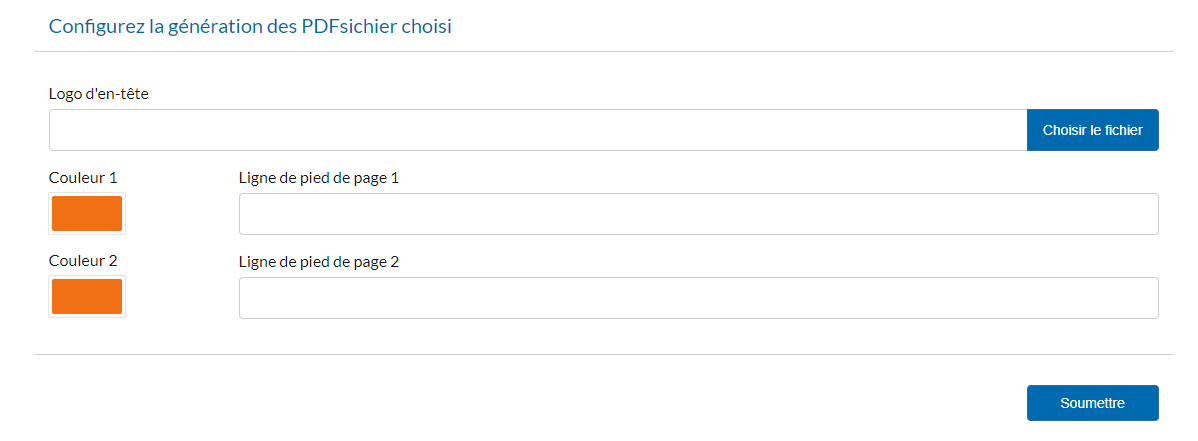
applied 2 pickers in above pic
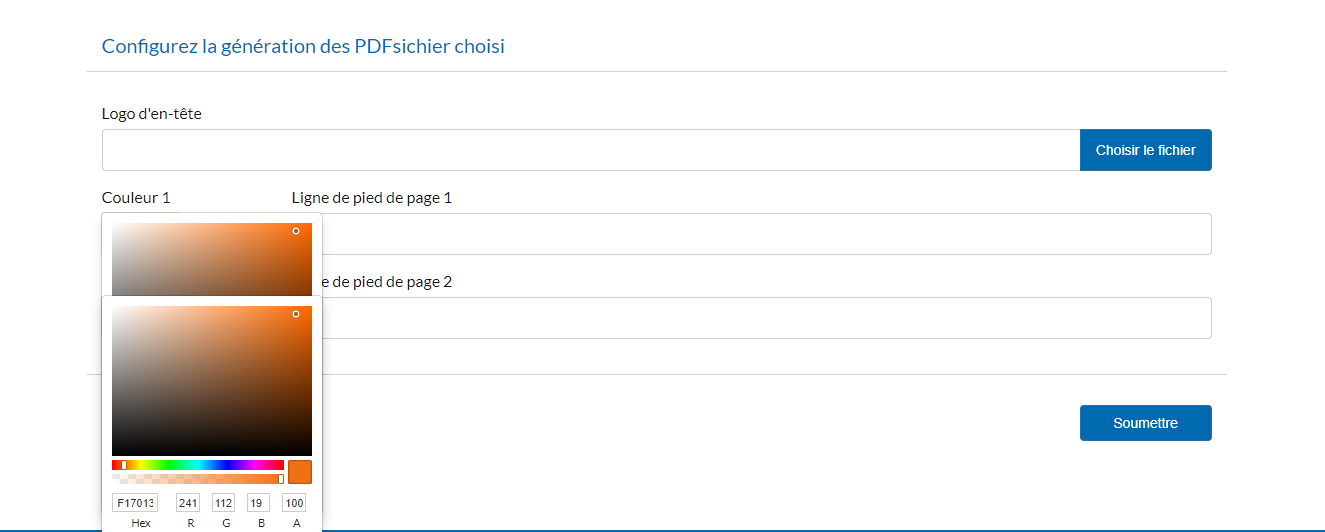
both opened on click at one picker
 amitkjangir
on 1 Sep 2017
amitkjangir
on 1 Sep 2017
Ah, the problem is you need to keep separate state variables for each picker so that they can open and close independently:
class PdfGraphics extends Component {

  constructor(props) {
     super(props);
     this.state = {
      displayColorPickerOne: false,
      displayColorPickerTwo: false,
      ...
    }
  }

  handleOpenOne = () => this.setState({ displayColorPickerOne: true })
  handleOpenTwo = () => this.setState({ displayColorPickerTwo: true })
  handleCloseOne = () => this.setState({ displayColorPickerOne: false })
  handleCloseTwo = () => this.setState({ displayColorPickerTwo: false })

  render() {
    return (
      <div>
        <div onClick={ this.handleOpenOne } />
        { this.state.displayColorPickerOne ? (
          <div style={ styles.popover }>
            <div style={ styles.cover } onClick={ this.handleCloseOne }/>
            <SketchPicker ... />
          </div>
        ) : null }

        <div onClick={ this.handleOpenTwo } />
        { this.state.displayColorPickerTwo ? (
          <div style={ styles.popover }>
            <div style={ styles.cover } onClick={ this.handleCloseTwo }/>
            <SketchPicker ... />
          </div>
        ) : null }
      </div>
    )
  }
Does this make sense?
casesandberg
on 1 Sep 2017
I am going to close this due to inactivity, feel free to open up a new issue if you still need help!
casesandberg
on 2 Mar 2018
@mitjangid Of course you can do that, and you have to use different state param for color pickers. I used below a function to create as many color pickers as I want(Which is ColorButton component). There is no need to put the whole ColorButton component here as all he does is open the color picker as in tutorial of their official page here: https://casesandberg.github.io/react-color/#create , but the main login for using them is below. Main key of function which you need to understand is that it uses different state variable as colorHex1, colorHex2 , which depends from loop. This is how i did it:
import React, { Component } from 'react';
import ColorButton from "../ColorButton";

class Form extends Component {
    state = {
        file: null,
        colorRGB1: {
            r: '241',
            g: '112',
            b: '19',
            a: '1',
        },
        colorRGB2: {
            r: '241',
            g: '112',
            b: '19',
            a: '1',
        },
        colorHex1: "Pick color 1",
        colorHex2: "Pick color 2"
    }


    handleColor = (color, i) => {
        let colorHex = "colorHex" + i;
        let colorRGB = "colorRGB" + i;

        if(color != null) {
            this.setState({
                [colorRGB]: color.rgb,
                [colorHex]: color.hex
            });
        }
    };

    getColorPickers = () => {
        let colorPickers = []

        for (let i = 1; i <= 2; i++) {
            let colorHex = "colorHex" + i;
            let color = "colorRGB" + i;
            colorPickers.push(
                <div key={i} className="form-group">
                        <ColorButton text={this.state[colorHex]}
                                     color={this.state[color]}
                                     key={i}
                                     handleColorChange={event => this.handleColor(event, i)}/>
                </div>);
        }
        return colorPickers;
    }

    render() {
        return (
            <div className="container form-container">
                    {this.getColorPickers()}
            </div>
        );
    }
}

export default Form;
Cheers , have fun programing :D
 yjviB
on 24 Jan 2019
yjviB
on 24 Jan 2019
Related issues
 YashalShakti
·
3Comments
YashalShakti
·
3Comments
 dmgauthier
·
5Comments
dmgauthier
·
5Comments
 stevenxxiu
·
6Comments
stevenxxiu
·
6Comments
 jimmylinh
·
4Comments
jimmylinh
·
4Comments
 imsheng
·
6Comments
imsheng
·
6Comments