React-calendar: tileContent called before my data has loaded
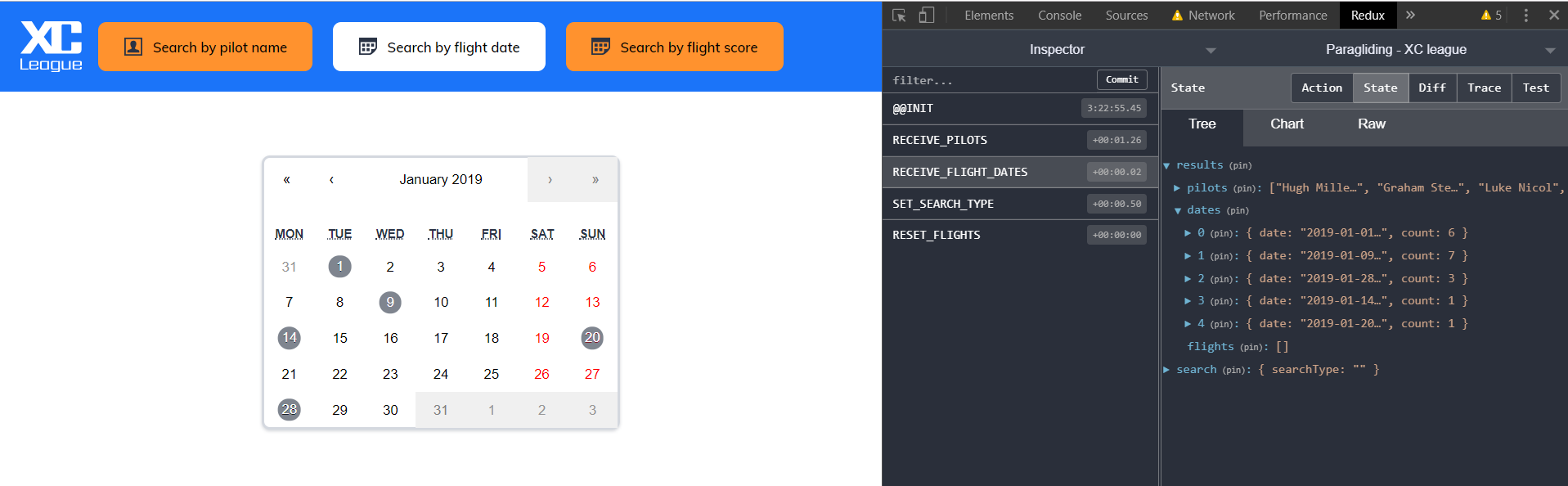
Now I select previous month and data updates:
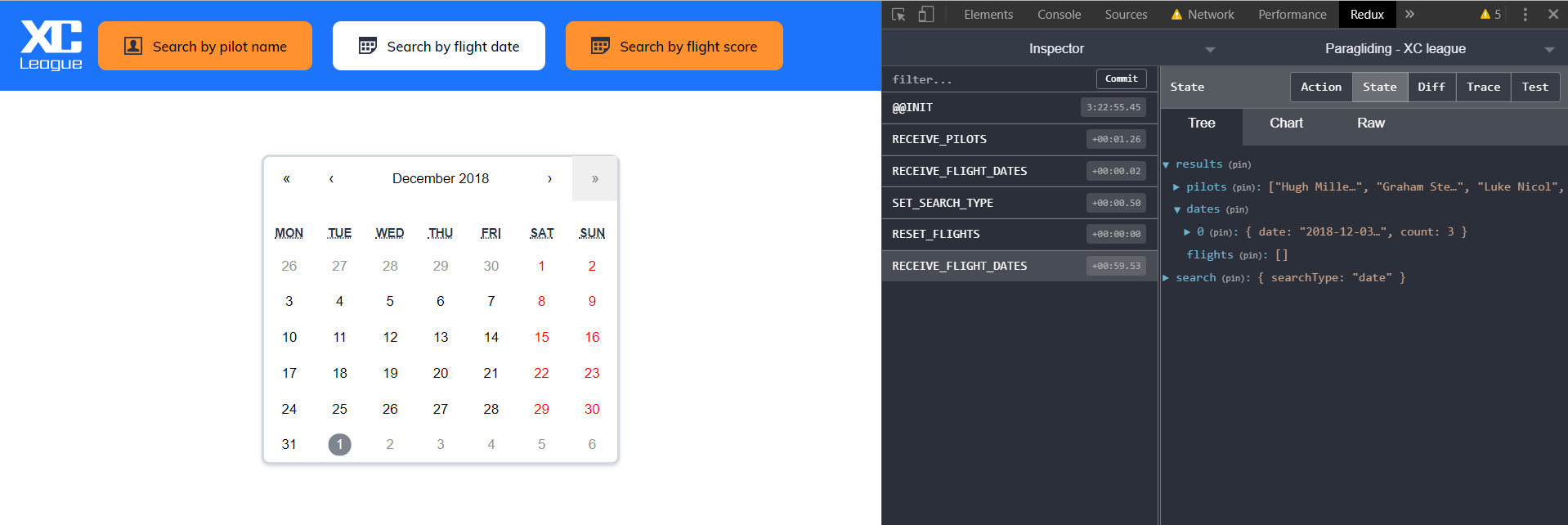
My data exists in redux store under results date.
When my app loads I have a list of dates which I use to render in tileContent. This works fine the first time, but when I change the month I load more data and this time it looks like tileContent is called before all my data arrives in this.props.dates. You can see that January data still highlighting in December.
How can I make tileContent function wait until my data loads or refresh the month view after it loads?
 Coder2012
All 5 comments
You could this.tileContent = ... at the moment you've received the data. This way, the function would be referentially unequal with the next render, causing the content to update.
 wojtekmaj
on 30 Jan 2019
wojtekmaj
on 30 Jan 2019
Thank you for the suggestion, I am using the calendar as follows:
<ReactCalendar
tileClassName="calendar-item"
tileContent={this.tileContent}
minDate={new Date('2005-01-01')}
maxDate={new Date()}
onChange={this.props.dateChangeHandler}
onClickMonth={this.props.monthChangeHandler}
onActiveDateChange={this.props.calendarNavigationHandler} />
and my tileContent fn:
tileContent = ({ date, view }) => {
let flightCount = this.dateExists(date.getMonth(), date.getDate());
if (flightCount) {
return view === 'month' && flightCount ? <span className={`calendar-flights ${this.getCountClass(flightCount)}`}>{date.getDate()}</span> : null;
}
return null;
}
I don't quite follow where I would make this update, the dates are passed as props to this wrapper component which contains your react-calendar component.
Coder2012
on 30 Jan 2019
@Coder2012 I ran into this issue as well, and did as he suggests.
class AvailabilityPicker extends Component {
  state = {
    // some state
  };

  tileHandler = this.handleDayColors.bind(this); // this is the hack to make it work

  componentDidMount() {
    // life cycle management
  }

  componentDidUpdate() {
    // more life cycle management
  }

  onDayClick = date => {
    // state handling
    // here I setState callback argument
    return this.setState(
      {
        // update the state
      },
      () => {
        this.tileHandler = this.handleDayColors.bind(this); // here you reassign!
      }
    );
  };

  handleDayColors({ date }) {
    // your own implementation
  }

  render() {
    // consuming props
    return (
      <Calendar
        onClickDay={this.onDayClick}
        minDate={today}
        maxDate={laterTime}
        view="month"
        tileClassName={this.tileHandler}
        showFixedNumberOfWeeks
      />
    );
  }
}
In short, changing to where tileClassName points will trigger a re-render. And you do this by assigning a class property in the beginning, and re-assign it after every update. Hope it makes sense!
 icyJoseph
on 31 Jan 2019
icyJoseph
on 31 Jan 2019
@icyJoseph @wojtekmaj
Now I understand it, It's working how I need it to
Thank you for your help!
Coder2012
on 31 Jan 2019
I am having a similar issue but instead I am trying to update my tileContent after my getYearMonthEvents Redux action finishes dispatching the data. I haven't been able to solve it. I tried the suggested solution.
onActiveDateChange = ({ activeStartDate, view }) => {
    const { getYearMonthEvents } = this.props;
    const payload = { date: activeStartDate };
    getYearMonthEvents(payload);
    return this.setState(
      { activeDate: activeStartDate },
      () => (this.tileHandler = this.handleDayColors.bind(this))
    );
};
 nathanhfoster
on 6 Feb 2019
nathanhfoster
on 6 Feb 2019
Related issues
 rmccue
·
4Comments
rmccue
·
4Comments
 akhilaudable
·
3Comments
wojtekmaj
·
5Comments
akhilaudable
·
3Comments
wojtekmaj
·
5Comments
 andymj
·
5Comments
andymj
·
5Comments
 fasmart4
·
6Comments
fasmart4
·
6Comments
Most helpful comment
@Coder2012 I ran into this issue as well, and did as he suggests.
In short, changing to where tileClassName points will trigger a re-render. And you do this by assigning a class property in the beginning, and re-assign it after every update. Hope it makes sense!