React-calendar: Custom styling
Hello there,
How do I get rid of some of those elements such as the << >> arrows, change Mon Tue Wed to just M T W.
Thanks in advance!
 yicaiweng
All 14 comments
check out the prevLabel and the prev2Label in the docs! The PrevLabel prop is what renders the '<' arrows, and the prev2Label is what renders '<<'
 jwrlee88
on 13 Sep 2018
jwrlee88
on 13 Sep 2018
thanks for your reply, I got that figured out. But not sure how to Chang Mon Tue We’d to just M T W T
yicaiweng
on 14 Sep 2018
You can hide that using CSS :) You need display: none on .react-calendar__month-view__weekNumbers.
 wojtekmaj
on 14 Sep 2018
wojtekmaj
on 14 Sep 2018
Hi,
How can I change font family? Also, I want circles instead of squares when selecting a day, is that possible? Can I have today’s day showing with one style and another day selected i.e. 2 days ago, with a different style?
 bobgutierrez
on 2 Nov 2018
bobgutierrez
on 2 Nov 2018
Hello, what can i do to change rendering of days to one line?
like:
1 2 3 4 ... 30
 yerassylad
on 8 Nov 2018
yerassylad
on 8 Nov 2018
@bobgutierrez
font family: Just via CSS font-family, should work fine.
circles: border-radius: 50% on .react-calendar__tile--active class
@yerassylad
flex-wrap: nowrap; to .react-calendar__month-view__days and margin: 0 !important; to .react-calendar__month-view__days .react-calendar__tile
wojtekmaj
on 12 Nov 2018
Hello @wojtekmaj, can we pass styles using the style prop?
 ctriantaf
on 19 Dec 2018
ctriantaf
on 19 Dec 2018
can add any html tag on Date box?
 sanjeevdev
on 20 Dec 2018
sanjeevdev
on 20 Dec 2018
@Clepto no, it's not possible, sorry.
@saitodisse You can't, but you can use CSS content to prepend/append content with some additional text.
wojtekmaj
on 27 Dec 2018
@bobgutierrez
circles:border-radius: 50%on.react-calendar__tile--activeclass
This does not work, since they are not circles, but ellipsises - element is 36x29
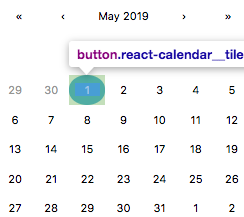
Looking at code, I think for my case it's just hardcoded as count={7} for days, so applying some custom height of height: 36px; should work for me
 llamerr
on 2 May 2019
llamerr
on 2 May 2019
@llamerr i found out you can do this to override the circle element style :)
"& abbr": {
              textDecoration: "none",
              width: "24px",
              height: "24px",
              borderRadius: "50%",
              display: "flex",
              justifyContent: "center",
              alignItems: "center"
            },
 DDDDDanica
on 25 Sep 2019
DDDDDanica
on 25 Sep 2019
how to change the border color of react-calendar?
.react-calendar{
    border: none !important;
}
I wrote this code .. but it doesn't work
 CrazyPythonLover1
on 11 Oct 2020
CrazyPythonLover1
on 11 Oct 2020
Hi, how could I change weekdays to - "M", "T", "W" ... instead of "MON" "TUE" "WED" ... ? And round only left and right for the first and last selected date on selecting range?
 raraitis
on 14 Apr 2021
raraitis
on 14 Apr 2021
@raraitis
Hi, how could I change weekdays to - "M", "T", "W" ... instead of "MON" "TUE" "WED" ... ?
See README for formatShortWeekday.
And round only left and right for the first and last selected date on selecting range?
Tiles have classes:
.react-calendar__tile--range.react-calendar__tile--rangeStart.react-calendar__tile--rangeEnd
I think they are pretty self explanatory. Add styles as you need them.
wojtekmaj
on 23 Apr 2021
Related issues
 rmccue
·
4Comments
wojtekmaj
·
3Comments
rmccue
·
4Comments
wojtekmaj
·
3Comments
 Muttakee31
·
4Comments
Muttakee31
·
4Comments
 boonware
·
4Comments
boonware
·
4Comments
 guydewinton
·
3Comments
guydewinton
·
3Comments
Most helpful comment
@bobgutierrez
font family: Just via CSS
font-family, should work fine.circles:
border-radius: 50%on.react-calendar__tile--activeclass@yerassylad
flex-wrap: nowrap;to.react-calendar__month-view__daysandmargin: 0 !important;to.react-calendar__month-view__days .react-calendar__tile