React-calendar-timeline: Items with different colors not working
Describe the bug
Item class override for overridable styles doesn't work.
To Reproduce
- Try to override the background color of an item using a class name according to the documentation.
https://github.com/namespace-ee/react-calendar-timeline#how-can-i-have-items-with-different-colors
Expected behavior
The background color is set according to the class name.
Screenshots
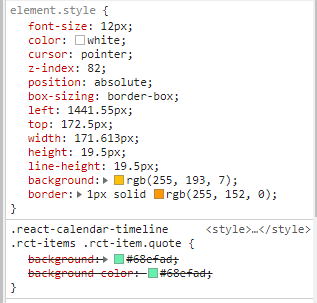
Library Version
0.19.0
Desktop (please complete the following information):
- OS: Windows 10 x64
- Browser: Chrome
- Version: 68.0.3440.106
Additional context
I believe that the introduction of src/lib/items/styles.js in e090aeec moves the background color from class to style directly on the element and prevents override from working.
 mrampersad
All 8 comments
Well, to be honest, I thought about that. You can, of course, override the inline styles using getItemProps, but I think this depends on the told you are using to style your components.
A solution I thought of is to move all the unnecessary styles to classes but if you are using itemRenderer then you will not get these classes in the return value for getItemProps. What do you think?
 Ilaiwi
on 8 Sep 2018
Ilaiwi
on 8 Sep 2018
itemRenderer is an advanced interface that I am not using. I cannot comment on how the solution will impact users of itemRenderer. It sounds like this will restore the ability to customize the look of items using class names, so I like it.
mrampersad
on 11 Sep 2018
@mrampersad Why don't you just use itemRenderer? it's purpose is use cases like this.
@Ilaiwi I disagree with moving these styles to css. The direction of introducing this props getters pattern was to provide the user with 100% control over what is rendered, including something as "simple" as styling/class names.
 mcMickJuice
on 12 Sep 2018
mcMickJuice
on 12 Sep 2018
@mcMickJuice The reason I have not considered itemRenderer is that according to the FAQ, changing the look of an item is two lines of effort: add a className and define it in CSS. Either the new behavior should be considered a bug, or the FAQ should be updated to put in a working example of changing the color. itemRenderer looks very powerful, but it is dozens of lines of reading with concepts that I haven't needed to understand thus far.
The method described in the FAQ is a reasonable middle-ground between zero customization and implementing itemRenderer myself. After reviewing the itemRenderer documentation for a few minutes, it seems like instead of a two-line change, I might have to add 40 lines to change the colors. Is that really what you want developers to do?
I also had a look at Item.js. Even if I implement itemRenderer myself, classes will probably not work. The getItemProps method always calls getItemStyle which always overrides a set of predefined styles (including background color). I do not see a simple way to prevent overridableStyles from being merged into the props except for overriding them with more specific styles (not classes). I would argue that at this point classes are basically useless for items. I may be wrong about this point, this is only from a quick look. If I'm wrong about this, feel free to ignore the next point.
With classes being useless, I can't just ask my UX designer to give me a CSS class name to put in the itemRenderer. I have to get them to write the equivalent of the overridableStyles object for each different look they wish an item to have.
mrampersad
on 12 Sep 2018
All those points are fair. Thank you for raising them.
I believe the FAQ needs to be updated as it is out of date. I understand your concern about having to dig into concepts that you might not need but this library has to strike a balance between developer productivity/ease of use and customization. We are skewing towards the latter as it gives the developer more power over what is rendered. Should you have to write 40 lines of code to change a color? Probably not. Is writing more than 2 lines of code to have complete control over rendering of an item unreasonable? No, it isn't. Sorry if this is a pain point that you yourself are facing but we have to consider all users of this library and their use cases.
@Ilaiwi what do you think of the following?
- keep baseStyles as inline, these are crucial for items to render properly
- remove overridable styles as these are the ones causing problems
- remove all logic related to canResizeLeft, canResizeRight etc from the getItemStyle function and move that into the defaultItemRenderer. Not 100% on this one
We're coming up against inline styles biting us in the butt so we should try to remove them where they're not necessary and allow the user to specify how they want to handle styles.
mcMickJuice
on 12 Sep 2018
@mrampersad I hope this isn't too much to ask but would you be able to create a codesandbox that reproduces this behavior? Like, have a bare minimum example of what you're trying to do so that, when we make these changes, we can confirm that they fixed your issue?
Here's a good starting point - https://codesandbox.io/s/zr5r289rm4
mcMickJuice
on 12 Sep 2018
@mcMickJuice Here is an example that I forked from the starting point you provided. I changed the version of react-calendar-timeline to 0.18.2 to show how it worked (https://codesandbox.io/s/r5w6xxjj4p):

This is the same code with only the version changed to 0.19.0 (https://codesandbox.io/s/24vvrzj19p):

mrampersad
on 13 Sep 2018
@mrampersad @mcMickJuice
Sorry for not getting to this sooner. This discussion is very on the point and thank you for raising it. I am actually thinking about this issue for custom headers and I had a very similar conversation with a colleague about where to put styles and how to override them.
So as far as your point @mrampersad about needing a 40 lines itemRenderer to change a color. I have the same opinion as @mcMickJuice. Since finding easy/middle ground/full control solutions is impossible.
I agree with @mcMickJuice that we need to only use inline styles for non-overridable styles only like width, left, right.... I would suggest doing the following as improvements to @mcMickJuice suggestions:
1- I agree with the first two points.
2- The third point can be done in default item renderer since we have itemContext which has everything we need to decide the style but I am thinking of using css classes instead of adding them as inline styles. The problem with classes I faced while implementing item renderer can be found here. To avoid this problem, I think PAM should be used for these classes instead of css specificity to apply the classes.
With this solution, I want to point out one thing though. You will not get any of these default classes if you use itemRenderer and you need to add them manually (I guess if you are using itemRenderer you might be needing a very specific feature for items)
I still need help in implementing this though since I don't have the resources nowadays to do this. Although this will be done in custom headers.
Ilaiwi
on 14 Sep 2018
Related issues
 DHerls
·
3Comments
DHerls
·
3Comments
 capt-obvious
·
6Comments
capt-obvious
·
6Comments
 sebastienbinda
·
5Comments
sebastienbinda
·
5Comments
 ivikash
·
5Comments
ivikash
·
5Comments
 neartik
·
4Comments
neartik
·
4Comments
Most helpful comment
@mcMickJuice The reason I have not considered itemRenderer is that according to the FAQ, changing the look of an item is two lines of effort: add a className and define it in CSS. Either the new behavior should be considered a bug, or the FAQ should be updated to put in a working example of changing the color. itemRenderer looks very powerful, but it is dozens of lines of reading with concepts that I haven't needed to understand thus far.
The method described in the FAQ is a reasonable middle-ground between zero customization and implementing itemRenderer myself. After reviewing the itemRenderer documentation for a few minutes, it seems like instead of a two-line change, I might have to add 40 lines to change the colors. Is that really what you want developers to do?
I also had a look at Item.js. Even if I implement itemRenderer myself, classes will probably not work. The getItemProps method always calls getItemStyle which always overrides a set of predefined styles (including background color). I do not see a simple way to prevent overridableStyles from being merged into the props except for overriding them with more specific styles (not classes). I would argue that at this point classes are basically useless for items. I may be wrong about this point, this is only from a quick look. If I'm wrong about this, feel free to ignore the next point.
With classes being useless, I can't just ask my UX designer to give me a CSS class name to put in the itemRenderer. I have to get them to write the equivalent of the overridableStyles object for each different look they wish an item to have.