react-bootstrap's Modal does not work with React 16
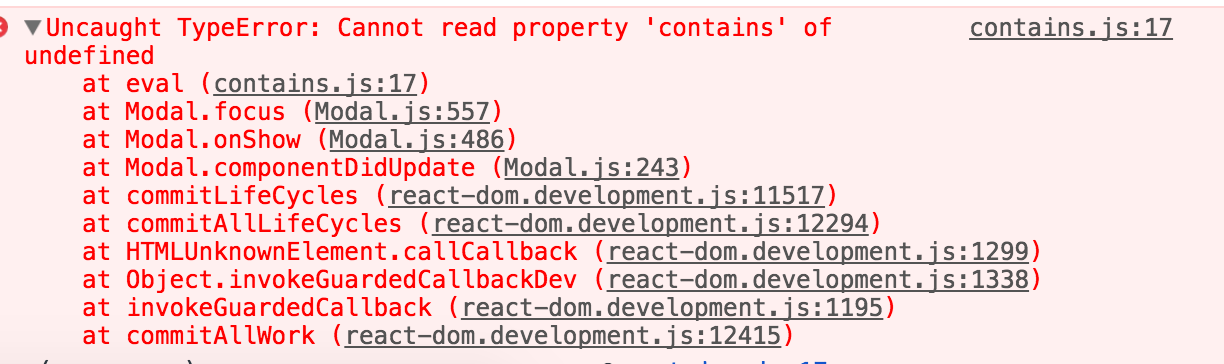
Look like the recent react's update has cause react-bootstrap modal to stop working. Here are the errors:

This issue is also discussed on react-overlays
https://github.com/react-bootstrap/react-overlays/issues/188
 ducdigital
All 40 comments
Trivially reproduced with the 2nd Bootstrap Modal sample class (the one opened by a Button) pasted into create-react-app's App.js file.
 jerry-duke
on 27 Sep 2017
jerry-duke
on 27 Sep 2017
As a workaround one can create new component
import React from 'react'
import { Modal, Fade, utils } from 'react-bootstrap'
import { Modal as ReactOverlayModal } from 'react-overlays'
import classNames from 'classnames'

class BaseModal extends ReactOverlayModal {
  focus = () => {}
}

class BootstrapModal extends Modal {
  render () {
    const {
      backdrop,
      backdropClassName,
      animation,
      show,
      dialogComponentClass: Dialog,
      className,
      style,
      children, // Just in case this get added to BaseModal propTypes.
      onEntering,
      onExited,
      ...props
    } = this.props

    const [baseModalProps, dialogProps] = splitComponentProps(props, BaseModal)

    const inClassName = show && !animation && 'in'

    return (
      <BaseModal
        {...baseModalProps}
        ref={c => {
          this._modal = c
        }}
        show={show}
        onEntering={utils.createChainedFunction(
          onEntering,
          this.handleEntering
        )}
        onExited={utils.createChainedFunction(onExited, this.handleExited)}
        backdrop={backdrop}
        backdropClassName={classNames(
          utils.bootstrapUtils.prefix(props, 'backdrop'),
          backdropClassName,
          inClassName
        )}
        containerClassName={utils.bootstrapUtils.prefix(props, 'open')}
        transition={animation ? Fade : undefined}
        dialogTransitionTimeout={Modal.TRANSITION_DURATION}
        backdropTransitionTimeout={Modal.BACKDROP_TRANSITION_DURATION}
      >
        <Dialog
          {...dialogProps}
          style={{ ...this.state.style, ...style }}
          className={classNames(className, inClassName)}
          onClick={backdrop === true ? this.handleDialogClick : null}
        >
          {children}
        </Dialog>
      </BaseModal>
    )
  }
}

const splitComponentProps = (props, Component) => {
  const componentPropTypes = Component.propTypes

  const parentProps = {}
  const childProps = {}

  Object.entries(props).forEach(([propName, propValue]) => {
    if (componentPropTypes[propName]) {
      parentProps[propName] = propValue
    } else {
      childProps[propName] = propValue
    }
  })

  return [parentProps, childProps]
}

export default BootstrapModal
Or maybe someone has better solution would be nice.
 qndrey
on 28 Sep 2017
qndrey
on 28 Sep 2017
I just lost the mount animation by using this.. But its working though with r16 so thats good
 xtabbas
on 28 Sep 2017
xtabbas
on 28 Sep 2017
@andrewBalekha answer is the quickest fix for me right now. I can attest as a temporary fix, that will work, minus the entry animation of the modal.
 DZuz14
on 29 Sep 2017
DZuz14
on 29 Sep 2017
I used shim for react overlay modal inspired by https://github.com/react-bootstrap/react-overlays/issues/188#issuecomment-332554814
import { Modal as ReactOverlayModal } from 'react-overlays';
import { Modal } from 'react-bootstrap';

const focus = () => {};
const cDU = ReactOverlayModal.prototype.componentDidUpdate;
const cDM = ReactOverlayModal.prototype.componentDidMount;

ReactOverlayModal.prototype.componentDidUpdate = function(prevProps: any) {
  if (this.focus !== focus) {
    this.focus = focus;
  }
  cDU.call(this, prevProps);
};

ReactOverlayModal.prototype.componentDidMount = function() {
  if (this.focus !== focus) {
    this.focus = focus;
  }
  cDM.call(this);
};

export default Modal;
 anaumov
on 29 Sep 2017
anaumov
on 29 Sep 2017
@anaumov nice, thanks
qndrey
on 29 Sep 2017
@anaumov Thank you for the Modal shim - it got my project working again. However, I had to make a couple of changes to it to check if this exists because this was undefined even in cDM and cDU:
import { Modal as ReactOverlayModal } from 'react-overlays'
import { Modal } from 'react-bootstrap'

const focus = () => {}
const cDU = ReactOverlayModal.prototype.componentDidUpdate
const cDM = ReactOverlayModal.prototype.componentDidMount

ReactOverlayModal.prototype.componentDidUpdate = prevProps => {
  if (this) { // <- check for this exists
    if (this.focus !== focus) {
      this.focus = focus
    }
    cDU.call(this, prevProps)
  } //
}

ReactOverlayModal.prototype.componentDidMount = () => {
  if (this) { // <- check for this exists
    if (this.focus !== focus) {
      this.focus = focus
    }
    cDM.call(this)
  } //
}

export default Modal
And, the shim is still throwing an error onHide:
Modal.js:496 Uncaught TypeError: Cannot read property 'remove' of undefined
    at Modal.onHide (Modal.js:496)
    at Object.handleHidden [as onExited] (Modal.js:515)
    at Transition.js:99
    at Transition._this.nextCallback (Transition.js:134)
    at commitCallbacks (react-dom.development.js:7250)
    at commitLifeCycles (react-dom.development.js:11524)
    at commitAllLifeCycles (react-dom.development.js:12294)
    at HTMLUnknownElement.callCallback (react-dom.development.js:1299)
    at Object.invokeGuardedCallbackDev (react-dom.development.js:1338)
    at invokeGuardedCallback (react-dom.development.js:1195)
onHide @ Modal.js:496
handleHidden @ Modal.js:515
(anonymous) @ Transition.js:99
_this.nextCallback @ Transition.js:134
commitCallbacks @ react-dom.development.js:7250
commitLifeCycles @ react-dom.development.js:11524
commitAllLifeCycles @ react-dom.development.js:12294
callCallback @ react-dom.development.js:1299
invokeGuardedCallbackDev @ react-dom.development.js:1338
invokeGuardedCallback @ react-dom.development.js:1195
commitAllWork @ react-dom.development.js:12415
workLoop @ react-dom.development.js:12687
callCallback @ react-dom.development.js:1299
invokeGuardedCallbackDev @ react-dom.development.js:1338
invokeGuardedCallback @ react-dom.development.js:1195
performWork @ react-dom.development.js:12800
scheduleUpdateImpl @ react-dom.development.js:13185
scheduleUpdate @ react-dom.development.js:13124
enqueueSetState @ react-dom.development.js:9646
760.ReactComponent.setState @ react.development.js:218
Transition._this.safeSetState @ Transition.js:123
(anonymous) @ Transition.js:98
_this.nextCallback @ Transition.js:134
react-dom.development.js:8305 The above error occurred in the <Transition> component:
    in Transition (created by Fade)
    in Fade (created by Modal)
    in div (created by Modal)
Hope this helps someone!
 gtwilliams03
on 29 Sep 2017
gtwilliams03
on 29 Sep 2017
@gtwilliams03 Same problem here...
 nelsongustavo
on 30 Sep 2017
nelsongustavo
on 30 Sep 2017
If it helps to anyone, I was having this issue after upgrading react, then checked the react-bootstrap package.json file and found this:
"peerDependencies": {
    "react": "^0.14.9 || >=15.3.0",
    "react-dom": "^0.14.9 || >=15.3.0"
},
So I downgraded the versions to the ones required and now it works fine.
I understand this is not a final solution, but if you don't need the last React version, this could help.
 alberdonpi
on 1 Oct 2017
alberdonpi
on 1 Oct 2017
Given that we are loosing mount transitions when hacking it with a shim, and after messing with the transition api provided with react-overlays, I came to a conclusion that using new react portals is the best (and easiest) solution to hack your own modal, PS animating with react-motion
Here I made an example repo if anyone is interested https://github.com/touqeerkhan11/react-portal-example (demo https://touqeerkhan11.github.io/react-portal-example/)
xtabbas
on 1 Oct 2017
Same here.
When will there be an upgrade for react-overlays so that overlays are compatible with react 16?
Meanwhile compelled to downgrade React back to v 15.5.4.
Looks like this is how third party plugins suspend penetration of progress)
contains.js:17 Uncaught TypeError: Cannot read property 'contains' of undefined

 wzup
on 5 Oct 2017
wzup
on 5 Oct 2017
Same issue here. Then I go back to react and react-dom v15.6.2, everything works well.
 TLiu2014
on 5 Oct 2017
TLiu2014
on 5 Oct 2017
I've upgraded my codebase to React 16.
I got the modals working, but the background is not darkened around the modal.
Also, the "show" argument doesn't seem to work.
 starqueue
on 7 Oct 2017
starqueue
on 7 Oct 2017
well I just had to run on my terminal $ npm install --save [email protected] [email protected]
and this sorted out all my problems
 GeorgeCrisan
on 7 Oct 2017
GeorgeCrisan
on 7 Oct 2017
When I upgraded to React 16, everything in my app worked as normal except for react-bootstrap Modals.
I'm seeing the same context.contains error as the original issuer showed in their screenshot.
Any idea of a fix to Modal?
The shims mentioned above introduce their own problems, including this js warning caused by the appear attribute in Fade Warning: Received 'true' for non-boolean attribute 'appear'. If this is expected, cast the value to a string. Also with the shims above, my modal backdrop doesn't appear and the animations are lost.
Switching to the react-motion solution mentioned above isn't a drop-in solution, it requires reworking a lot of things, work I'd rather not undertake if there's a fix for bootstrap Modals coming soon.
Downgrading to previous (15.x) version of React is obviously less than ideal.
Anyone have a better fix?
UPDATE 2017.10.14:
As others mention below, version 0.7.3 of react-overlays seems to have fixed the issue. I reinstalled react-bootstrap with react-overlays via npm and Modals seems to work now with React 16.
 boaticus
on 8 Oct 2017
boaticus
on 8 Oct 2017
There is no good fix until we can upgrade the underlying portal component to the new react v16 api, which is almost done, we are working through some api considerations in the PR until then tho the modal isn't supported in v16
 jquense
on 8 Oct 2017
jquense
on 8 Oct 2017
@andrewBalekha workaround working great for until version 0.8 which using portals and other props than <0.8 versions. Thanks for the workaround.
 idangozlan
on 9 Oct 2017
idangozlan
on 9 Oct 2017
@jquense can you please confirm when we will get this fix done for Modals? any release planned any time soon?
 Sram5368
on 10 Oct 2017
Sram5368
on 10 Oct 2017
Hello - I ran into this issue last night...
Here is a very simple demo app that does a few things:
- demonstrates how to use shim posted by @anaumov
- makes it easy to comment/uncomment lines to flip back to the failing state.
Hope you get this sorted out soon - Cheers!
 aljachimiak
on 11 Oct 2017
aljachimiak
on 11 Oct 2017
An alternative to the show (until it gets fixed) is just wrap the modal in an if statement which is toggled in state change
{this.state.showModal ? (
<Modal.Dialog>
...
</Modal.Dialog>
) : null}
The only downside is the click-outside-box-to-close won't work but you can still add a 'close' button in the modal that will trigger the hide
 mclapa
on 11 Oct 2017
mclapa
on 11 Oct 2017
version 0.7.3 of react-overlays seems to have fixed the issue.
I reinstalled react-bootstrap from npm (which grabbed the new react-overlays version) and it seems to work now with React 16.
 jharris4
on 14 Oct 2017
jharris4
on 14 Oct 2017
note for yarn users: you may have to remove, then add react-bootstrap for the dependencies to properly update.
Working for me now, thanks for the updates!
 kieran
on 14 Oct 2017
kieran
on 14 Oct 2017
Fixed for me as well!
boaticus
on 14 Oct 2017
Is this actually fixed? Would someone mind giving a simple example please of a modal that implements the onExited event and the "show" property? I can't find the syntax to make it work.
thanks
 dukedougal
on 15 Oct 2017
dukedougal
on 15 Oct 2017
Working for me now .. after reinstalling react-bootstrap from npm. But why this bug is still kept open .. Is there something left still?
 kanwar-saad
on 15 Oct 2017
kanwar-saad
on 15 Oct 2017
This is in fact fixed. Wipe cache and reinstall w/the latest react-overlays dep.
 taion
on 16 Oct 2017
taion
on 16 Oct 2017
After updating react-overlay npm, I confirmed that it works fine with React 16 on local development.
But I am using cdnjs.com on production. The react-bootstrap 0.31.3 hosted on cdnjs is bundling the old react-overlay npm.
https://cdnjs.com/libraries/react-bootstrap
I'm happy that you can also update CDN.
 shokai
on 16 Oct 2017
shokai
on 16 Oct 2017
λ npm info react-overlays dist-tags
{ latest: '0.7.3' }

λ npm info react-bootstrap dependencies

{ 'babel-runtime': '^6.11.6',
  classnames: '^2.2.5',
  'dom-helpers': '^3.2.0',
  invariant: '^2.2.1',
  keycode: '^2.1.2',
  'prop-types': '^15.5.10',
  'prop-types-extra': '^1.0.1',
  'react-overlays': '^0.7.0', // <--- Should this be 0.7.3?
  'react-prop-types': '^0.4.0',
  uncontrollable: '^4.1.0',
  warning: '^3.0.0' }
 jktravis
on 16 Oct 2017
jktravis
on 16 Oct 2017
I'd suggest removing either yarn.lock or package-lock.json in your local env otherwise react-overlays 0.7.3 will never be resolved properly.
Also, it would be helpful to move "react-overlays": "^0.7.0", to "^0.7.3" then remove lock files won't be necessary as @jktravis pointed out.
One more thing, the patch in "^0.7.3" fixed the issue for us 👍 .
 juanpicado
on 17 Oct 2017
juanpicado
on 17 Oct 2017
Thanks for all the hard work getting this one ironed out!
Any idea when this will be published to the react-bootstrap cdn bundle?
It's also still affecting live editors like this example on codesandbox.io.
 taylorham
on 17 Oct 2017
taylorham
on 17 Oct 2017
Really impressive turnaround on this issue! Kudos to the maintainers and also the community.
 DaddyWarbucks
on 17 Oct 2017
DaddyWarbucks
on 17 Oct 2017
Can confirm it works!! Amazing thank you!
 adrienDog
on 18 Oct 2017
adrienDog
on 18 Oct 2017
Hey folks! I'm upgrading to React16 and also ran into the Cannot read property 'contains' of undefined error when trying to open a react-bootstrap modal. I followed the aboveadvice to delete package-lock.json and reinstall react-bootstrap@^0.31.3. Now my modal opens as expected, but the onHide is no longer working for click events (Close button, x in the corner, and outside the modal). Using this esc key is the only way to dismiss the modal.
The only thing that has changed is the upgrades for react and react-bootstrap, so I'm wondering if there is another step I missed?
Thanks!
const ExampleModal = ({
    isShownModal,
    onHide,
}) => (
    <Modal show={isShownModal} onHide={onHide}>
        <Modal.Header closeButton>
            <Modal.Title>Example Title</Modal.Title>
        </Modal.Header>

        <Modal.Body>
            <h5>Example body content</h5>
        </Modal.Body>

        <Modal.Footer>
            <Button onClick={onHide}>Close</Button>
        </Modal.Footer>
    </Modal>
)

export default class ExampleModal extends React.Component {
    constructor(props) {
        super(props)
        this.state = {isShownModal: false}
    }

    openModal = () => {this.setState({ isShownModal: true })}
    closeModal = () => {this.setState({ isShownModal: false })}

    render() {
        return (
            <span onClick={this.openModal}>
                <i className="fa fa-question-circle mr-3"></i>
                <ExampleModal
                    isShownModal={this.state.isShownModal}
                    onHide={this.closeModal}
                />
            </span>
        )
    }
}
 jahlela
on 23 Oct 2017
jahlela
on 23 Oct 2017
@jahlela
I got the same issue.
It appears that upon React 16, a click on Modal's close sign (or a click outside Modal) that should have triggered this.closeModal only, now triggers not only this.closeModal in Modal component, but also the this.openModal in the outer wrapper of Modal.
I temporarily fixed it by moving Modal out of its wrapper by returning an array of both the wrapper/trigger and the Modal instead. You may try something as follows:
render() {
  return [
    <span key="trigger" onClick={this.openModal}>
      <i className="fa fa-question-circle mr-3"></i>
    </span>,
    <ExampleModal
      key="modal"
      isShownModal={this.state.isShownModal}
      onHide={this.closeModal}
    />,
  ];
}
I suppose there should be some fix to Modal to reverse the incompatibility.
 microdou
on 23 Oct 2017
microdou
on 23 Oct 2017
@microdou Worked like a charm! I'll count that as our first array return implemented with React 16 :)
jahlela
on 24 Oct 2017
@microdou You saved me !!
 zxzl
on 7 Dec 2017
zxzl
on 7 Dec 2017
@microdou solution didn't work for me... any help?
thanks!
 StuartMartinho
on 7 Sep 2018
StuartMartinho
on 7 Sep 2018
I'm running into this issue with the latest version of every module in my app. I'm not sure how to solve this 😕
 demian85
on 30 Oct 2018
demian85
on 30 Oct 2018
ya'll we've been using modals from react-bootstrap in production with react 16 for the last 18 months, since it was released. If anyone has a reproduction of this error we;d be happy to look at it, but we can't troubleshoot errors we can't see.
if the error is due to the way react 16 changed event propagation for portals, then all modal libraries will have the same problem.
jquense
on 30 Oct 2018
Same issue here. Then I go back to
reactandreact-domv15.6.2, everything works well.
This worked me 👍
 VijayKumarBadugu
on 9 May 2020
VijayKumarBadugu
on 9 May 2020
Related issues
 ericdcobb
·
3Comments
ericdcobb
·
3Comments
 ckiss
·
3Comments
ckiss
·
3Comments
 AnderssonChristian
·
3Comments
AnderssonChristian
·
3Comments
 agile116
·
3Comments
agile116
·
3Comments
 delia-m
·
3Comments
delia-m
·
3Comments
Most helpful comment
There is no good fix until we can upgrade the underlying portal component to the new react v16 api, which is almost done, we are working through some api considerations in the PR until then tho the modal isn't supported in v16