React-bootstrap-typeahead: Option to highlight first item instead of showing gray text
Would it be possible to add option selectFirstItem so it could work like this?

 user753
All 7 comments
Hi @user753, thanks for the feature request. Can you tell me more about why you need this and who else this might be useful for?
In general, it's unlikely I'd add a very specific feature like selectFirstItem since it leads to a bloated and inflexible API. I'd consider adding a way to disable the hint. I looked at highlighting the first option in the past and the behavior was strange, so it wasn't a straightforward option to add.
 ericgio
on 5 Jun 2019
ericgio
on 5 Jun 2019
Can you tell me more about why you need this and who else this might be useful for?
I believe it's just more common approach for autocomplete. For example ant.desing, material highlight first item. So if someone search for autocomplete solution I think they would prefer more popular approach.
Option to disable the hint and programmatic control highlight item would also work.
user753
on 5 Jun 2019
I would also benefit from this feature; I'm sorting the list items in order of relevance, so allowing selection of the top item would streamline the user's searching.
 davey561
on 20 Aug 2019
davey561
on 20 Aug 2019
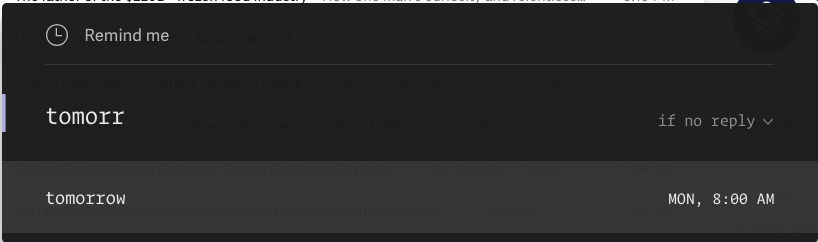
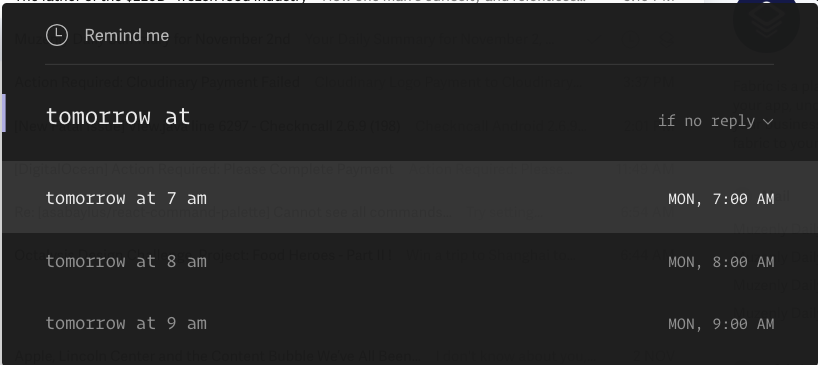
We would greatly value this feature as well. It will actually make it extremely fast and we are desperately looking for this option as well. So a good example / use case is the superhuman ( the email app ) like reminder keyboard. Where if I want to type in something like a time "Tomorrow at 8 pm".
What superhuman does is that until I type "tomorrow", it shows me only tomorrow in the drop down so I can click enter, but once i type "tomorrow at", it gives me more options like "tomorrow at 7 am", "tomorrow at 8 am" and "tomorrow at 9 am".
So if you make something like this available, I don't have to type the full word tomorrow ( because typeahead would allow me to click on the right button) and once I do that, i can type the rest of it quickly and / or pick from the suggestions as I go.
We looked at multiple libraries and it seems like you might be our best bet and you also have this nice feature of "hiding the menu when no options are available" so it let's us type our own input.
Please please add this or then show us how to do this. Would be very very grateful !
 sudhamab
on 3 Nov 2019
sudhamab
on 3 Nov 2019
@ericgio any chance you can help us with this? getting quite frustrated trying multiple other libraries (which have select but then they don't have type ahead, clearing the input is tricky and they show a menu item for the "no options" ).
Would be great if we can have an option to 'select first' by default and highlight the rows as it matches so I can press enter to select. So it's like combining the main benefit of react-select library but with the power & simplicity of react-bootstrap-typeahead.
On tab I can complete the word ( as is now) and on enter I can select from the highlighted row. Only the "selectHintOnEnter" prop will have to be false in this case by default so that there is no conflict.
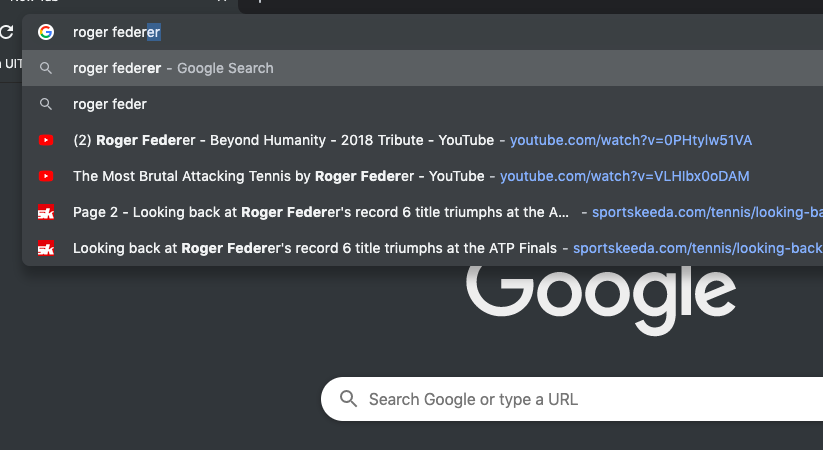
This will increase the speed of inputting quite a bit and something like this is also available if you search inside the URL field of the chrome browser ( attaching screenshot) Except that in chrome, to complete the word you have to click on the right arrow but it's faster in RBS with the "Tab" button.
sudhamab
on 5 Nov 2019
Hi @sudhamab and thanks for the detailed explanation. Unfortunately, this isn't a feature I'm likely to add in the near future.
ericgio
on 5 Nov 2019
thanks @ericgio could you at least guide me how I can do this and where to look at in the code. So we can implement it for our project?
sudhamab
on 6 Nov 2019
Related issues
 gilm123
·
10Comments
gilm123
·
10Comments
 yedyharova
·
9Comments
yedyharova
·
9Comments
 juanpaco
·
10Comments
juanpaco
·
10Comments
 jtmunn
·
4Comments
jtmunn
·
4Comments
 rsshilli
·
7Comments
rsshilli
·
7Comments
Most helpful comment
I believe it's just more common approach for autocomplete. For example ant.desing, material highlight first item. So if someone search for autocomplete solution I think they would prefer more popular approach.
Option to disable the hint and programmatic control highlight item would also work.