React-bootstrap-table2: Cannot use pageListRenderer with PaginationListStandalone
I would like to use a custom page list as a standalone component so that I can change the order of the pagination list and total.
However, when I use a custom page list, while it does appear to pass my pageListRenderer in the props, the custom page list is not rendered when used as a standalone component. Instead, the table renders the default page list.
Here are some code snippets.
As a side note, I have my pageListRender in a separate file for re-use in other places. I have tried using it within the same file as the table, but this doesn't have any impact.
PageListRenderer.js:
(nothing fancy here, just copying and pasting the example from Storybook to illustrate the issue)
```import React from "react";
const PageListRenderer = ({ pages, onPageChange }) => {
const pageWithoutIndication = pages.filter(p => typeof p.page !== "string");
return (
{pageWithoutIndication.map(p => (
onClick={() => onPageChange(p.page)}
>
{p.page}
))}
);
};
export default PageListRenderer;
**SampleTable.js:**
```import React, { PureComponent } from "react";
import BootstrapTable from "react-bootstrap-table-next";
import paginationFactory, {
  PaginationProvider,
  PaginationTotalStandalone,
  PaginationListStandalone
} from "react-bootstrap-table2-paginator";
import PageListRenderer from "./PageListRenderer";
import { rows, columns } from "../data/data.js";

class SampleTable extends PureComponent {
  render() {
    const options = {
      sizePerPage: 1,
      pageListRenderer: props => PageListRenderer({ ...props }),
      custom: true,
      totalSize: rows && rows.length
    };

    const pagination = paginationFactory(options);

    return (
      <PaginationProvider pagination={pagination}>
        {({ paginationProps, paginationTableProps }) => (
          <div>
            <PaginationTotalStandalone {...paginationProps} />
            <BootstrapTable
              keyField="id"
              data={rows}
              columns={columns}
              {...paginationTableProps}
            />
            <PaginationListStandalone {...paginationProps} />
          </div>
        )}
      </PaginationProvider>
    );
  }
}

export default SampleTable;
App.js:
```import React from "react";
import "./App.css";
import SampleTable from "./components/SampleTable.js";
function App() {
return (
);
}
export default App;
```
Expected:
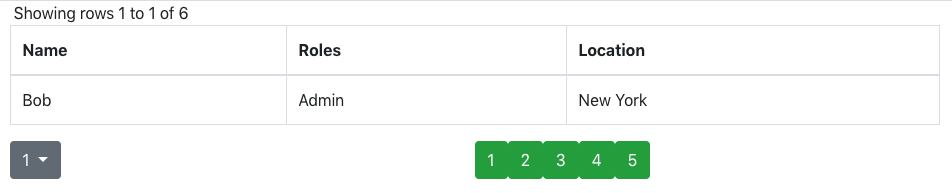
Actual:

Thanks for your time!
 mvernier-fuze
All 9 comments
Same here. Thanks!
 ghost
on 17 May 2019
ghost
on 17 May 2019
@mswithenbank-fuze @oprobst-ethz You can not use PaginationListStandalone and pageListRenderer at the same time.
The purpose of PaginationListStandalone is you want to put this component in a custom position
The purpose of pageListRenderer is you want to custom this component
If you want to do both of them, you can just:
<PaginationProvider pagination={pagination}>
        {({ paginationProps, paginationTableProps }) => (
          <div>
            <PageListRenderer { ....paginationProps } />
            <BootstrapTable
              keyField="id"
              data={rows}
              columns={columns}
              {...paginationTableProps}
            />
          </div>
        )}
      </PaginationProvider>
paginationProps have all the necessary data for you to custom the component. Do let me know if this answer can not help you, thank
 AllenFang
on 19 May 2019
AllenFang
on 19 May 2019
Thanks for the reply @AllenFang.
What I am ultimately trying to do is move only the pagination total to the top (by default, it is shown in the bottom, below the table). I still want to show the pagination pages on the bottom.
It seems the pagination total and the pagination pages are grouped together at the bottom, but I need to separate them. This is why I was trying to use PaginationTotalStandalone.
I could move the total with CSS, but is there a way I can move the total in the component using the existing options, while also having a custom PageListRenderer?
Thank you!
mvernier-fuze
on 22 May 2019
sorry for lately reply, @mswithenbank-fuze I think the only way so far is use standalone component.
AllenFang
on 1 Jun 2019
Hey @AllenFang I'm in the same situation as described in this issue. How would I go about to create a custom <PageListRenderer { ....paginationProps } /> component you mentioned? How to I get it to receieve the {pages, onPageChange} props?
 lham
on 3 Mar 2020
lham
on 3 Mar 2020
I'm having the same issue here, @lham did you get this resolved ?
 vhbert
on 20 Mar 2020
vhbert
on 20 Mar 2020
@vhbert I ended up creating my own component replacing the <PageListRenderer> following the code in the library. I'll just make a code dump and hopefully you can replicate it in a way you want :)
Here is the component
import React from 'react';
import ButtonGroup from 'react-bootstrap/ButtonGroup';
import standaloneAdapter from 'react-bootstrap-table2-paginator/lib/src/standalone-adapter';
import PaginationHandler from 'react-bootstrap-table2-paginator/lib/src/pagination-handler';
import paginationListAdapter from 'react-bootstrap-table2-paginator/lib/src/pagination-list-adapter';

const ButtonGroupPaginationListComponent = ({ pages, onPageChange, pageButtonRenderer }) => {
    if (_.isEmpty(pages)) {
        return null;
    }

    const onClick = (page) => {
        if (!page.active && !page.disabled) {
            onPageChange(page.page)
        }
    };

    return (
        <ButtonGroup>
            {pages.map(page => pageButtonRenderer(page, () => onClick(page)))}
        </ButtonGroup>
    )
};

const ButtonGroupPaginationList = standaloneAdapter(PaginationHandler(paginationListAdapter(ButtonGroupPaginationListComponent)));

export default ButtonGroupPaginationList;
which I then use like this:
```es6
)}
lham
on 20 Mar 2020
Thanks for the very quick answer, your solution works like a charm.
I'll just have to write some more typings for it since I am using TypeScript.
Thanks again for your help
vhbert
on 20 Mar 2020
Cant get this to work either :(
 EinarJohansson
on 14 Aug 2020
EinarJohansson
on 14 Aug 2020
Related issues
 harishkumarreddy12
·
3Comments
harishkumarreddy12
·
3Comments
 dillobird
·
3Comments
dillobird
·
3Comments
 josefheld
·
3Comments
josefheld
·
3Comments
 nskiro
·
4Comments
nskiro
·
4Comments
 cnav007
·
4Comments
cnav007
·
4Comments