React-bootstrap-table2: formatExtraData value from state not refreshing
I might have implemented it not on the most perfect way, but it worked for RBTv1.
Why? Because the formatExtraData value was explicitly declared inside render.
With RBTv2, it is just a field on a JSON, and changing the state isn't seen by render().
I make a bunch of ajax calls (up to 3). One is for master tabledata, and others to get descriptions about IDs used on the database table, so I can display names instead of ids.
Since everything is async, it happens to update this side data bucket AFTER rendering, and I keep seeing nothing at table cells (since side-json is empty at this moment).
The trick is (and where I am asking for quick help) that if I do paginate, next page has all my data, and if I go back to page 1, it is sitting there perfectly. But I don't know how to trigger that re-render w/o changing pages.
Long help would be if this is a real problem, and needs to be discussed. My point on this is because using table v1 it was working because it happened to be declared in render on TableHeaderColumn as prop.
 lovato
All 17 comments
I did a few experiments now, w/o success.
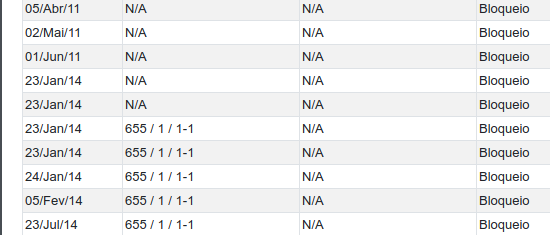
One thing I saw is changing the page rows limit from 25 to 50. The "newer" records showed up correctly, but the current older view remained with the "n/a" in the fields, meaning it was not rendered again.
lovato
on 16 Mar 2019
Same data, if I keep 25 per page, and do "go to page 2" and "go to page 1" back.
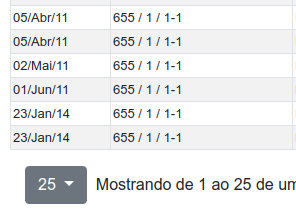
From now on, everything gets fine, till I reload the page.
lovato
on 16 Mar 2019
Some snips of code:
component.constructor:
    this.state = {
      contas: []
    };

component.async componentDidMount:
    await api.get_contas().then(response => {
      if (response.status === 200) {
        this.setState({
          contas: response.data.message
        });
      }
    });

component.render.columns:
      {
        dataField: "conta_uuid",
        text: "Banco / Ag / Conta",
        sort: true,
        align: "left",
        formatter: contaFormatter,
        formatExtraData: this.state.contas
      },

function contaFormatter(cell, row, rowIndex, values=[]) {
  // bad code, I know, it has terrible performance, but I needed a lookup
  if (values) {
    var i;
    for (i = 0; i < values.length; i++) {
      if (cell == values[i].uuid) {
        return (
          values[i].banco_codigo +
          " / " +
          values[i].banco_agencia +
          " / " +
          values[i].banco_conta +
          "-" +
          values[i].banco_conta_digito
        );
      }
    }
    return "N/A";
  } else {
    return null;
  }
}
Well, "solved" my problem this way:
component.render:
    if ( this.state.contas.length > 1) {
      const columns = [...
      ... and so on up to render the table
    } else {
      return (<div> HOLD ON </div>);
    }
I will evolve it to a better "no data yet" handler, but if there is another way to implement something better than the way I did, I will appreciate. Else, this ticket can be closed.
lovato
on 16 Mar 2019
@lovato https://react-bootstrap-table.github.io/react-bootstrap-table2/docs/column-props.html#columnformatter-function
I will not suggest developer to give a state data to formatExtraData, but if you did, you must update formatExtraData in a correct way: https://redux.js.org/recipes/structuring-reducers/immutable-update-patterns
If ok, would you please give me a simple and minimal code on codesandbox so that I can help you to see what's kind of issue you face? No rush, thank you
btw, https://codesandbox.io/s/jlol04qrxv this is an example you can take and remember to change react-bootstrap-table-next version to the newest. Many thank
 AllenFang
on 17 Mar 2019
AllenFang
on 17 Mar 2019
@AllenFang I am also experiencing this issue. Would you mind explaining what is incorrect about the example below?
 jrae26
on 22 Mar 2019
jrae26
on 22 Mar 2019
@jrae26 I think I can reproduce your case and I hope @lovato had the same issue like your, I will fix it in next version, thanks
AllenFang
on 25 Mar 2019
hello @jrae26 and @lovato this issue is fixed, please at least to upgrade related package listed below to newest version:
https://react-bootstrap-table.github.io/react-bootstrap-table2/blog/2019/03/26/version-bump.html
AllenFang
on 26 Mar 2019
I will give it a try, but as I said, I am now waiting till all my ajax calls get 200, and that is the greenlight to render the component.
lovato
on 28 Mar 2019
I still have this issue with v3.0.3 and v3.1.0 using this sample:
https://codesandbox.io/s/zkn05nxpvl
Updates to state do not force a rendering of the table even if passed through formatExtraData. However, if you choose to sort a column, that does force a render and displays the updated state data.
 mvandergrift
on 10 Apr 2019
mvandergrift
on 10 Apr 2019
@AllenFang I coded another feature, which led me back to the same issue, on a different Bootstrap Table property.
"react-bootstrap-table-next": "^3.1.1",
"react-bootstrap-table2-paginator": "^2.0.6",
"react-bootstrap-table2-toolkit": "^1.4.1",
      {
        dataField: "name",
        formatter: (cell, row) => titleFormatter(cell, row, this.props.globalState.debug_ui),
So, just by clicking here:

I understand that my table should refresh, but it doesn't.
However, if I navigate or even paginate, it gets refreshed nicely.
Is this supposed to be fixed, or I should workaround this in a different way? I mean, I can force-refresh if I find a way to subscribe to globalstate changes, but I don't think this will be correct.
Should we keep it here or open another issue?
Best,
Lovato
lovato
on 18 Apr 2019
I still have this issue with v3.0.3 and v3.1.0 using this sample:
https://codesandbox.io/s/zkn05nxpvlUpdates to state do not force a rendering of the table even if passed through formatExtraData. However, if you choose to sort a column, that does force a render and displays the updated state data.
I'm facing the exact same issue. Can't seem to figure out an effective and efficient workaround either.
 NAsejevs
on 29 Aug 2019
NAsejevs
on 29 Aug 2019
I still have this issue with v3.0.3 and v3.1.0 using this sample:
https://codesandbox.io/s/zkn05nxpvl
Updates to state do not force a rendering of the table even if passed through formatExtraData. However, if you choose to sort a column, that does force a render and displays the updated state data.I'm facing the exact same issue. Can't seem to figure out an effective and efficient workaround either.
Using "react-bootstrap-table-next": "^3.2.1" in the codesandbox does the trick
 chazarabriseis
on 31 Oct 2019
chazarabriseis
on 31 Oct 2019
I seem to still be having this issue in ^4.0.6 with my use case. I am passing in a Map, and every time the data updates, I create a new Map and pass that to formatExtraData. However, it does not rerender when I pass a new Map to formatExtraData.
I update the state of the Map like this:
function addNewData(data, state) {
  return {
    ...state,
    mapping: new Map([...state.mapping, ...data])
  }
}
Then I pass state.mapping to formatExtraData. But it does not update.
 IPetrik
on 16 Oct 2020
IPetrik
on 16 Oct 2020
The library (underscore) that you are using to compare equality for formatExtraData does not seem to work right for Map objects:
import React from "react";

import _ from "underscore";
import {_ as __} from "lodash";

import "./styles.css";

export default function App() {
  const [map1, map2] = [
    new Map(),
    new Map(
      [["hello", "world"], ["works", false]]
    )]
  return (
    <div className="App">
      <p>native: {(map1 === map2).toString()}</p>
      <p>underscore: {_.isEqual(map1, map2).toString()}</p>
      <p>lodash: {__.isEqual(map1, map2).toString()}</p>
    </div>
  );
}
This shows:
native: false
underscore: true
lodash: false
(https://codesandbox.io/s/romantic-easley-dbqt7)
IPetrik
on 16 Oct 2020
Related issues
 nskiro
·
4Comments
nskiro
·
4Comments
 Randore
·
3Comments
Randore
·
3Comments
 eylonronen
·
3Comments
eylonronen
·
3Comments
 harishkumarreddy12
·
3Comments
harishkumarreddy12
·
3Comments
 imtmh
·
3Comments
imtmh
·
3Comments
Most helpful comment
I still have this issue with v3.0.3 and v3.1.0 using this sample:
https://codesandbox.io/s/zkn05nxpvl
Updates to state do not force a rendering of the table even if passed through formatExtraData. However, if you choose to sort a column, that does force a render and displays the updated state data.