React-bootstrap-table2: setState in selectRow.onSelect will break the row expand
Not sure if I missed something in the docs, but my rows are only expanding when the ExpansionHeaderCell is clicked. When inspecting with my React dev tools, I set my props expanded: true and it only changes the + to -, without expanding the data. It renders fine when the header is clicked. Not sure if I'm just missing a prop somewhere?
const columns = [
      {
        dataField: "jobOrderNumber",
        text: "Job #"
      },
      {
        dataField: "profitCenter",
        text: "Profit Center"
      },
      {
        dataField: "customer",
        text: "Customer"
      },
      {
        dataField: "year",
        text: "Year"
      },
      {
        dataField: "make",
        text: "Make"
      },
      {
        dataField: "model",
        text: "Model"
      }
    ];

    const selectRow = {
      mode: "radio",
      clickToSelect: true,
      selected: [this.state.jobOrderValue],
      clickToExpand: true,
      onSelect: (row, isSelect, selected, e) => {
        this.handleOnSelect(row, isSelect, selected, e);
      }
    };

    const expandRow = {
      renderer: row => (
        <div>
          <p>{`This Expand row is belong to rowKey ${row.jobOrderNumber}`}</p>
          <p>You can render anything here, also you can add additional data on every row object</p>
          <p>expandRow.renderer callback will pass the origin row object to you</p>
        </div>
      ),
      showExpandColumn: true
      // expandByColumnOnly: true
    }

<BootstrapTable
    keyField={"jobOrderNumber"}
    data={this.state.matchedJobs}
    columns={columns}
    loading={true}
    bootstrap4={true}
    id={"MultipleJobsTable"}
    hover={true}
        selectRow={selectRow}
       expandRow={ expandRow }
/>
 CaitlinSweeney
All 17 comments
Sorry for the novel, I just wanted to add:
I'm currently trying to render the expanded cells as such. Still getting the same results.
If I set expanded: [0, 1, 2] //or whatever) rows are opened with ExpansionHeaderCell and the ExpandCell is clicked, it closes all of the cells.
    const expandRow = {
      renderer: row => (
        <div>
         {jobMatches.map(job => {
              return <p key={job.jobOrderNumber}>{job.warningMessage}</p>
            })}
        </div>
      ),
      showExpandColumn: true,
    }
    console.log(expandRow)

CaitlinSweeney
on 24 Oct 2018
@CaitlinSweeney I will look into on it. But would you please help to do a quick check?
- remove
selectRow.onSelector dont callsetStateinsideselectRow.onSelect.
 AllenFang
on 25 Oct 2018
AllenFang
on 25 Oct 2018
Hey @AllenFang,
Thanks for getting back. I had a feeling that was where the problem is. When I comment out the
selectRow={selectRow} it works fine. Need to think of a work-around ❓ 🤔
I will have to setState somewhere when it's selected, but I might figured out a workaround if I pull that component out and make it a SLC.
CaitlinSweeney
on 25 Oct 2018
yeah... I think the issue is you call the setState in selectRow.onSelect, In my opinion, I will prefer to find the good way avoid the setState to break the internal action inside react-bootstrap-table.
Thanks
AllenFang
on 28 Oct 2018
Hello, I would like to enable/disable remove button when any of rows selected. I guess the ability to call setState inside onSelect is crucial for this task. Maybe you could provide some API to set currently selected items, so than if prop with selected items is provided (for ex. not “undefined”) table render them. Otherwise, if this prop is not provided, table use its internal state variable to store selected items as it does now.
 antonvstepanov
on 1 Nov 2018
antonvstepanov
on 1 Nov 2018
I haven't found a work-around yet, just wrote up the table in the meantime. I really like the plugin, so I'll dig a bit more for a solution. But I need to update the state data when I select a row. What other purpose would one use utilize the data within the row if they weren't updating the state somehow?
CaitlinSweeney
on 2 Nov 2018
@CaitlinSweeney, first, sorry for my English, it is because of lack of practice. What about the work-around, you can make your own state controlled selection. That's how I did it.
- Define a column for checkboxes. Here I also wrapped columns object with a function to provide selection callbacks and state for "select all":
const Columns = (onSelect, onSelectAll, isAllSelected) => [
        {
            dataField: 'isSelected',
            text: ' ',
            formatter: (cell, row, rowIndex) =>
                <input type="checkbox" className="selection-input-4"
                       checked={cell} onChange={e => onSelect(row, e.target.checked, rowIndex)}/>,
            headerFormatter: (cell, row, rowIndex) =>
                <input type="checkbox" className="selection-input-4"
                       checked={isAllSelected} onChange={e => onSelectAll(e.target.checked)}/>,
            headerStyle: () => { return { width: '30px' } },
        },
        ...
]
We will need to inject the data field "isSelected" in our rows later. For styling I just used class names that @AllenFang uses for his built in selection.
- In our class where we render table I defined states for object with selected items, and all selected flag
class WorkersList extends Component
{
    state = {
      canRemove: false, isAllSelected: false, selected: {}
    };

    handleCanRemove()
    {
        const canRemove = !!this.state.selected && Object.keys(this.state.selected).length > 0;
        if (canRemove !== this.state.canRemove)
        {
            this.setState({canRemove});
        }
    }

    handleSelect = (row, isSelect) =>
    {
        this.setState({selected: TableSelect(row, isSelect, this.state.selected)}, this.handleCanRemove);
    };

    handleSelectAll = (isSelect) =>
    {
        this.setState({selected: TableSelectAll(isSelect, this.props.items), isAllSelected: isSelect}, this.handleCanRemove);
    };

    ...
}
canRemove state and handleCanRemove method are not mandatory it just for my business logics.
Here I used helper functions for getting tables selection state:
export const TableSelect = (row, isSelected, items, idAlias = "id") =>
{
    const result = Object.assign({}, items);
    if (isSelected)
    {
        result[row[idAlias]] = row;
    }
    else
    {
        delete result[row[idAlias]];
    }
    return result;
};

export const TableSelectAll = (isSelected, items) =>
{
    return isSelected ? Object.assign({}, items) : {};
};
I should mention that the data source for my table is object with keys not an array.
- Finally my table definition:
<BootstrapTable bootstrap4 keyField='id' hover
     data={
          Object.keys(items).map(key =>
               Object.assign({ isSelected: !!this.state.selected[key] }, items[key])
          )
      }
     columns={Columns(this.handleSelect, this.handleSelectAll, this.state.isAllSelected)}/>
Here I'm injecting isSelected into my rows and call Columns function with appropriate callbacks.
The result looks like this:
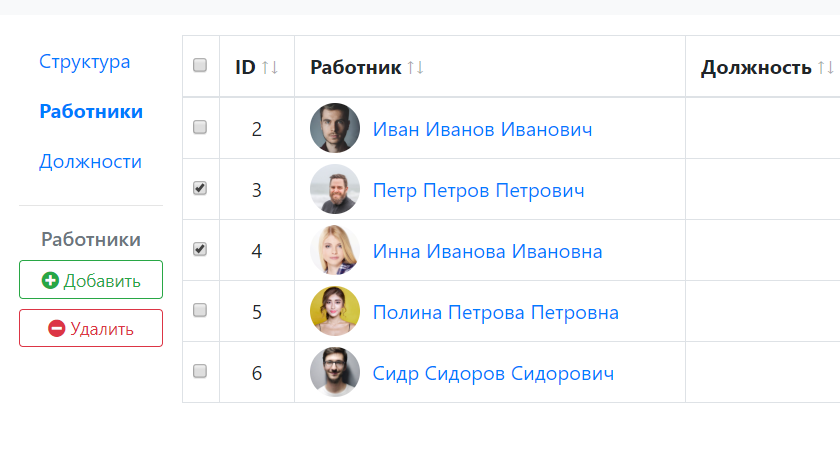
Hope this will help you!
antonvstepanov
on 2 Nov 2018
In next version, I will fix this issue. You guys can free to call setState in selectRow.onSelect. thanks
AllenFang
on 3 Nov 2018
now you can call setState in selectRow.onSelect and we support a feature that you can reject the selection, please check this and here is example
AllenFang
on 4 Nov 2018
Please tag me if this issue still remain, thanks
AllenFang
on 4 Nov 2018
Hello! Sorry for the delayed response (I was offline since yesterday). @AllenFang, thanks so much for the quick release! I'll work on it shortly.
Thank-you @antonvstepanov for your help and code examples as well. Your English is 👍 , don't ever apologize for that. I'm going to pick it apart today as well.
CaitlinSweeney
on 4 Nov 2018
@AllenFang, works like a charm, many thanks!
antonvstepanov
on 4 Nov 2018
@CaitlinSweeney, we don't need any workarounds for now, since @AllenFang released 1.4.0, It works just out of the box!
antonvstepanov
on 4 Nov 2018
👍 Anyway, sorry for lately fixed...
AllenFang
on 6 Nov 2018
Hi everyone.
I just notice that the samething happens to onExpand, when there's a this.setState inside it, it stops working.
Thanks to you all
 LuisGSandoval
on 23 Apr 2019
LuisGSandoval
on 23 Apr 2019
Tried to work my way around it using the events.onClick option in the columns object, but it also breaks the expand.
Please look it it :cry: we would really apreciated
LuisGSandoval
on 23 Apr 2019
I also tried this...
const expandRow = {
renderer: row => (...),
expandColumnRenderer: (row) => {
if (expanded) {
return (
);
}
return (
);
}
}
but it didn't work either.
In general it's a great tool though... But I'll have to find another way...
LuisGSandoval
on 23 Apr 2019
Related issues
 kamarajuPrathi
·
4Comments
kamarajuPrathi
·
4Comments
 eylonronen
·
3Comments
eylonronen
·
3Comments
 rsgoss
·
4Comments
rsgoss
·
4Comments
 epsyan
·
4Comments
epsyan
·
4Comments
 SandeepKapalawai
·
3Comments
SandeepKapalawai
·
3Comments
Most helpful comment
RELEASE NOTE
now you can call
setStateinselectRow.onSelectand we support a feature that you can reject the selection, please check this and here is example