React-bootstrap-table2: [Bug] Can't click radio button if using setState inside handleOnSelect
Hi, I have this options
const selectRow = {
      mode: "radio",
      clickToSelect: true,
      onSelect: this.handleOnSelect
    };

 handleOnSelect = (row) => {
    //if using setState the radio button options will not show up, if remove setState everything ok
    this.setState({
      selectedId: row.userId
    });
  };
Below is error

 ngohungphuc
All 35 comments
@ngohungphuc did u use react-bootstrap-table2?
 AllenFang
on 9 Apr 2018
AllenFang
on 9 Apr 2018
@AllenFang yes of course.
Here is my version
     "react-bootstrap-table-next": "^0.1.7",
    "react-bootstrap-table2-filter": "^0.1.5",
    "react-bootstrap-table2-overlay": "^0.1.1",
    "react-bootstrap-table2-paginator": "^0.1.1",
@AllenFang @Chun-MingChen
the error I get
Can only update a mounted or mounting component. This usually means you called setState, replaceState, or forceUpdate on an unmounted component reactjs
@AllenFang @Chun-MingChen any update about this is been 3 days
ngohungphuc
on 11 Apr 2018
i will switch to another plugin thank you
ngohungphuc
on 11 Apr 2018
sorry for lately reply, let me know if the problem still remain.
AllenFang
on 15 Apr 2018
the problem still remain
ngohungphuc
on 15 Apr 2018
@ngohungphuc any repo for reproducing this issue? we can't reproduce this by your example code, thanks
AllenFang
on 15 Apr 2018
@AllenFang Here is similar code. I try with previous version react-bootstrap-table and work fine
import BootstrapTable from "react-bootstrap-table-next";
class AccountTable extends Component {
  constructor(props) {
    super(props);
    this.state = {
      selectedUserId: ""
    };
  }

  onSelectAccount = row => {
    //error occur in this setState
    this.setState({ selectedUserId: row.userId });
  };

  render() {
    const columns = [
      {
        dataField: "id",
        text: "Product ID"
      },
      {
        dataField: "name",
        text: "Product Name"
      },
      {
        dataField: "price",
        text: "Product Price"
      }
    ];

    const selectRow = {
      mode: "radio",
      clickToSelect: true,
      onSelect: this.onSelectAccount
    };

    return (
      <BootstrapTable
        keyField="id"
        data={products}
        columns={columns}
        selectRow={selectRow}
      />
    );
  }
}

export default AccountTable;
@ngohungphuc I my opinion, setState will trigger the component render again, so in your case, it will make the react-bootstrap-table broken for selection row. If you really need to call setState, I will recommand you to also manage the selection by yourself:
class Table extends React.Component {
  constructor(props) {
    super(props);
    this.state = {
      selectedUserId: ''
    };
  }

  onSelectAccount = (row) => {
    console.log(row);
    console.log(row.id);
    this.setState({ selectedUserId: row.id });
  };

  render() {
    const selectRow = {
      mode: 'radio',
      clickToSelect: true,
      selected: [this.state.selectedUserId],
      onSelect: this.onSelectAccount
    };

    return (
      <BootstrapTable
        keyField="id"
        data={ products }
        columns={ columns }
        selectRow={ selectRow }
      />
    );
  }
}
How do you think?
AllenFang
on 16 Apr 2018
@AllenFang your suggest not working
import React, { Component } from "react";
import { render } from "react-dom";
import BootstrapTable from "react-bootstrap-table-next";
import filterFactory, {
textFilter,
selectFilter
} from "react-bootstrap-table2-filter";
import paginationFactory from "react-bootstrap-table2-paginator";
import toastr from "toastr";
import qs from "qs";
import { validateInput } from "../../Helper/Validation";
import { isDomExist } from "../../Helper/util";
import { Get, Post } from "../../Helper/ajax";
import env from "../../Helper/envConfig";
import { APP_ENUM } from "./../../Helper/appEnum";
import ACCModal from "../../Common/ACCModal.jsx";
class AccountTable extends Component {
constructor(props) {
super(props);
this.state = {
userList: [],
loading: false,
showModal: false,
selectedUserId: "",
btnActivate: "",
btnDeactivate: "",
toogleFlag: false,
email: "",
username: ""
};
this.validationObject = {};
this.selectRow = {
mode: "radio",
clickToSelect: true,
selected: [this.state.selectedUserId],
onSelect: this.onSelectAccount
};
this.accountStatus = {
True: "True",
False: "False"
};
this.paginationOptions = {
page: 1,
sizePerPage: 5,
pageStartIndex: 1,
hideSizePerPage: true,
prePage: "Prev",
nextPage: "Next",
firstPage: "First",
lastPage: "Last"
};
this.addUserModalOptions = [
{
name: "username",
type: APP_ENUM.INPUT_TEXT,
required: "required"
},
{
name: "email",
type: APP_ENUM.INPUT_TEXT,
required: "required"
} /* ,
{
name: "Roles",
type: APP_ENUM.SELECT,
value: ["Admin", "Owner", "Editor"]
} */
];
this.columns = [
{
dataField: "userName",
text: "User Name",
filter: textFilter()
},
{
dataField: "email",
text: "Email",
filter: textFilter()
},
{
dataField: "emailConfirmed",
text: "Email Confirmed",
filter: selectFilter({
options: this.accountStatus
})
},
{
dataField: "roles",
text: "Roles"
}
];
}
componentDidMount() {
Get(env.userList).then(res => {
this.setState({ userList: res.data });
});
}
handleAddUser = () => {};
toggleAccountStatus = () => {
if (this.state.selectedUserId) {
Post(
env.deactiveAccount,
qs.stringify({
accountId: this.state.selectedUserId,
toogleFlag: this.state.toogleFlag
})
)
.then(() => {
toastr.info("Account status successfully set");
})
.catch(() => {
toastr.error("Something went wrong");
});
}
};
onSelectAccount = row => {
if (row.emailConfirmed === "True") {
this.setState({ btnDeactivate: "", btnActivate: "disabled" });
this.setState({ selectedUserId: row.userId, toogleFlag: false });
}
if (row.emailConfirmed === "False") {
this.setState({ btnActivate: "", btnDeactivate: "disabled" });
this.setState({ selectedUserId: row.userId, toogleFlag: true });
}
};
render() {
const { userList, btnActivate, btnDeactivate } = this.state;
this.validationObject = {
username: this.state.username,
email: this.state.email
};
const errors = validateInput.call(this, this.validationObject);
return (
<div className="card">
<div className="card-header">User List</div>
<div className="card-body">
<div className="row" id="userListOptions">
<div className="col-md-6">
<button
type="button"
className="btn btn-primary"
id="btnAddUser"
data-toggle="modal"
data-target="#addUserModal"
>
<i className="fa fa-user-plus" aria-hidden="true" />
Add User
</button>
<ACCModal
title="Add User"
id="addUserModal"
errors={errors}
onClick={this.handleAddUser}
options={this.addUserModalOptions}
/>
<button type="button" className="btn btn-warning">
<i className="fa fa-pencil-square-o" aria-hidden="true" /> Edit
Role
</button>
</div>
<div className="col-md-6" id="deactiveSection">
<button
type="button"
className="btn btn-danger pull-right"
onClick={this.toggleAccountStatus}
disabled={btnDeactivate}
>
<i className="fa fa-power-off" aria-hidden="true" /> Deactive
Account
</button>
<button
type="button"
className="btn btn-success pull-right"
onClick={this.toggleAccountStatus}
disabled={btnActivate}
>
<i className="fa fa-toggle-on" aria-hidden="true" />
Activate Account
</button>
</div>
</div>
<BootstrapTable
noDataIndication="Table is Empty"
classes="table text-center table-hover table-bordered table-striped"
keyField="userId"
data={userList}
columns={this.columns}
filter={filterFactory()}
pagination={paginationFactory(this.paginationOptions)}
selectRow={this.selectRow}
/>
</div>
</div>
);
}
}
if (isDomExist("accountTable")) {
render(<AccountTable />, document.getElementById("accountTable"));
}
@ngohungphuc it work, please see me code again more carefully.
AllenFang
on 17 Apr 2018
I check my code with your code, they are same
ngohungphuc
on 17 Apr 2018
@AllenFang I am also having the same problem but I am using remote and redux. My redux state does not change but when an onClick event happens but it causes the table to re-render for some reason. This causes the selected row radio to not show and also makes my current page on the pagination shows 1 even though I am on page 4 for example.
 xSynack
on 18 Apr 2018
xSynack
on 18 Apr 2018
Here is what happens:

xSynack
on 18 Apr 2018
If someone would create a sandbox or something for this repo so @AllenFang can see, probably would help.
 waynebrantley
on 2 May 2018
waynebrantley
on 2 May 2018
@AllenFang Same problem occurs with multiple selection. Here is the codesandbox
https://codesandbox.io/s/93jj53kkpp
remove the setState from the App part and try:
    this.setState({
      selection: selection
    });
 ababakanian
on 8 May 2018
ababakanian
on 8 May 2018
@ababakanian please check this example firstly.
AllenFang
on 12 May 2018
@ngohungphuc , you have mentioned that "it worked with previous version". Can you specify which version you are referring.
 sanjesh
on 15 May 2018
sanjesh
on 15 May 2018
@AllenFang in this example
onSelect, onSelectAll methods explicitly set selected array in state
Is this the intended way of using onSelect, onSelectAll with state(or redux state) or is this a bug which will be fixed.
sanjesh
on 15 May 2018
@sanjesh the react-bootstrap-table version
ngohungphuc
on 15 May 2018
@sanjesh I think it can be improved, but as I mention above:
Right now, if you call setState in onSelect or onSelectAll callback, I will suggest you to also manage the selection via selectRow.selected props, because setState will cause component re-render and react-bootstrap-table will have no chance to change internal states.
However, I will consider to enhance if a lots of people feel it is not make sense. So do let me know your idea.
AllenFang
on 16 May 2018
I understand the legacy react-bootstrap-table allow you to call setState without manage/control the selection by selectRow.selected. So it can be improved in react-bootstrap-table2, but with much lower priority
AllenFang
on 16 May 2018
@AllenFang I followed this example but using redux.
Functionality is working but, there is an error in console.
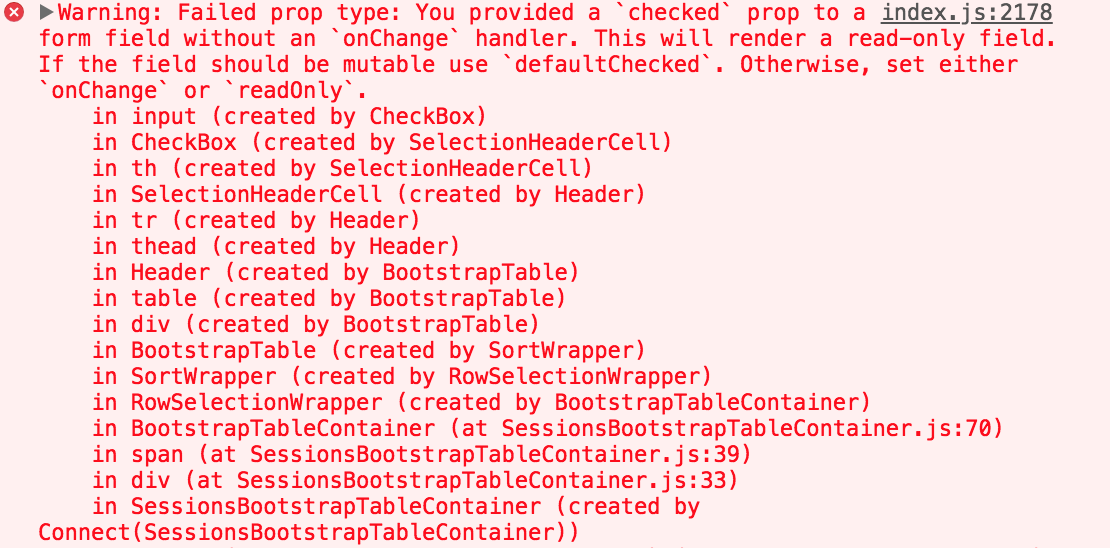
sanjesh
on 17 May 2018
@sanjesh thanks, I will enhance this warning,
AllenFang
on 19 May 2018
Having the same issue. Would love to have this fixed so that we don't have to manipulate the selectRow.selected prop. Thanks!
 ctoppel
on 24 May 2018
ctoppel
on 24 May 2018
@ctoppel thanks, I will consider to enhance this, thanks!!
AllenFang
on 28 May 2018
is there some news?
 AndresMunozB
on 6 Jun 2018
AndresMunozB
on 6 Jun 2018
That problem is going to be fixed soon? when I change the state of a prop on row selection or click event the selection breaks. I'm using this table for a project and If is not fixed soon I need to change but I actually like this component.
Thanks!
 ghost
on 13 Jun 2018
ghost
on 13 Jun 2018
I thought this was still an issue, but checking the storybook above, it does work if you send the onSelect function to a method somewhere inside your component, and do it there. Make sure the keyField on your table matches the things you are saving in your array of selected items - I made that mistake and as soon as I fixed it, behold it worked!
 alexandraclaire
on 14 Jun 2018
alexandraclaire
on 14 Jun 2018
@alexandraclaire thanks! can you show me an example that worked for you?
ghost
on 14 Jun 2018
Hey guys, it will be an enhancement in the future, but in the react-bootstrap-table2, if you need to call setState in the selectRow.onSelect or selectRow.onSelectAll, please also management the selection, check this
AllenFang
on 1 Jul 2018
It seems your intention for the onSelect was for the user of the component to manage the state of the selections.
However, it seems to be the common use case is not to manage the selection - but to simply be notified and take some other action on the selection.
Perhaps you could simply add a property of customSelectStateManagement or something that when set would behave as it does now - assuming user will manage state. If it is false (the default) the grid manages the state but calls the event handlers as simply call backs.
Just my thoughts
waynebrantley
on 2 Jul 2018
For those looking for a solution to the radio/checkbox toggle disabling when calling setState:
What works for me is setting the selected property in the selectRow object you pass to the table. selected: [this.state.selectedUserId], as mentioned by @AllenFang (16 April comment above)
 abdhass
on 24 Jul 2018
abdhass
on 24 Jul 2018
Sorry for lately fixed.....
RELEASE NOTE
now you can call setState in selectRow.onSelect and we support a feature that you can reject the selection, please check this and here is example
AllenFang
on 4 Nov 2018
Related issues
 Randore
·
3Comments
Randore
·
3Comments
 thevangelist
·
4Comments
thevangelist
·
4Comments
 imtmh
·
3Comments
imtmh
·
3Comments
 eylonronen
·
3Comments
eylonronen
·
3Comments
 saifulss
·
4Comments
saifulss
·
4Comments
Most helpful comment
For those looking for a solution to the radio/checkbox toggle disabling when calling setState:
What works for me is setting the
selectedproperty in theselectRowobject you pass to the table.selected: [this.state.selectedUserId],as mentioned by @AllenFang (16 April comment above)