React-big-calendar: Having Concurrent Later Overlapping Events Hides Earier Event
Do you want to request a _feature_ or report a _bug_?
_Bug_
What's the current behavior?
A regression/edge case of #404 (which should be reopened)

Code Sandbox: https://codesandbox.io/embed/react-big-calendar-example-96cue
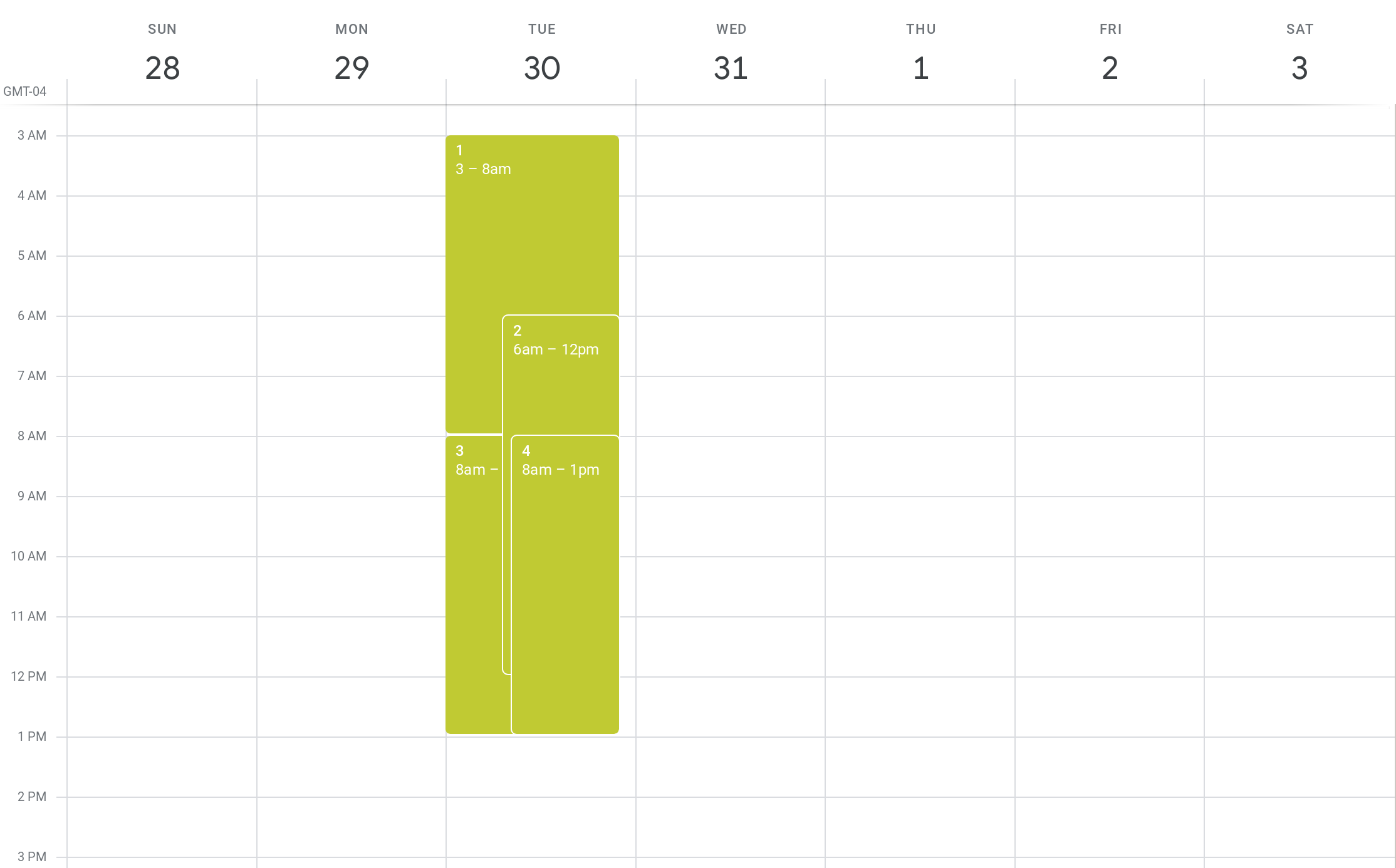
This edge case occurs precisely when the following two conditions are satisfied:
- There is an event A that overlaps with another event B which ends later
- There are events C and D that begin after A but overlap with B
Affected Browser(s):
- Mozilla Firefox 68.0
- Google Chrome 75.0.3770.142
What's the expected behavior?
For event B not to be completely hidden by events C/D. Example (from Google Calendar):
 Christopher-Chianelli
All 11 comments
@Christopher-Chianelli oh, I planned to report a similar bug today.
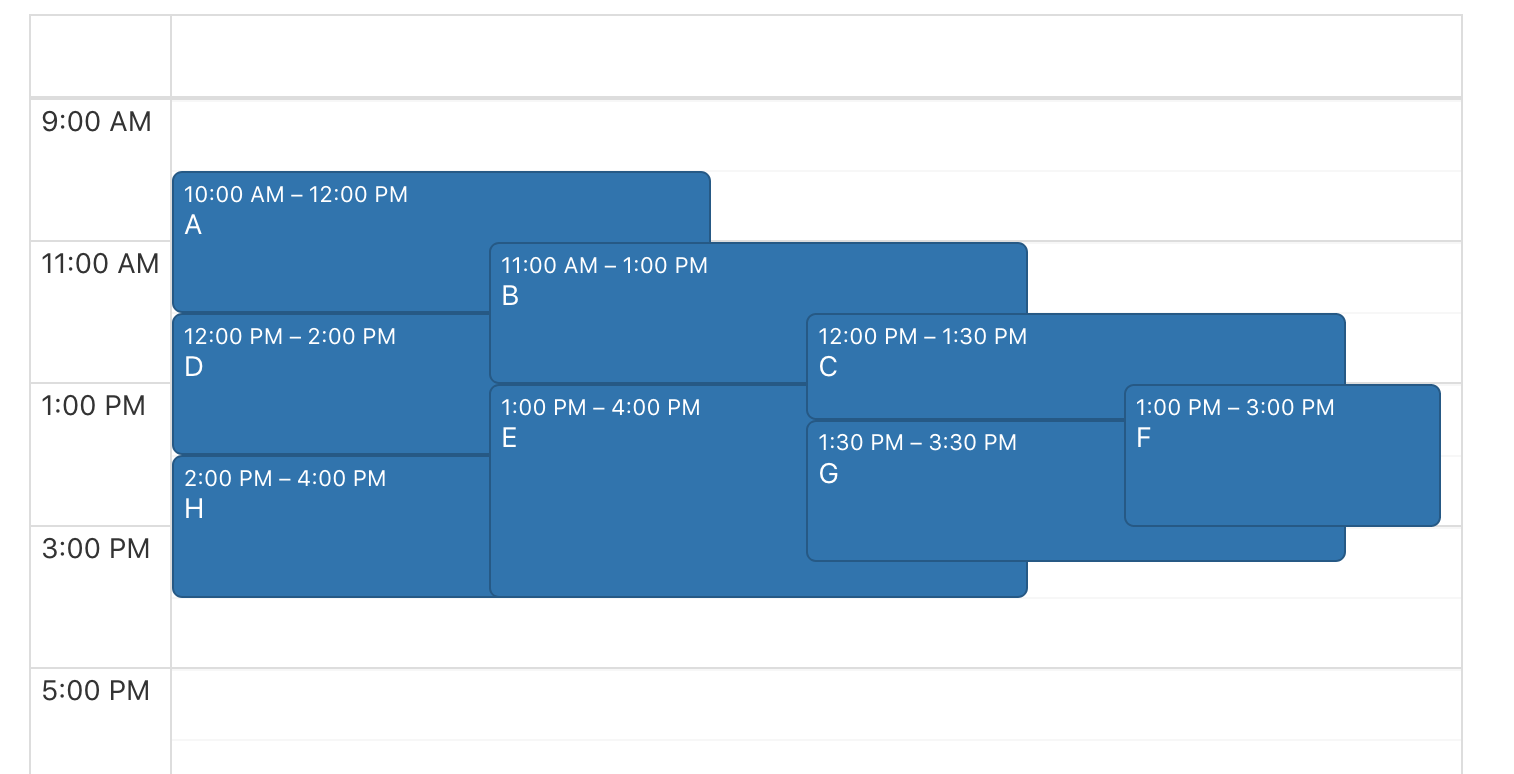
Here is a codesandbox with a combination of events with same times as I have in a real app.
There are events A - H and event G is completely hidden behind other ones.
 dmitrykrylov
on 23 Jul 2019
dmitrykrylov
on 23 Jul 2019
@dmitrykrylov Depending on how important it is to be able to view overlapping events and how important having a Google Calendar-like calendar is to you, there is a workaround that will have all events visible: https://codesandbox.io/s/zqk8vmqn3m (from #814). The disadvantages of this approach are:
- It differs from Google Calendar.
- Having lots of concurrent events at the same time mean events without any concurrent events are extremely narrow.
- You need to hack the position and display styles of the components.
I am currently using this approach on an application; it works quite well even with 6 or more concurrent events.
Christopher-Chianelli
on 23 Jul 2019
@Christopher-Chianelli I like this way to display events! But it seems like it doesn't take minutes into account?
[UPD]
Hm, wow
grid-template-rows: repeat(1440, calc(40px / 60));
and
const hourStart = moment(event.start).hour() * 60 + moment(event.start).minute();
const hourStop = moment(event.end).hour() * 60 + moment(event.end).minute();
@dmitrykrylov What I did was overwrite the wrapper to use style instead of startDate.hours. top will be between 0% and 100%, and height will be between 0% and 100%. gridStartPoisition would then be Math.floor(parseFloat(style.top) * 0.01 * rowsInGrid)) and gridEndPosition will be Math.floor(parseFloat(style.height) * 0.01 * rowsInGrid) + gridStartPosition. I warn against using more than 1000 rows in a grid; some browsers will not render those properly: https://bugs.chromium.org/p/chromium/issues/detail?id=688640. As such, I recommend rowsInGrid = 770 for 2 minute precision, or rowsInGrid = 100 if you want to simplify the formula to parseInt(style.top). (Of course, using the event start & end times won't break if in the future they don't use percent widths and heights).
Christopher-Chianelli
on 25 Jul 2019
@Christopher-Chianelli awesome! Haven't you managed to make it working with drag'n'drop?
dmitrykrylov
on 26 Jul 2019
@dmitrykrylov Unfortunately no; if you are able to detect when the drag starts, you might be able to do it by temporarily disabling the modified styles (which can be done by moving the overrides into a new CSS classes, and only adding them to the EventWrapper and Event if you are not dragging).
Christopher-Chianelli
on 26 Jul 2019
@Christopher-Chianelli I tried to rewrite the events arrangement algorithm
Before

After
dmitrykrylov
on 31 Jul 2019
@dmitrykrylov That looks a lot better!
Christopher-Chianelli
on 31 Jul 2019
@dmitrykrylov It looks great!
Besides getting a new algorithm. It's possible to inject a new prop numberOfConcurrentEvents to the EventWrapper based on the new algorithm? It opens a large door to the customization of the styles of those events, like allowing non-overlapping events or a different background color depending on whether the event is overlapped by the others.
 WillisShek
on 3 Sep 2019
WillisShek
on 3 Sep 2019
This issue might be fixed by https://github.com/intljusticemission/react-big-calendar/pull/1473; I will verify this issue is fixed when a new version is released.
Christopher-Chianelli
on 21 Oct 2019
Can confirm #1473 fixes the issue when the Calendar prop dayLayoutAlgorithm="no-overlap" is set.
Christopher-Chianelli
on 21 Nov 2019
Related issues
 Hector26
·
3Comments
Hector26
·
3Comments
 gsavvid
·
3Comments
gsavvid
·
3Comments
 zhming0
·
3Comments
zhming0
·
3Comments
 nirchernia
·
3Comments
nirchernia
·
3Comments
 nicolasriccardi
·
3Comments
nicolasriccardi
·
3Comments
Most helpful comment
@Christopher-Chianelli I like this way to display events! But it seems like it doesn't take minutes into account?
[UPD]
Hm, wow
and