React-big-calendar: change background-color event by events array
Hello Guys
I have in my array the prop color of user, where I would like to change the background color of the event to rgb defined, how to do this by sending the array?
I have not yet created the events api, but the color stays in this.getUsers ()
import React, { Component } from 'react';
import { connect } from 'react-redux';
import {
  RctCollapsibleCard, Title, IntlMessages, AppConfig,
  Row, Col, CheckboxList
} from './../../components/custom';
import {
  getUsersAPI
} from './../../actions';
import BigCalendar from 'react-big-calendar';
import moment from 'moment';
import { array } from 'prop-types';

BigCalendar.setLocalizer(BigCalendar.momentLocalizer(moment))

let MyOtherNestedComponent = () => <div>NESTED COMPONENT</div>

let MyCustomHeader = ({ label }) => (
  <div>
    CUSTOM HEADER:
    <div>{label}</div>
    <MyOtherNestedComponent />
  </div>
)

class ScheduleComponent extends Component {
  constructor(props, context) {
    super(props, context);
    //I have not yet created the events api, but the color stays in this.getUsers ()
    this.events = [
      {
        'title': 'All Day Event very long title',
        'allDay': true,
        'start': new Date(2015, 3, 0),
        'end': new Date(2015, 3, 1)
      },
      {
        'title': 'Long Event',
        'start': new Date(2015, 3, 7),
        'end': new Date(2015, 3, 10)
      },

      {
        'title': 'DTS STARTS',
        'start': new Date(2016, 2, 13, 0, 0, 0),
        'end': new Date(2016, 2, 20, 0, 0, 0)
      },

      {
        'title': 'DTS ENDS',
        'start': new Date(2016, 10, 6, 0, 0, 0),
        'end': new Date(2016, 10, 13, 0, 0, 0)
      },

      {
        'title': 'Some Event',
        'start': new Date(2015, 3, 9, 0, 0, 0),
        'end': new Date(2015, 3, 9, 0, 0, 0)
      },
      {
        'title': 'Conference',
        'start': new Date(2015, 3, 11),
        'end': new Date(2015, 3, 13),
        desc: 'Big conference for important people'
      },
      {
        'title': 'Meeting',
        'start': new Date(2015, 3, 12, 10, 30, 0, 0),
        'end': new Date(2015, 3, 12, 12, 30, 0, 0),
        desc: 'Pre-meeting meeting, to prepare for the meeting'
      },
      {
        'title': 'Lunch',
        'start': new Date(2015, 3, 12, 12, 0, 0, 0),
        'end': new Date(2015, 3, 12, 13, 0, 0, 0),
        desc: 'Power lunch'
      },
      {
        'title': 'Meeting',
        'start': new Date(2015, 3, 12, 14, 0, 0, 0),
        'end': new Date(2015, 3, 12, 15, 0, 0, 0)
      },
      {
        'title': 'Happy Hour',
        'start': new Date(2015, 3, 12, 17, 0, 0, 0),
        'end': new Date(2015, 3, 12, 17, 30, 0, 0),
        desc: 'Most important meal of the day'
      },
      {
        'title': 'Dinner',
        'start': new Date(2015, 3, 12, 20, 0, 0, 0),
        'end': new Date(2015, 3, 12, 21, 0, 0, 0)
      },
      {
        'title': 'Birthday Party',
        'start': new Date(2015, 3, 13, 7, 0, 0),
        'end': new Date(2015, 3, 13, 10, 30, 0)
      },
      {
        'title': 'Birthday Party 2',
        'start': new Date(2015, 3, 13, 7, 0, 0),
        'end': new Date(2015, 3, 13, 10, 30, 0)
      },
      {
        'title': 'Birthday Party 3',
        'start': new Date(2015, 3, 13, 7, 0, 0),
        'end': new Date(2015, 3, 13, 10, 30, 0)
      },
      {
        'title': 'Late Night Event',
        'start': new Date(2015, 3, 17, 19, 30, 0),
        'end': new Date(2015, 3, 18, 2, 0, 0)
      },
      {
        'title': 'Multi-day Event',
        'start': new Date(2015, 3, 20, 19, 30, 0),
        'end': new Date(2015, 3, 22, 2, 0, 0)
      }
    ];

    this.state = {
      listUsers: []
    };
  }

  componentWillMount() {

    this.props.getUsersAPI()

  }

  componentWillReceiveProps(nextProps) {
    let newArr = [];

    nextProps.users.map((array, i) => {

      let status = nextProps.user.id == array.id ? true : false;

      newArr.push({
        id: array.id,
        description: array.name,
        status: status,
        color: array.color
      });
    });

    this.setState({
      listUsers: newArr
    });
  }

  updateListStatus(users){
    this.setState({
      listUsers: users
    });
  }

  render() {
    return (
        <div>
          <Title title={<IntlMessages id="sidebar.schedule" />} match={this.props.match} />
            <RctCollapsibleCard>
            <Col sm={12}>
              <Row>
                <Col sm={9}>
                  <BigCalendar
                    selectable

                    events={this.events}
                    defaultView="week"
                    culture={AppConfig.locale.languageId}
                    scrollToTime={new Date(1970, 1, 1, 6)}
                    defaultDate={new Date(2015, 3, 12)}
                    onSelectEvent={event => alert(event.title)}
                    onSelectSlot={slotInfo =>
                      alert(
                        `selected slot: \n\nstart ${slotInfo.start.toLocaleString()} ` +
                        `\nend: ${slotInfo.end.toLocaleString()}` +
                        `\naction: ${slotInfo.action}`
                      )
                    }

                  />
                </Col>
                <Col sm={3}>
                  <CheckboxList
                    items={this.state.listUsers}
                    onUpdateList={this.updateListStatus.bind(this)}
                  />
                </Col>
              </Row>
            </Col>

          </RctCollapsibleCard>
        </div>
      );

  }
}

// map state to props
const mapStateToProps = ({ userAPI, authUser }) => {

  const { user } = authUser;
  const { users } = userAPI;

  return { users, user };
}

export default connect(mapStateToProps, {
  getUsersAPI
})(ScheduleComponent);

Does anyone know how I can do this?
 Deboracgs
All 6 comments
I think you want eventPropGetter
 jquense
on 18 Aug 2018
jquense
on 18 Aug 2018
you have an example? @jquense
Deboracgs
on 18 Aug 2018
No example but the docs describe usage https://intljusticemission.github.io/react-big-calendar/examples/index.html#prop-eventPropGetter you can also search the issues for examples
jquense
on 18 Aug 2018
i make with the eventpropgetter, but not working with my find function
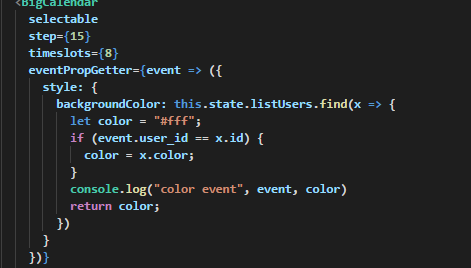
you can help me ? @jquense
Deboracgs
on 18 Aug 2018
Looks fine, your logic mayhave a typo it mistake. The API usage is correct tho
jquense
on 18 Aug 2018
eventPropGetter={event => {
  const user = this.state.listUsers.find(user => user.id === event.user_id);
  const backgroundColor = user ? user.color : "#fff";
  return { style: { backgroundColor } };
}
this is a solution
Deboracgs
on 18 Aug 2018
Related issues
 Beyazatli
·
3Comments
Beyazatli
·
3Comments
 The-Oracle
·
3Comments
The-Oracle
·
3Comments
 npalansky
·
3Comments
npalansky
·
3Comments
 martinnov92
·
3Comments
martinnov92
·
3Comments
 zhming0
·
3Comments
zhming0
·
3Comments
Most helpful comment
eventPropGetter={event => {
  const user = this.state.listUsers.find(user => user.id === event.user_id);
  const backgroundColor = user ? user.color : "#fff";
  return { style: { backgroundColor } };
}
this is a solution