React-big-calendar: Customize day item in month view
Hi,
I'd like to be able to customize day container but couldn't find how to do that yet...
I tried by supplying a dayWrapper to the components props, but it didn't seem to work.
Here's an example of what I'm willing to do, the circle I drawn are representating pictures that I'd like to be displayed for each day.
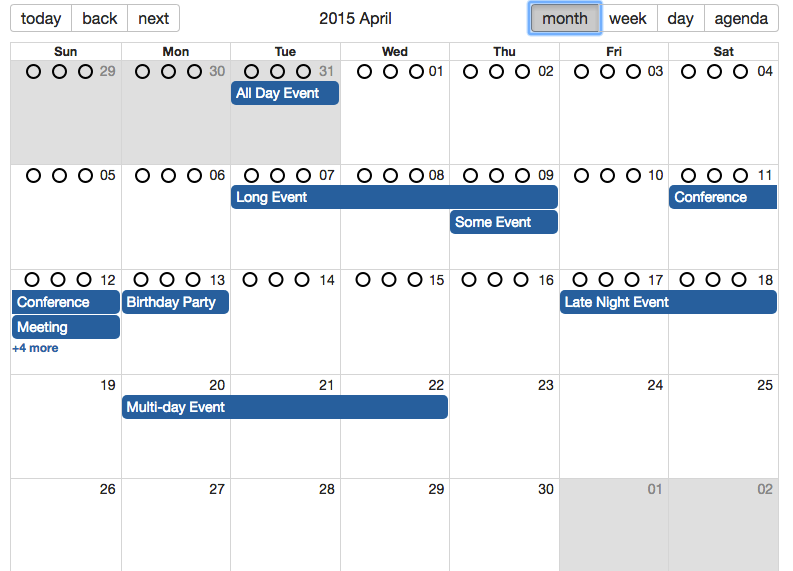
So if you have any idea that would be great thanks!
 Daavidaviid
All 10 comments
+1
 medslt
on 14 Dec 2017
medslt
on 14 Dec 2017
I second that
 dokicoder
on 14 Dec 2017
dokicoder
on 14 Dec 2017
I made it and made a pull request https://github.com/intljusticemission/react-big-calendar/pull/646

Daavidaviid
on 15 Dec 2017
You can use the dateHeader component prop for this:
<BigCalendar
  components={{
    month: {
      dateHeader: (props) => (
        <div>Custom Date Header</div>
      )
    }
  }}
/>
 tobiasandersen
on 4 Jan 2018
tobiasandersen
on 4 Jan 2018
@tobiasandersen @jquense is there any way to make Apr 12-18 like Apr 12-18, 2018? I cant figure it out. Thanks
 RusselFourteen
on 12 Feb 2018
RusselFourteen
on 12 Feb 2018
Use the message props
 jquense
on 12 Feb 2018
jquense
on 12 Feb 2018
For future readers who discovered like me that @tobiasandersen 's solution didnt work for them since it removes the date from each cell, here's my solution which allowed me to add a button to each day
````
function CustomDateHeader({ label, drilldownView, onDrillDown }) {
return (
{label}
)
}
const Calendar = props => (
events={events}
popup
startAccessor="start"
endAccessor="end"
components={{
month: {
dateHeader: CustomDateHeader
}
}}
/>
)
export default Calendar;
````
 alansutherland
on 10 Oct 2018
alansutherland
on 10 Oct 2018
Hi, this 'dateHeader' props is working great for me! But i want to know if there's any similar props for week view and day view, thanks
 hzbarkan
on 12 Nov 2018
hzbarkan
on 12 Nov 2018
@hzb-imasine you can use header instead of dateHeader
components={{
    week: {
         header: CustomDateHeader
    }
}}
 pitops
on 15 Nov 2018
pitops
on 15 Nov 2018
@pitops @alansutherland @hzb-imasine how to do custom header for day view?
 adirzoari
on 3 Jan 2019
adirzoari
on 3 Jan 2019
Related issues
 KatiaPosPago
·
3Comments
KatiaPosPago
·
3Comments
 zhming0
·
3Comments
zhming0
·
3Comments
 connercms
·
3Comments
connercms
·
3Comments
 dogC76
·
4Comments
dogC76
·
4Comments
 martinnov92
·
3Comments
martinnov92
·
3Comments
Most helpful comment
I made it and made a pull request https://github.com/intljusticemission/react-big-calendar/pull/646
