React-big-calendar: Events show as "all day" when they end 00:00:00 the next day
Wondering if anybody could shed any light on this.
I have events that run from 23:00 - 00:00 that only show up as "all day". Is this expected?
Thanks!
{
title: "The Papa Biggs Show",
desc: "A family-orientated show with an interesting mix of music, mayhem & chat helped along by his family",
start: "Sun Apr 09 2017 23:00:00 GMT-0700 (PDT)",
end: "Mon Apr 10 2017 00:00:00 GMT-0700 (PDT)"
}

 gabek
gabek
All 11 comments
+1.
I see how 00:00:0000 means the next day, and crossing midnight is what makes an event "all day", but in my application, events are understood to be start-inclusive, end-exclusive. So I, too, want any events ending at 00:00:0000 the next day to not be "all day". How can I disable this behavior in the view? Is there any built-in way to do this, or will I need to fork and hack?
I found this: https://github.com/intljusticemission/react-big-calendar/issues/331 but I don't understand how to disable "all day".
 IanLondon
on 26 Apr 2017
IanLondon
on 26 Apr 2017
I'm currently hiding the "all day" row via CSS as to not add confusion, but an obvious side effect is that those items are no longer visible on the calendar.
gabek
on 26 Apr 2017
@IanLondon this isn't configurable, and hiding the ui isn't going to help, you will jsut be missing events on the calendar. I suggest using the endAccessor to return a end-inclusive date in the case where the events end on midnight. e.g
// subtract one millisecond from the end date putting midnight dates at 11:59:999
endAccessor={({ end }) => new Date(end.getTime() - 1)
 jquense
on 26 Apr 2017
jquense
on 26 Apr 2017
That solution works for me!
gabek
on 26 Apr 2017
@jquense the only problem with the endAccessor workaround is then the event cell says X PM - 11:59 PM instead of X PM - 12:00 AM, which contradicts other areas in my app that correctly display the event end time as 12:00 AM.
 jedwards1211
on 18 May 2017
jedwards1211
on 18 May 2017
@jquense besides, I thought the "all day" gutter was only intended for events explicitly marked allDay: true, and allDay: false events that span multiple days would be shown in the main time area.
jedwards1211
on 18 May 2017
This really seems like a misnomer to me. Something that starts at 23 hours, and goes until 2 hours of the following day would be marked as "all day" for both days, which is quite absurd don't you think?
I'm assuming the problem is that it's just a bit too technically difficult to split the event into two parts, one for the last hour of the first day and the other for the first two hours of the second day? Could you please confirm that this is the reason that it's not be changed or configurable?
 decoursin
on 6 Dec 2017
decoursin
on 6 Dec 2017
@decoursin this is configurable. please read the docs before complaining on old closed issues thanks
jquense
on 6 Dec 2017
Thanks for the hint, but I can't get it working nonetheless. I'm using showMultiDayTimes: true,
but it results in this (version 0.17.0):

Which is not what I want.
I just want what fullCalendar.js does:

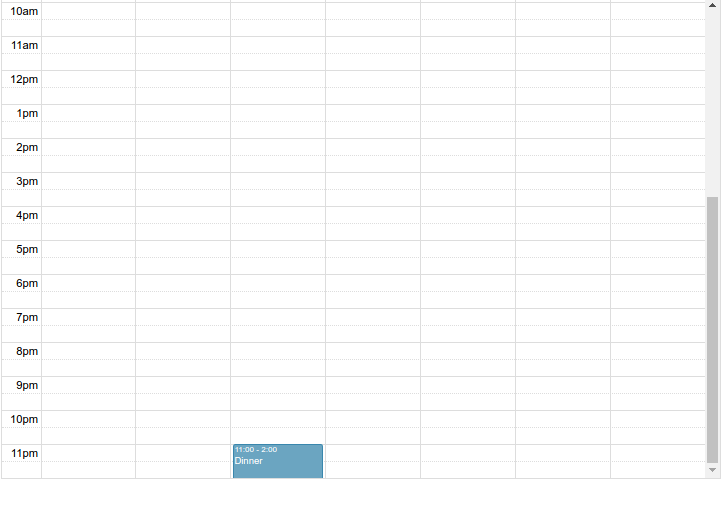
I don't think there is anything currently like that, am I wrong?
decoursin
on 7 Dec 2017
looks like a bug! Care to send over a PR?
jquense
on 7 Dec 2017
Thanks man, but I don't think that will happen. Good luck on the project!
decoursin
on 9 Dec 2017
Related issues
 The-Oracle
·
3Comments
The-Oracle
·
3Comments
 mathieusanchez
·
4Comments
mathieusanchez
·
4Comments
 nirchernia
·
3Comments
nirchernia
·
3Comments
 Hector26
·
3Comments
Hector26
·
3Comments
 bionicvapourboy
·
3Comments
bionicvapourboy
·
3Comments
Most helpful comment
@jquense besides, I thought the "all day" gutter was only intended for events explicitly marked
allDay: true, andallDay: falseevents that span multiple days would be shown in the main time area.